
UnReloadDetachSelectedXrefs_01

Short description

UnReloadDetachSelectedXrefs Xref management dialog for filtering, selecting, zooming, saving lists, loading lists, and batch operations on xrefs in the current drawing.
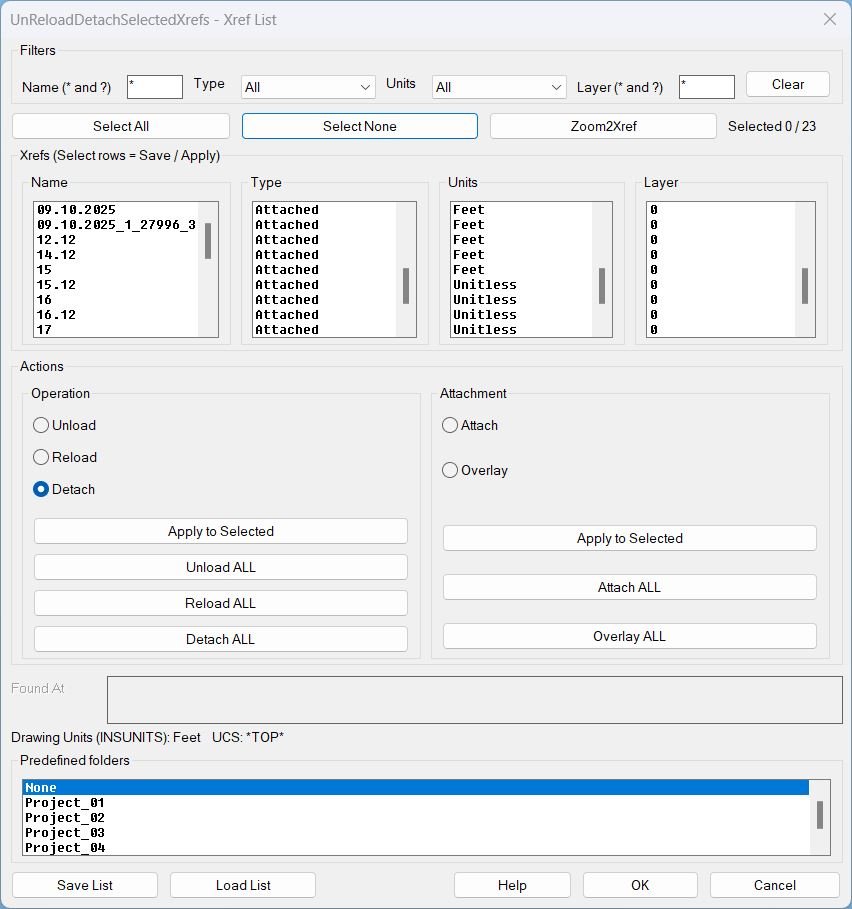
unreloaddetachselectedxrefs 000

Command:

Command UnReloadDetachSelectedXrefs

Description:

Description This lisp scans the current drawing for xref definitions and displays them in a multi-column dialog (Name, Type, Units, Layer) with synchronized selection across columns. It allows users to apply batch xref operations, change xref attachment type, and save or load xref lists for repeatable setups across drawings. Predefined folder behavior The Save List and Load List file dialogs can start in a predefined folder chosen from a scrolling list. The predefined folder root is the user OneDrive location and the selected entry appends a relative path such as \Work\Project_01\_extra\Xref_Load_List. The predefined folder options are: None, Project_01, Project_02, Project_03, Project_04, Project_05.

Helper function: (if any)​

Helper logic and protections
  • Discovery reads xrefs from the drawing Blocks table and builds the list with Name, Type (Attached or Overlay), Units, Found At, and Layer.
  • Filtering supports wildcard patterns for name and layer, plus Type and Units dropdown filters.
  • Selection map stores selection state by xref name and keeps it consistent while filters change.
  • UCS and view preservation wraps actions to restore UCS and view after each operation.
  • Layer robustness sanitizes illegal layer characters, creates missing layers, and can move all xref inserts to the stored layer.
  • Zoom2Xref computes the Model Space bounding box of selected xref inserts and zooms to it without closing the dialog.
  • Predefined folder resolution uses the selected list entry to set the default start directory for Save List and Load List dialogs.

Functionalities:

Functionalities
  • Filter xrefs by Name wildcard, Type, Units, and Layer wildcard, then work only on the visible subset.
  • Select All and Select None for the currently filtered list, with a live selected counter.
  • Zoom2Xref zooms to the Model Space extents of the first selected xref insert set.
  • Operations on selected using the Operation radio group and Apply to Selected: Unload, Reload, Detach.
  • Operations on all using dedicated buttons: Unload ALL, Reload ALL, Detach ALL.
  • Attachment type conversion using the Attachment radio group and Apply to Selected: Attach or Overlay.
  • Attachment conversion on all using dedicated buttons: Attach ALL, Overlay ALL.
  • Save List writes a text file containing only the selected xrefs with their key properties (Name, Type, Found At, UnitsCode, Layer) plus host metadata (INSUNITS and UCSNAME).
  • Load List reads a saved list, attaches missing xrefs from Found At paths, enforces stored units during attach, reloads them, and restores host settings after completion.
  • Predefined folders allow Save List and Load List dialogs to open directly in the selected project folder: None, Project_01, Project_02, Project_03, Project_04, Project_05.

Result:

Result Running UnReloadDetachSelectedXrefs opens a dialog where the user can safely batch-manage xrefs without manually selecting drawing entities. The user can unload, reload, or detach xrefs, convert attach type between Attached and Overlay, zoom to xref inserts, and save or load repeatable xref lists. Saved lists are plain text and can be reused to recreate or standardize xref setups, including layer assignment and units control during attach operations. Tags Lisp, Xrefs, Dialog_UI, DCL, Layers, UCS, WCS, Coordinate_Systems, Model Space Suggest relevant tags not in the above list File_IO, Batch_Processing, Path_Management

Images, animations etc.
unreloaddetachselectedxrefs 000
Pixel

Additional info:

Share this page:

Page Tag: Layers

  • UnReloadDetachSelectedXrefs_01

    Short description UnReloadDetachSelectedXrefs Xref management dialog for filtering, selecting, zooming, saving lists, loading lists, and batch operations on xrefs in the current drawing. Command: Command UnReloadDetachSelectedXrefs Description: Description This lisp scans the current drawing for xref definitions and displays them in a multi-column dialog (Name, Type, Units, Layer) with synchronized selection across columns. It allows…

  • LayerCreation

    Short description LayerCreation — create/update a layer with True Color + Color Books support, plus a “Set as current layer” toggle (DCL with CLI fallback). Fields: Name, Color (ACI / RGB / ColorBook), Linetype, Lineweight, Transparency; also sets defaults for NEW objects (CELTSCALE, CETRANSPARENCY, THICKNESS). Runs a DCL dialog when the DCL core is healthy;…

  • UnReloadDetachSelectedXrefs_00

    Short description Sort / Purpose: Interactive Xref management tool for AutoCAD that saves, reloads, and bulk-edits Xref state via a dialog, while preserving the current UCS and view for bulk actions. • Type of tool: Dialog-driven Xref control command with filters, selection, zoom-to-xref, save/load list, and batch operations. • Scope: Works on all Xrefs in…

  • FreezeLayersInVP

    Short description Shows a DCL dialog to filter and multi-select layers, then freezes the selected layers in the current viewport using VPLAYER. Supports filtering by Current layers, Xref layers, or Current_and_Xref, with an optional Xref picker and a fixed-width “faux columns” layer list. Command: Commands: FreezeLayersInVP and alias FLVP Description: Builds an embedded DCL file…

  • Zoom2Layer

    Short description Displays a filterable layer selection dialog and then zooms the view to the extents of all objects on the chosen layer. Supports picking a layer directly from a selected object in the drawing and remembers the last filter used. Command: Command: Zoom2Layer Description: Builds a list of layers that are visible and unfrozen,…

  • Unfreez_Layers

    Short description Comming soon … Command: Comming soon … Description: Comming soon … Helper function: (if any)​ Comming soon … Functionalities: Comming soon … Result: Comming soon … Images, animations etc. Lisp code: Expand Code ⬇ Select Code Copy Code Comming soon … Additional info: Based on / Source code: Open Website Share this page:

  • RenameLayerClick

    Short description Comming soon … Command: Comming soon … Description: Comming soon … Helper function: (if any)​ Comming soon … Functionalities: Comming soon … Result: Comming soon … Images, animations etc. Lisp code: Expand Code ⬇ Select Code Copy Code Comming soon … Additional info: Based on / Source code: Open Website Share this page:

  • RenameLayer

    Short description LRN — DCL-driven batch layer renamer with search filter, add prefix/suffix, remove substring, replace text, optional ALL CAPS, and optional auto-merge after remove Builds a matching layer list (excluding layer 0), then renames each layer via command-line -RENAME and optionally merges via -LAYMRG Wraps operation in an Undo mark and shows an Express…

  • PurgeUnusedLayers

    Short description Purges unused layers using a dialog that scans the drawing and deletes layers with no entities on them. Protects critical layers and the current layer and optionally skips Xref layers. Command: Command: PURGEUNUSEDLAYERS Description: Creates a single file workflow by embedding a DCL definition inside the LISP and writing it to the temp…

  • LayersNameToClipboard

    Short description LayersName2Clipboard — collect unique layer names from a user selection and copy them to the Windows clipboard as a newline-separated list Uses an HTMLFile COM object to access clipboardData and write text directly to the clipboard Command: • LayersName2Clipboard Description: Prompts the user to select entities, then scans the selection set and extracts…