
Zoom Window

Short description

LZW summary LZW opens a DCL selection dialog for Layouts, then prompts for a window and runs Zoom Window in Paper Space on the selected layouts after the dialog closes. Key stability rule The zoom action is executed after the dialog closes to avoid UI timing issues.
zoomwindow 000

Command:

Command
  • LZW Runs Zoom Window on selected layouts in Paper Space.

Description:

User workflow
  • Run LZW.
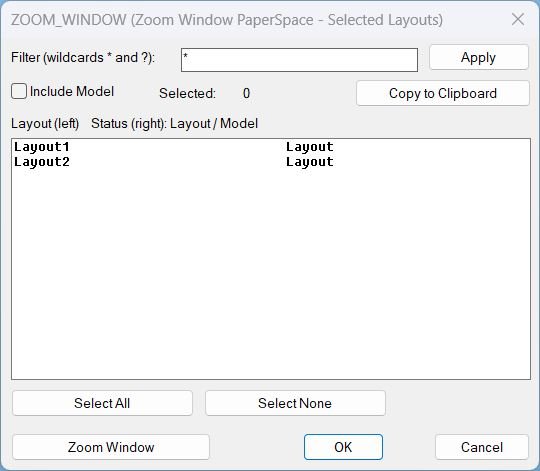
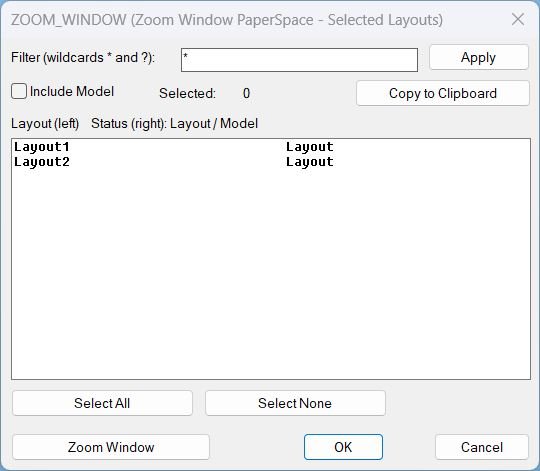
  • Select one or more Layouts from the list.
  • Optional filter using wildcards * and ?.
  • Optional toggle Include Model to show MODEL in the list.
  • Optional Copy to Clipboard to copy selected layout names and status.
  • Trigger Zoom Window, the dialog closes, then pick two corners for the window, and the same window is applied to each selected layout tab.
  • If point picking is cancelled, the routine cancels the action and restores the original tab.
Execution context The routine forces MSpace false so the zoom happens in Paper Space rather than inside a viewport.

Helper function: (if any)​

Helper functions and mechanisms
  • GetLayouts reads available layouts using layoutlist.
  • FilterLayouts applies wildcard filtering using wcmatch and optional Model inclusion.
  • WriteDCL builds a temporary DCL file with a unique dialog name per run.
  • CopyClipboard copies text via htmlfile clipboardData with PowerShell and clip fallback.
  • ZoomWindowLayouts asks for one window then iterates CTAB across layouts and applies the same window with COM then command fallback.
  • Cleanup unloads the dialog and deletes the temporary DCL file.

Functionalities:

Functionalities
  • Dialog UI for filtering and multi-selecting layouts.
  • Select All and Select None selection tools and selected count display.
  • Clipboard export of selected layout names and status.
  • Zoom Window in Paper Space across the selected layouts using one picked window applied consistently.
  • Undo grouping for multi-layout operations using StartUndoMark and EndUndoMark.
  • Robust fallbacks for temp DCL creation and zoom execution.

Result:

Result After selection in the dialog, LZW prompts for a zoom window once, then switches through the chosen layout tabs and applies Zoom Window in Paper Space, restoring the original tab when finished. Tags CAD, General_AutoCAD, Extra_AutoCAD, Lisp, Layouts, Paper Space, Viewports, DCL, Dialog_UI, Clipboard Suggest relevant tags not in the list Zoom, Wildcards, Undo, Selection_UI, Temp_File_Handling

Images, animations etc.
zoomwindow 000
Pixel

Additional info:

Share this page:

Page Tag: General_AutoCAD

  • Zoom Window

    Short description LZW summary LZW opens a DCL selection dialog for Layouts, then prompts for a window and runs Zoom Window in Paper Space on the selected layouts after the dialog closes. Key stability rule The zoom action is executed after the dialog closes to avoid UI timing issues. Command: Command LZW Runs Zoom Window…

  • Layouts_list

    Short description Shows a DCL dialog listing all layouts with wildcard filtering and multi-select, then copies the selected layout names to the Windows clipboard (one per line). Includes optional Model tab inclusion, selection count display, and Select All or Select None shortcuts. Command: Commands: ALL_LAYOUTS_LIST, All_Layouts_list Description: Collects layout names from the active drawing using…

  • FreezeLayersInVP

    Short description Shows a DCL dialog to filter and multi-select layers, then freezes the selected layers in the current viewport using VPLAYER. Supports filtering by Current layers, Xref layers, or Current_and_Xref, with an optional Xref picker and a fixed-width “faux columns” layer list. Command: Commands: FreezeLayersInVP and alias FLVP Description: Builds an embedded DCL file…

  • TitleBlocksTools

    Short description Title Blocks Tools – Unified Menu System Comprehensive dialog-based interface for exporting and updating titleblock attributes via CSV with integrated help, file management, and reload utilities. Command: Commands: TitleBlocksTools, EXPTBCSV_EXPORT, UTB2 Description: This integrated toolset combines CSV export and import functionality for titleblock attribute management: Main Menu Dialog provides radio button selection between…

  • SteSysVar

    Short description Tabbed “system variables tuner” for AutoCAD that lets you set common SYSVARs from dropdowns instead of typing SETVAR. Builds its own DCL with tabs (File, Dialogs, Drawing Behavior, Selection, Drafting Aids, Xrefs, Publish) and applies all chosen values at once. Command: Command: c:SteSysVar Opens the main tabbed dialog starting on the “File” tab,…

  • SetPlotDeviceNames_00

    Short description SetPlotDeviceNames — set every layout’s plot device to DWG To PDF.pc3 when available Iterates all layouts, refreshes device info, validates availability, then assigns the plot configuration Prints a warning per layout when the target device is not present Command: • SetPlotDeviceNames Description: Loads COM and targets a single plot configuration name: DWG To…

  • ObjectProp2Clipboard

    Short description Comming soon … Command: Comming soon … Description: Comming soon … Helper function: (if any)​ Comming soon … Functionalities: Comming soon … Result: Comming soon … Images, animations etc. Lisp code: Expand Code ⬇ Select Code Copy Code Comming soon … Additional info: Based on / Source code: Open Website Share this page:

  • ObjectProp

    Short description Comming soon … Command: Comming soon … Description: Comming soon … Helper function: (if any)​ Comming soon … Functionalities: Comming soon … Result: Comming soon … Images, animations etc. Lisp code: Expand Code ⬇ Select Code Copy Code Comming soon … Additional info: Based on / Source code: Open Website Share this page:

  • Match AutoCAD Screens​

    Short description Comming soon … Command: Comming soon … Description: Comming soon … Helper function: (if any)​ Comming soon … Functionalities: Comming soon … Result: Comming soon … Images, animations etc. Lisp code: Expand Code ⬇ Select Code Copy Code Comming soon … Additional info: Based on / Source code: Open Website Share this page:

  • Hide / Show Objects

    Short description Provides a dialog box for controlling object visibility in AutoCAD. Lets you choose between isolating, hiding, or displaying all objects using radio buttons and confirmation controls. Command: Command: c:HS Opens the “Display Objects Options” dialog where you can select whether to isolate selected objects, hide them, or show all objects again. Description: When…