
Short description
- Purpose: Provides a DCL dialog to reorder XREF draw order from Top to Bottom, then applies that order safely using the DRAWORDER command.
- Persistence: Remembers the last applied order per drawing and supports named saved orders stored on disk.
Command:
- • C:MXR Opens the Arrange XREFs dialog and applies the selected order.
- • C:MXR_DCL Alias that runs C:MXR.
Description:
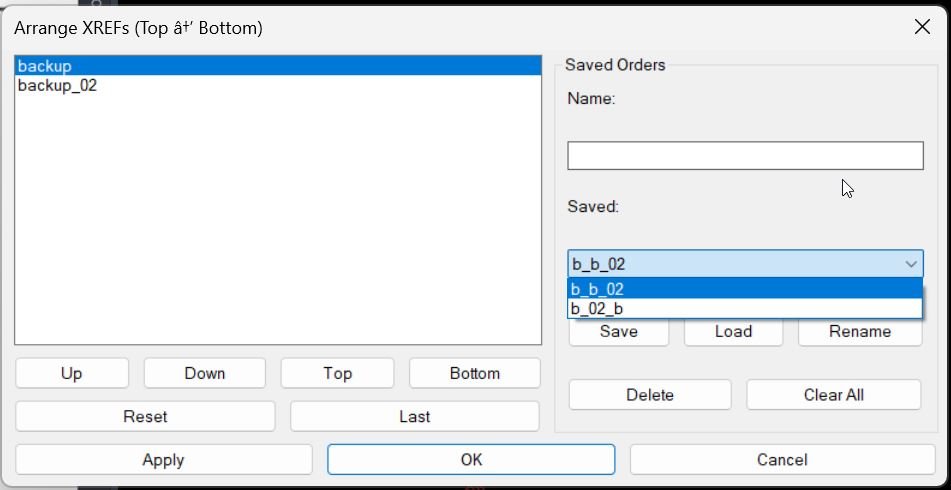
- • Builds a temporary DCL dialog titled Arrange XREFs (Top → Bottom) showing the current XREF list and controls to reorder it.
- • Uses the ordered list to apply draw order changes so each XREF is moved under the one above it, producing the requested Top to Bottom stacking.
- • Stores the most recently applied order inside the current drawing using the Named Objects Dictionary so it can be recalled with Last.
- • Supports disk-based Saved Orders with Save, Load, Rename, Delete, and Clear All operations.
- • Rename behavior: pick an existing saved order in the dropdown, type a new name, click Rename. If the target name already exists, it is overwritten.
Helper function: (if any)
- • String helpers: MXR:ToString, MXR:EnsureStr, MXR:Trim, MXR:JoinS, MXR:Split, MXR:Atoi.
- • List helpers: MXR:Len, MXR:Nth, MXR:Reverse, MXR:Append1, MXR:InList?, MXR:IndexOf, MXR:ListRemoveAt, MXR:ListInsertAt.
- • XREF helpers: AT:GetXrefNames, MXR:SSXref, MXR:MoveUnder, AT:Dedupe-Then-Fill.
- • Per drawing memory: MXR:GetOrdersDict, MXR:SaveLastOrder, MXR:LoadLastOrder.
- • Saved orders on disk: MXR:StorePath, MXR:LoadSaved, MXR:SaveSaved, MXR:DelSaved, MXR:FindSavedByName.
Functionalities:
- • List XREFs: Reads all XREF block definitions (excluding layouts) and displays their names in a list box.
- • Reorder UI: Up, Down, Top, Bottom buttons reorder the list selection.
- • Reset: Rebuilds the order from the current XREF set (deduped, then fills missing).
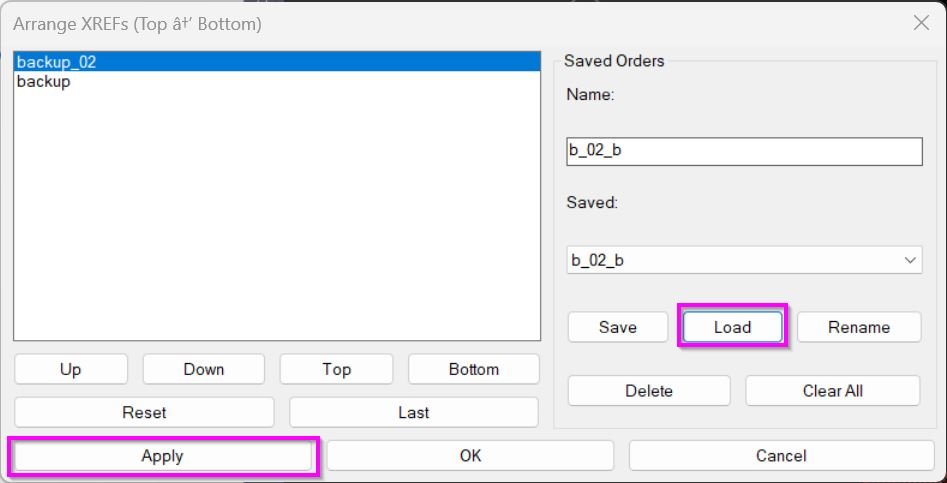
- • Last: Restores the most recently applied order stored inside the drawing, then fills any new XREFs not in the stored list.
- • Apply safe loop: Apply runs without closing the dialog, letting the user test and adjust repeatedly.
- • Save named order: Saves the current ordering under a name, overwriting an existing record with the same name.
- • Load named order: Loads a saved ordering, then merges it with the current XREF set (dedupe then fill).
- • Rename: Renames the selected saved order to the typed name and overwrites the target name if it exists.
- • Delete: Deletes the selected or typed saved order name if it exists.
- • Clear All: Removes all saved orders from the storage file.
- • Draw order application: Applies order by repeatedly issuing DRAWORDER to move each subsequent XREF under the previous one.
Result:
- Clicking Apply executes the draw order changes immediately, saves the order as the per drawing last order, and keeps the dialog open.
- • Clicking OK applies the order, saves it as last, closes the dialog, and returns the final list.
- • Clicking Cancel closes the dialog without applying.
- • The last applied order is stored inside the drawing under a dictionary entry named MXR_ORDERS with an XRECORD key _LAST_.
- • Named saved orders are stored in a text file at MXR_XrefOrders.txt (typically under DWGPREFIX, otherwise USERPROFILE, TEMP, or current folder).
Images, animations etc.
Log in to download.
Log in
Log in
Additional info:
Learn more:
Open Website
Share this page:
Subscribe
Login
0 Comments
Oldest