
Short description
Sort / Purpose: Export cleaned text from selected drawing annotations directly to the Windows clipboard in a copy ready format.
• Clipboard Export: Gathers text from TEXT, MTEXT, attributes, dimensions, multileaders, and blocks, then sends the processed result to the clipboard.
• Two Output Styles: Lets you choose between one line concatenated text without paragraphs or line by line text keeping logical paragraphs.
• Formatting Cleanup: Strips MText formatting codes and Unicode markers so that the clipboard content is clean, readable, and ready for pasting into external applications.
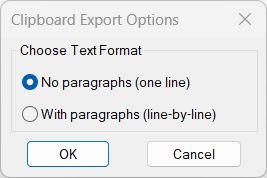
Command:
Command name: CTC
How to run: Type CTC in the command line and press Enter to open the export options dialog.
• CTC_1: Runs automatically if “No paragraphs (one line)” is chosen.
• CTC_2: Runs automatically if “With paragraphs (line-by-line)” is chosen.
Description:
• Dialog Selection: Opens a DCL window where the user chooses one of two export modes for clipboard text.
• Interactive Workflow: The last selected radio button option is remembered and pre-selected on the next run.
• Text Extraction: Reads content from TEXT, MTEXT, DIMENSION, MULTILEADER, ATTRIB, ATTDEF, and blocks with attributes.
• Formatting Cleanup: Removes U+ codes, inline MTEXT formatting, paragraph markers, and replaces them with clean characters.
• Clipboard Output: Automatically transfers the cleaned text directly into the Windows clipboard via HTMLfile COM object.
Helper function: (if any)
Internal helper procedures used:
• writeCTCDCL: Generates a temporary DCL file containing the radio button dialog layout.
• radioCTCDCL: Loads, displays, and manages the dialog interaction and stores the user’s chosen option.
Text-cleaning functions:
• StripMTextCodes_1: Produces one-line output by removing formatting, Unicode codes, and replacing line breaks with spaces.
• StripMTextCodes_2: Produces paragraph-friendly multi-line output with cleaner break insertion rules.
System / COM functions:
• vlax-create-object: Creates an HTMLfile object to write cleaned text into the clipboard.
• vlax-release-object: Ensures clean memory cleanup and prevents COM object leaks.
• ssget / entget / vlax-ename->vla-object: Collects and analyzes selected entities to extract readable text.
Functionalities:
• Two Export Modes: Choose between flat single-line text or structured line-by-line paragraphs.
• MTEXT Formatting Removal: Eliminates all inline codes such as A1;, H0.7;, fArial;, L, O, etc.
• Unicode Handling: Converts U+XXXX hexadecimal escape sequences into real characters (≥ ≤ ± °).
• Paragraph Logic: Cleans unwanted “P” markers while preserving valid words like “PE-HD”.
• Clipboard Automation: Sends the processed result directly to the Windows clipboard without prompting.
• Wide Object Support: Works with TEXT, MTEXT, DIMENSION, MULTILEADER, attributes, and attribute blocks.
• Error Safety: Custom *error* handler ensures clipboard object is released even during failures.
Result:
Result: The selected annotation content is cleaned, normalized, stripped of formatting codes, and copied directly to the Windows clipboard in the chosen text format.
• Mode 1 (rb01): Produces one continuous clean text line suitable for Excel cells, filenames, or compact notes.
• Mode 2 (rb02): Produces structured multi-line text for documentation, emails, or reports.
• Clean Output: All MTEXT formatting, Unicode escapes, control codes, and garbage strings are removed, leaving readable plain text only.
• Universal Use: The clipboard result can be pasted instantly into Word, Excel, Notepad, Outlook, or any external application.
Copy code:
Images, animations etc.
Log in to download.
Log in
Log in
Additional info:
Based on / Source code:
Open Website
Based on / Source code:
Open Website
Based on / Source code:
Open Website
Share this page:
Subscribe
Login
0 Comments
Oldest