
Short description
Purpose: Compute and report a simplified slope ratio and angle between two user-picked points Run style: Interactive two-point measurement with no drawing modifications Standard: Uses a fixed 12-unit horizontal run for imperial slope representation Output: Displays slope ratio and angle through an alert dialog only
Command:
Command: SLOPE_01 Start: User picks a start point Next: User picks an end point Action: Calculates ratio rise:run (simplified), computes angle in degrees, displays both
Description:
This routine requests two points from the user, computes the vertical and horizontal differences, converts them into a simplified rise-over-run ratio based on a constant 12-unit run, and calculates the slope angle using arctangent mathematics. The resulting slope and angle are shown in a dialog box, allowing quick field verification without producing any entities or altering the drawing. The routine cleans up after itself by restoring BLIPMODE and CMDECHO system variables.
Helper function: (if any)
• System variable handling — Disables BLIPMODE and CMDECHO temporarily for clean operation • Slope formula — Computes slope as |ΔY ÷ ΔX| with protection for division by zero • Ratio reduction — Uses repeated GCD to simplify rise and run until they cannot be reduced further • Angle calculation — Uses ATAN then converts radians to degrees • Undo grouping — Begins an UNDO group to encapsulate any future extensions
Functionalities:
• Two-point slope measurement — Uses user input for start and end points • Imperial 12-run standard — Converts slope to a rise-per-12-units format • Automatic ratio simplification — Ensures output is reduced (e.g., 12:6 → 2:1) • Angle reporting — Provides the slope angle with two decimal precision • Error-safe logic — Prevents zero-division and handles flat slopes correctly • Clean environment — Restores system variables on exit
Result:
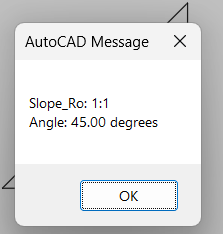
• Displayed slope ratio — Presented as Slope_Ro: run:rise after simplification • Displayed slope angle — Angle shown in degrees with two decimals • No geometry created — Does not draw text, objects, or symbols • Useful for quick checks — Ideal for rapid field/plan slope validation • Environment restored — BLIPMODE and CMDECHO returned to original values
Images, animations etc.
Log in to download.
Log in
Log in
Additional info:
Learn more:
Open Website
Share this page:
Subscribe
Login
0 Comments
Oldest