
Short description
Sort / Purpose: Interactively extend lines, arcs and polylines at both start and end by user defined distances, using a dialog with separate values for each side and safe Apply or Undo control.
• Scope: Works on LINE, ARC, LWPOLYLINE and classic POLYLINE entities, handling straight and bulged segments at both ends.
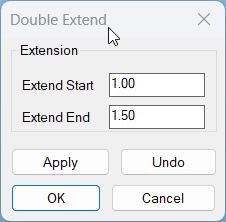
• Goal: Provide a flexible Double Extend tool where you can tweak start and end extension, preview the result with Apply, step back with Undo, and only confirm when you are satisfied.
Command:
Command name: ExtendStartEndMultiple
How to run: Type ExtendStartEndMultiple in the command line after loading the LISP.
• Selection: When prompted, select one or more LINE, ARC, LWPOLYLINE or POLYLINE entities to be extended.
• Dialog cycle: Use the dialog to set start and end extension values and control Apply, Undo, OK or Cancel from within the same session.
Description:
• Initial globals: Stores two persistent extension values *DEX_extStart* and *DEX_extEnd* so the dialog remembers your last used distances between runs.
• DCL creation: Dynamically writes a temporary DCL file that defines the Double Extend dialog with two edit boxes (Extend Start and Extend End) and buttons for Apply, Undo, OK and Cancel.
• Dialog behavior: Each time the dialog is shown it pre fills the edit boxes from the global values and updates those globals when you press Apply or OK, converting strings to distances.
• Return codes: The dialog function returns a code that distinguishes between OK, Cancel, Apply and Undo so the main routine can decide what to do without re selecting geometry.
• Selection and group: The command first gathers a selection set of eligible entities, then starts an overall UNDO group so the entire session can be undone as one operation if desired.
• Apply loop: When you press Apply the routine places an UNDO mark, calls the geometry engine to extend all selected entities by the current start and end values, increments an internal apply counter and regenerates the drawing.
• Undo button: Pressing Undo triggers an UNDO back to the last mark, rolling back the most recent Apply, decrementing the apply counter and updating the drawing again.
• OK semantics: If you have never used Apply or Undo, pressing OK performs one single extension using the current values and then exits; if you have already applied or undone changes, OK simply accepts the current state without further modification.
• Cancel semantics: If you press Cancel or close the dialog without confirming, the routine repeats UNDO back as many times as there were Apply operations, fully restoring the pre command state and then ends the UNDO group.
• End of session: After leaving the dialog loop the command always closes the UNDO group, making the final chosen state a single undo step from normal AutoCAD undo.
Helper function: (if any)
Vector and poly helpers:
• vxs: Multiplies a 3D vector by a scalar, used to compute extension vectors along the segment direction.
• LM:bulgecentre: Calculates the centre point of an arc defined by two points and a bulge value so the routine can extend bulged polyline segments accurately.
• LM:lwvertices: Extracts the list of lightweight polyline vertices along with width and bulge data into a structured list that can be passed to the extension processor.
Extension engine:
• LM:dex:extendpoly: Extends the first and last segments of a polyline (lightweight or old style) by separate distances for start and end, handling both straight and bulged segments without exceeding a full circle on arcs.
• LM:dex:run: Core geometry driver that iterates over the selection set and applies the appropriate extension logic depending on entity type (LINE, ARC, LWPOLYLINE or POLYLINE).
Dialog helpers:
• DEX:make-dcl: Writes the temporary DCL file describing the Double Extend dialog and returns its file name.
• DEX:read-values: Reads tile values extStart and extEnd from the dialog, converts them to numeric distances and updates the global extension variables.
• DEX:dialog: Loads the DCL, initializes tiles, assigns action tiles for Apply, Undo, OK and Cancel, runs the dialog and then returns the pressed button as a numeric result code while deleting the temporary DCL file.
Error and UNDO handling:
• Local *error*: The command defines a local error handler that, if an error occurs while an UNDO group is active, backs out all Apply operations, closes the group and prints a message before exiting cleanly.
Functionalities:
• Separate start and end control: Lets you extend the start and end of each entity by different distances so you can lengthen segments asymmetrically where needed.
• Multi type support: Handles plain lines, circular arcs, lightweight polylines and old style polylines, preserving bulges and widths where appropriate.
• Arc safety: For arcs and bulged segments the extension length is limited so that the implied arc never wraps around into a full circle, preventing invalid geometry.
• Iterative preview: Apply can be pressed repeatedly with different extension values in one session, allowing you to visually tune the result while Undo steps back to the previous version each time.
• Global persistence: The extension values are stored in global variables so the next time you run the command the dialog opens with the last used start and end distances already filled in.
• Undo group integration: All modifications performed while the command is active are wrapped inside a single AutoCAD UNDO group, making it easy to revert the entire operation with one undo if needed.
• Selection reuse: The initial selection set is kept for the whole dialog loop, so you do not need to re select objects between Apply and Undo cycles.
Result:
Result: All selected lines, arcs and polylines are extended at their start and end by the chosen distances, with the final state reflecting your last confirmed Apply or single OK execution.
• Precise control: You obtain fine grained control over how far each end of the geometry is extended, including curved segments, without manual stretching for each object.
• Safe experimentation: The Apply and Undo buttons allow you to experiment with multiple extension settings while the command is running, always able to step back to the previous state within the same session.
• Clean undo path: If you cancel, all extensions made during that run are reverted, leaving the drawing unchanged; if you accept, the final geometry is grouped into a single undo step for later reversal.
• Workflow integration: The load message reminds you that the tool is available and how to invoke it, integrating smoothly into everyday drafting for trimming and extending geometry with more flexibility than the standard extend command.
Copy code:
Images, animations etc.
Log in to download.
Log in
Log in
Additional info:
Source code:
Open Website
Share this page:
Subscribe
Login
0 Comments
Oldest