
Short description
LZW summary
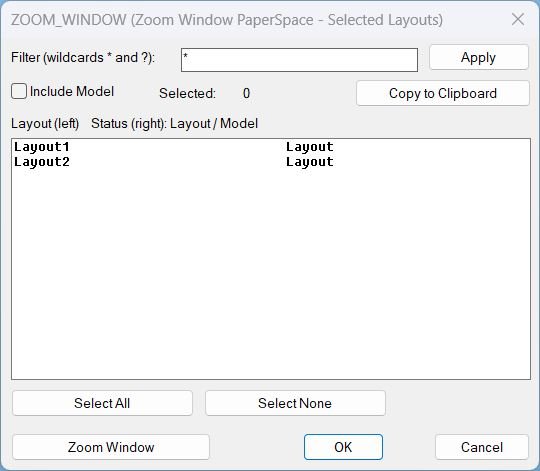
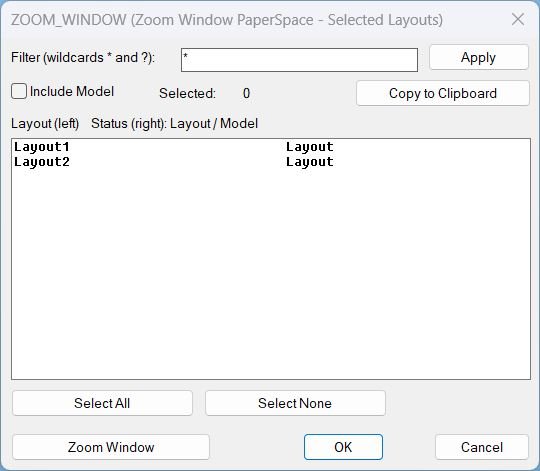
LZW opens a DCL selection dialog for Layouts, then prompts for a window and runs Zoom Window in Paper Space on the selected layouts after the dialog closes.
Key stability rule The zoom action is executed after the dialog closes to avoid UI timing issues.
Command:
Command
- LZW Runs Zoom Window on selected layouts in Paper Space.
Description:
User workflow
- Run LZW.
- Select one or more Layouts from the list.
- Optional filter using wildcards * and ?.
- Optional toggle Include Model to show MODEL in the list.
- Optional Copy to Clipboard to copy selected layout names and status.
- Trigger Zoom Window, the dialog closes, then pick two corners for the window, and the same window is applied to each selected layout tab.
- If point picking is cancelled, the routine cancels the action and restores the original tab.
Helper function: (if any)
Helper functions and mechanisms
- GetLayouts reads available layouts using layoutlist.
- FilterLayouts applies wildcard filtering using wcmatch and optional Model inclusion.
- WriteDCL builds a temporary DCL file with a unique dialog name per run.
- CopyClipboard copies text via htmlfile clipboardData with PowerShell and clip fallback.
- ZoomWindowLayouts asks for one window then iterates CTAB across layouts and applies the same window with COM then command fallback.
- Cleanup unloads the dialog and deletes the temporary DCL file.
Functionalities:
Functionalities
- Dialog UI for filtering and multi-selecting layouts.
- Select All and Select None selection tools and selected count display.
- Clipboard export of selected layout names and status.
- Zoom Window in Paper Space across the selected layouts using one picked window applied consistently.
- Undo grouping for multi-layout operations using StartUndoMark and EndUndoMark.
- Robust fallbacks for temp DCL creation and zoom execution.
Result:
Result
After selection in the dialog, LZW prompts for a zoom window once, then switches through the chosen layout tabs and applies Zoom Window in Paper Space, restoring the original tab when finished.
Tags CAD, General_AutoCAD, Extra_AutoCAD, Lisp, Layouts, Paper Space, Viewports, DCL, Dialog_UI, Clipboard
Suggest relevant tags not in the list Zoom, Wildcards, Undo, Selection_UI, Temp_File_Handling
Images, animations etc.
Log in to download.
Log in
Log in
Additional info:
Based on / Source code:
Open Website
Share this page:
Subscribe
Login
0 Comments
Oldest
Tags: CAD, Clipboard, DCL, Dialog_UI, Extra_AutoCAD, General_AutoCAD, Layouts, Lisp, Paper Space, Viewports
Tags: CAD, Clipboard, DCL, Dialog_UI, Extra_AutoCAD, General_AutoCAD, Layouts, Lisp, Paper Space, Viewports