
Short description
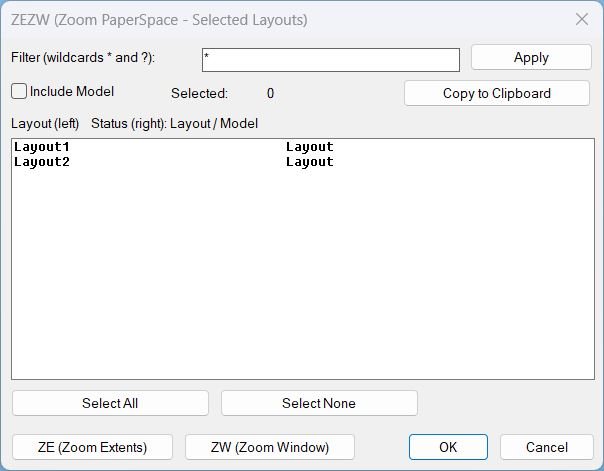
What this LISP does ZEZW opens a DCL dialog to multi-select layouts and then applies Zoom Extents or Zoom Window in Paper Space on the selected layouts.
Key concept The zoom action runs after the dialog closes for stability and predictable execution.
Command:
Commands
- ZEZW Main command that launches the selection dialog and triggers zoom actions.
- ZEZW Alias command (same behavior).
- _ZEZW Alias command (same behavior).
Description:
User workflow
- Run ZEZW to open the layout selection dialog.
- Use the filter box with wildcards * and ? to narrow the layout list.
- Optionally toggle Include Model to show or hide MODEL in the list.
- Multi-select layouts in the list (fixed width display shows layout name and status).
- Click ZE (Zoom Extents) to zoom extents on each selected layout in Paper Space.
- Click ZW (Zoom Window) to pick two corners once, then apply the same zoom window to each selected layout in Paper Space.
- If selection is empty, the program prompts the user to select one or more layouts before running zoom.
Helper function: (if any)
Notable helper functions and internal mechanisms
- LV:GetLayouts Collects layout names using layoutlist for reliability.
- LV:FilterLayouts Applies wildcard filtering via wcmatch and optionally excludes MODEL.
- LV:MakeTempDCL Creates a robust temporary DCL path (mktemp with fallback to TEMP or DWGPREFIX).
- LV:WriteDCL Writes the dialog definition with a unique dialog name each run.
- LV:CopyClipboard Copies text via MSHTML clipboardData, with fallback to PowerShell Set-Clipboard and cmd clip.
- LV:ZoomExtentsLayouts Iterates layouts and runs COM zoom extents with command fallback ZOOM E.
- LV:ZoomWindowLayouts Prompts for a window once and applies it to all selected layouts with COM and command fallback ZOOM W.
- LV:Cleanup Unloads the dialog and deletes the temporary DCL file to avoid residue and lock issues.
- *error* handler ensures cleanup runs on unexpected failures and suppresses noise on normal cancel events.
Functionalities:
Functionalities
- Dialog UI with filter, multi-select list, select all, select none, and selected count display.
- Layout filtering using wildcards to quickly isolate target layout tabs.
- Clipboard export of selected layout names and their status, formatted line-by-line for paste into other tools.
- Zoom Extents across selected layouts in Paper Space with stable post-dialog execution.
- Zoom Window across selected layouts using one picked window applied consistently to all layouts.
- Paper Space enforcement by forcing MSpace false before zooming to avoid viewport context issues.
- Undo grouping using StartUndoMark and EndUndoMark for clean rollback of multi-layout operations.
- Robust fallbacks for zoom (COM first, then command-based) and for clipboard copy (multiple methods).
Result:
Result summary
The routine provides a stable dialog-driven way to select layouts, optionally include Model, copy selections to clipboard, then apply zoom extents or a consistent zoom window in Paper Space across the selected layouts.
Tags Layouts, Paper Space, DCL, Dialog_UI, Clipboard, Viewports, General_AutoCAD, Lisp, Extra_AutoCAD
Suggest relevant tags not in the list Zoom, Wildcards, Undo
Images, animations etc.
Log in to download.
Log in
Log in
Share this page:
Subscribe
Login
0 Comments
Oldest
Tags: CAD, Clipboard, DCL, Dialog_UI, Extra_AutoCAD, General_AutoCAD, Layouts, Lisp, Paper Space, Viewports
Tags: CAD, Clipboard, DCL, Dialog_UI, Extra_AutoCAD, General_AutoCAD, Layouts, Lisp, Paper Space, Viewports