
Short description
- Single dialog that sets ANNOALLVISIBLE to 1 or 0 for a chosen set of Model/Layout tabs.
- Combines the functionality of AAON and AAOFF with mode radio buttons and tab multi-select in one UI.
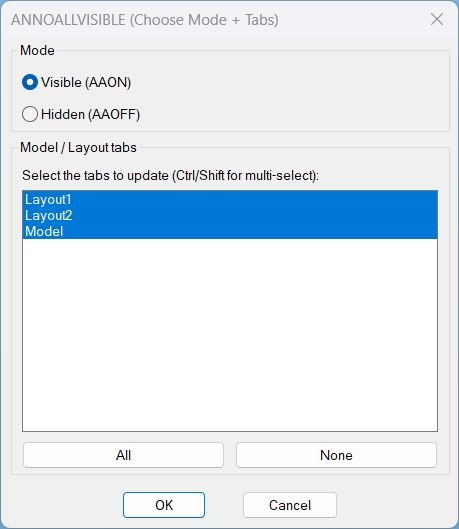
Command:
- Command: AAVIS
Description:
- Generates an embedded DCL dialog at runtime that provides a Mode selector and a multi-select list of Model / Layout tabs.
- Mode is chosen via radio buttons: Visible (AAON) sets ANNOALLVISIBLE to 1, and Hidden (AAOFF) sets it to 0.
- Tabs are selected via list box with helper buttons All and None, then applied on OK.
- Note: ANNOALLVISIBLE is stored per Model/Layout tab, so the change is applied by switching tabs rather than modifying viewport entities.
Helper function: (if any)
- AAVIS:WriteDcl writes the embedded DCL definition to a temporary .dcl file for the session.
- AAVIS:GetTabNames enumerates the document layouts via ActiveX and returns a list of tab names including Model.
- AAVIS:MakeAllIndexString generates the list box index string needed to select all tabs by default and via the All button.
- AAVIS:IdxList->Names converts the list box selection index string into a list of tab names to update.
- AAVIS:SetAnnoAllVisible switches to each selected tab, forces paperspace for layouts when needed, runs ANNOALLVISIBLE with the selected value, then restores prior state.
- c:AAVIS drives the UI: sets defaults, handles All/None buttons, reads the chosen mode and tabs on OK, applies the update, and cleans up temp files.
Functionalities:
- • Embedded DCL is written to a temp file at runtime and loaded to display a single configuration dialog.
- • Mode selection via radio buttons: Visible (AAON) sets value 1, Hidden (AAOFF) sets value 0.
- • Multi-select tab picker allows choosing any combination of Model/Layout tabs to update.
- • All selects all tabs using a generated index string, and None clears selection to prevent changes.
- • Per-tab application switches CTAB for each selected tab and applies ANNOALLVISIBLE to the chosen value.
- • Layout handling forces paperspace on layout tabs by setting MSPACE to false when in a layout context.
- • State restoration restores CTAB, TILEMODE, and MSPACE after execution.
Result:
- If the user confirms a selection, sets ANNOALLVISIBLE to the chosen value (1 or 0) for each selected tab and restores the prior tab/mode state.
- If no tabs are selected, prints AAVIS: Nothing selected. No changes made.
- If the dialog is cancelled, prints AAVIS: Cancelled.
- If the dialog cannot be loaded, prints AAVIS: Could not load dialog.
- After applying, prints a confirmation message indicating the value applied to the selected tabs.
Images, animations etc.

Log in to download.
Log in
Log in
Additional info:
Based on / Source code:
Open Website