
Short description
DuplicateLayouts provides a DCL Dialog_UI to queue layout tabs with copy counts, then batch duplicate them using -LAYOUT Copy with safe fallbacks and unique naming.
Command:
Commands
- DuplicateLayouts opens the dialog and runs the full tool workflow.
Description:
What the user does
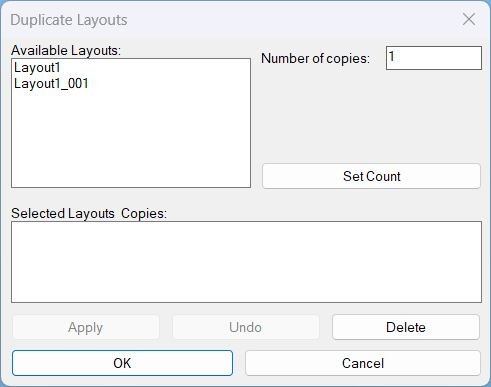
- Run DuplicateLayouts to open the DCL dialog.
- Select a layout in Available Layouts and enter Number of copies.
- Press Set Count to add or update that layout in Selected Layouts and Copies summary.
- Press Apply to duplicate and keep the dialog open, or press OK to duplicate and exit.
- Press Undo to undo the last session operation, then continue working in the dialog.
- Press Delete to remove an item from the summary when a summary row is selected, otherwise delete the selected available layout tab from the drawing.
Helper function: (if any)
Key helper behavior
- Builds the available layout list by iterating the Layouts collection and excluding Model.
- Maintains stable session state using globals for selected layouts, delete target, and undo availability.
- Generates unique destination names using BaseName_### with zero padded numbering and an existence check before each creation.
- Copies layouts using -LAYOUT Copy with multiple fallback variants to handle command localization or option differences.
- Wraps duplication and deletion in StartUndoMark and EndUndoMark so each operation can be reverted cleanly.
- Implements session undo by issuing UNDO 1 and tracking a session counter to enable or disable the Undo button.
- Writes a temporary DCL file, loads it, runs the dialog loop, then unloads the dialog and deletes the temp file on exit.
Functionalities:
Functionalities
- Queue layouts for duplication
- Select an available layout and set Number of copies.
- Press Set Count to add or update the queued entry in the summary list.
- Displays queued items as layout : count for review before applying.
- Batch duplicate layouts
- Apply duplicates all queued layouts and keeps the dialog open for additional changes.
- OK duplicates all queued layouts then exits, and exits silently if nothing is queued.
- Each duplicate is created with a unique name BaseName_### to prevent naming conflicts.
- Delete behavior
- If a summary row is selected, Delete removes that queued entry only and does not change the drawing.
- If no summary row is selected and an available layout is selected, Delete deletes that layout tab from the drawing and switches CTAB to Model first if the tab was active.
- Deletion blocks invalid targets such as Model and missing layouts with clear alerts.
- Undo within the session
- Undo runs a single step undo using UNDO 1 for the last duplication batch or delete operation executed in this dialog session.
- The tool enables the Undo button only after at least one operation was performed during the session.
- UI rules
- Apply is disabled until at least one layout is queued with Set Count.
- OK remains enabled always, and will only duplicate when there are queued items.
Result:
Tags
- Layouts, DCL, Dialog_UI, General_AutoCAD, Extra_AutoCAD, Lisp
- Undo or UndoMark grouping
- Naming or UniqueName generation
- Batch duplication workflow
Images, animations etc.
Log in to download.
Log in
Log in
Additional info:
Based on / Source code:
Open Website
Share this page:
Subscribe
Login
0 Comments
Oldest