
Short description
- Purges unused layers using a dialog that scans the drawing and deletes layers with no entities on them.
- Protects critical layers and the current layer and optionally skips Xref layers.
Command:
- Command: PURGEUNUSEDLAYERS
Description:
- Creates a single file workflow by embedding a DCL definition inside the LISP and writing it to the temp folder at runtime.
- Loads the dialog, scans all layers, identifies unused layers, then lets you purge selected layers or purge all unused layers.
- Always prevents deletion of layer 0, layer DEFPOINTS, and the current layer.
Helper function: (if any)
- PUL:_DCLLines builds the DCL text as a list of lines used to generate the dialog file.
- PUL:_WriteDCL writes the embedded DCL content to a temp .dcl file.
- PUL:_EnsureDCL forces a fresh DCL write to avoid stale dialog definitions.
- PUL:_SplitByComma parses the user skip list from the dialog into layer names.
- PUL:_AllLayers collects all layer names from the drawing using tblnext.
- PUL:_ScanUnusedLayers detects unused layers by checking for entities on each layer using ssget with a layer filter.
- PUL:_TryLayDel attempts deletion via -LAYDEL and uses tblsearch to confirm removal.
- PUL:_PurgeLayers purges a list of layers, temporarily suppressing command echo and returning deleted and failed counts.
Functionalities:
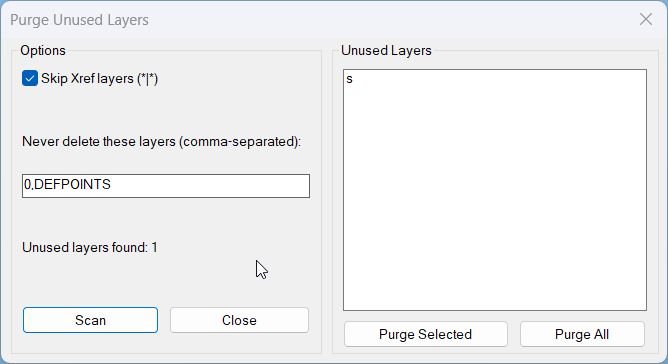
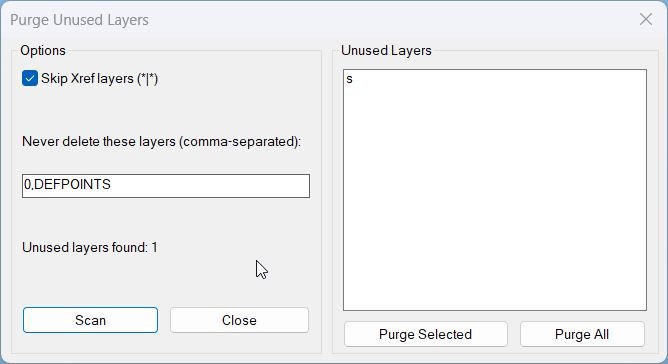
- Dialog options: toggle to Skip Xref layers that match *|* and an edit box for additional never delete layers.
- Scan: refreshes the unused layer list based on current settings and updates the status count.
- Purge Selected: deletes only the layers selected in the list box.
- Purge All: deletes all currently detected unused layers in one operation.
- Safety rules: never deletes 0, DEFPOINTS, or the current layer and can exclude Xref layers when enabled.
Result:
- Shows a populated list of unused layers and a status line with the total unused layers found.
- After purge, prints results to the command line with counts for Deleted and Failed deletions.
- If nothing is selected or nothing is unused, reports the condition instead of deleting anything.
- Cancelled is reported when the dialog is closed without purging.
Images, animations etc.
Log in to download.
Log in
Log in
Additional info:
Based on / Source code:
Open Website
Share this page:
Subscribe
Login
0 Comments
Oldest
Tags: Layers
Tags: Layers