
Short description
- LayersName2Clipboard — collect unique layer names from a user selection and copy them to the Windows clipboard as a newline-separated list
- Uses an HTMLFile COM object to access clipboardData and write text directly to the clipboard
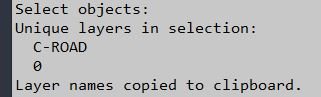
Command:
- • LayersName2Clipboard
Description:
- Prompts the user to select entities, then scans the selection set and extracts each entity’s layer name (DXF group 8).
- Builds a list of unique layer names (no duplicates) in the order encountered, prints them to the command line, and concatenates them into a newline-separated string.
- Copies the resulting string (layers only) into the Windows clipboard so it can be pasted into other applications.
Helper function: (if any)
- • ClipPut — writes a text string to the Windows clipboard via an htmlfile COM object using parentWindow.clipboardData.setData.
- • DXF 8 — layer name group code used to extract an entity’s layer from entget data.
Functionalities:
- • User selection — uses ssget to collect entities; exits with a message if nothing is selected.
- • Layer extraction — iterates the selection set, calls entget, and reads (assoc 8) to obtain each entity’s layer name.
- • Deduplication — adds layer names to an in-memory list only if they are not already present (member check).
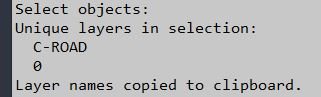
- • Reporting — prints “Unique layers in selection” and lists each layer name in the command line output.
- • Clipboard formatting — builds a single string containing only layer names separated by newline characters (one layer per line).
- • Clipboard write — calls ClipPut to copy the newline-separated list into the clipboard and prints confirmation.
- • COM cleanup — releases the temporary htmlfile object after writing to the clipboard.
Result:
- The command outputs the unique layer names used by the selected entities and copies those names to the clipboard as a clean, newline-separated list suitable for pasting elsewhere.
- If no objects are selected or no layer names are found, nothing is copied and an informational message is printed.
Images, animations etc.
Log in to download.
Log in
Log in
Additional info:
Based on / Source code:
Open Website
Share this page:
Subscribe
Login
0 Comments
Oldest