
Short description
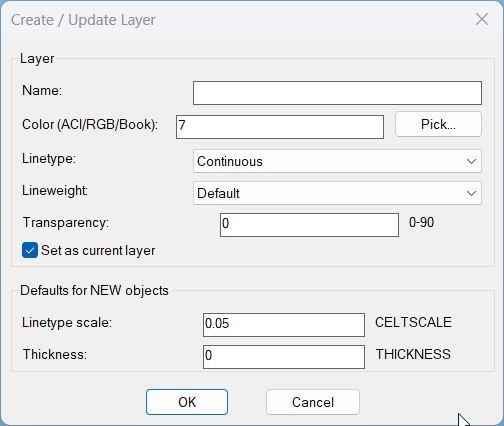
- LayerCreation — create/update a layer with True Color + Color Books support, plus a “Set as current layer” toggle (DCL with CLI fallback).
- Fields: Name, Color (ACI / RGB / ColorBook), Linetype, Lineweight, Transparency; also sets defaults for NEW objects (CELTSCALE, CETRANSPARENCY, THICKNESS).
- Runs a DCL dialog when the DCL core is healthy; otherwise runs NEWLAYERCLI (always works).
Command:
- • LayerCreation
- • NEWLAYERCLI
Description:
- LayerCreation is a layer creation/update tool that supports ACI colors, RGB truecolor, and Color Book colors through the AutoCAD color dialogs, and can optionally set the new layer as current.
- When DCL is available, it generates a temporary dialog to capture layer properties and default settings; if the DCL core is not usable, it automatically falls back to a command-line workflow (NEWLAYERCLI).
- The routine creates the layer if missing, sets Linetype, Lineweight, and Transparency via scripted -LAYER calls, then applies the selected color via the layer’s TrueColor object (supports book colors and RGB).
- Finally, it applies drawing defaults for newly created objects (CELTSCALE, CETRANSPARENCY, THICKNESS) and optionally sets CLAYER to the created/updated layer based on the toggle.
Helper function: (if any)
- • NL:_dclReadyP — checks whether core DCL functions exist as callable subrs, to decide between DCL dialog vs CLI fallback without using fboundp.
- • NL:_trim / NL:_illegalLayerNameP — trims input and validates layer names against forbidden characters and empty names.
- • NL:_getLinetypes / NL:_ensureLinetypeLoaded — enumerates available linetypes and loads missing ones from acad.lin when needed.
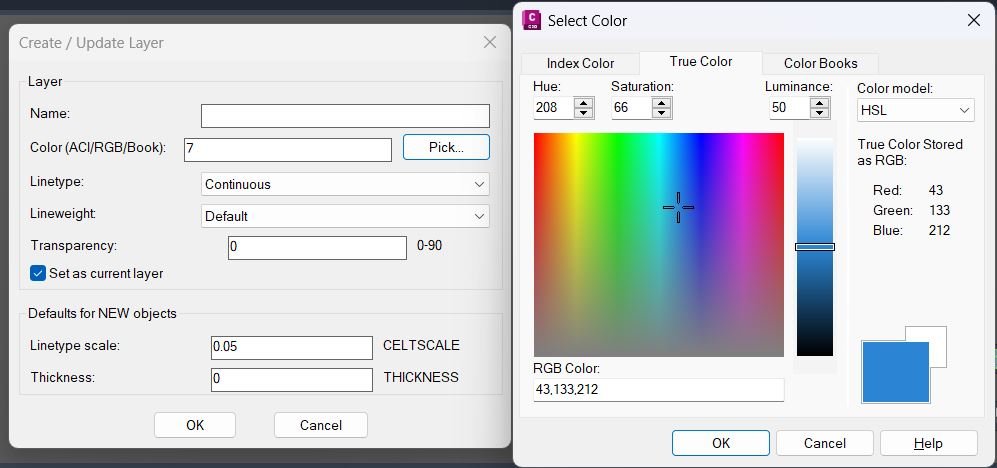
- • NL:_pickColor — opens the truecolor/color book dialog (acad_truecolordlg) with fallback to acad_colordlg; persists last selection.
- • NL:_parseColorText — parses manual color text input as ColorBook (BOOK$NAME), RGB (r,g,b), or ACI index, returning the selector list used for TrueColor application.
- • NL:_applyColorToLayer — applies ACI/RGB/ColorBook colors to a layer using its TrueColor object (supports SetRGB and SetColorBookColor).
- • NL:_makeOrUpdateLayer — creates the layer if missing and sets Linetype/Lineweight/Transparency using scripted -LAYER commands.
- • NL:_applyDefaultsAndMaybeSetCurrent — safely sets drawing defaults (CELTSCALE, CETRANSPARENCY, THICKNESS) and optionally sets the new layer current, using a protected setvar wrapper.
- • DCL temp helpers — generate unique temp DCL filenames, write dialog text, and ensure cleanup after closing.
Functionalities:
- • Dual interface — LayerCreation uses DCL when available; otherwise it runs NEWLAYERCLI which prompts in the command line and always works.
- • Layer name validation — rejects empty names and names containing forbidden characters (\ / : ; * ? " < > | , =).
- • Color selection — supports three color modes: ACI index (62), RGB truecolor (420), and Color Book color (430), with persistent “last used” values.
- • Manual color input — dialog allows typing ACI, r,g,b, or BOOK$COLOR; parser converts it into the internal selector list used for TrueColor application.
- • Linetype management — linetypes are listed from the drawing; missing linetypes can be auto-loaded before assignment.
- • Layer creation/update — if the layer does not exist, creates it; then sets Linetype, Lineweight, and Transparency using -LAYER scripted calls; color is applied afterwards via TrueColor API to support RGB/books.
- • Defaults for new objects — applies CELTSCALE (default 0.05), CETRANSPARENCY (default 0), and THICKNESS (default 0) using a safe setvar wrapper so invalid settings do not cancel the command.
- • Set current toggle — both UI flows allow setting the created/updated layer as current (default Yes/checked).
- • Cleanup — DCL version writes a unique temp dialog file, loads/unloads it, then deletes it; color selection is persisted for the next run.
Result:
- Running LayerCreation creates or updates a layer with the specified name, linetype, lineweight, transparency, and color (ACI/RGB/ColorBook), then applies the configured defaults for new objects and optionally sets the new layer current.
- If the DCL core is not usable, the routine automatically falls back to NEWLAYERCLI, which collects the same key inputs via the command line and performs the same layer creation/update and default-setting steps.
- The last used color selection is retained for subsequent runs, enabling consistent layer creation workflows across sessions.
Images, animations etc.
Log in to download.
Log in
Log in
Additional info:
Based on / Source code:
Open Website
Share this page:
Subscribe
Login
0 Comments
Oldest
Tags: Layers
Tags: Layers