
Short description
Sort / Purpose:
Civil 3D utility to set pipe invert elevations from selected
TIN Surfaces and/or Profiles, using separate elevation offsets
for each source and a scrollable, filterable UI for many pipes.
• Scope: Works with AeccDbPipe (model), pipe profile-views, TIN Surfaces and Profiles, using wildcard filters and “Apply” inside the dialog so you can tweak/preview without closing it.
• Priority: For each pipe, it tries Profiles first, then falls back to Surfaces if no valid profile elevation is found at pipe ends.
Command:
Main Command:
• Pipes2SurfacesProfilesElevationTool_00
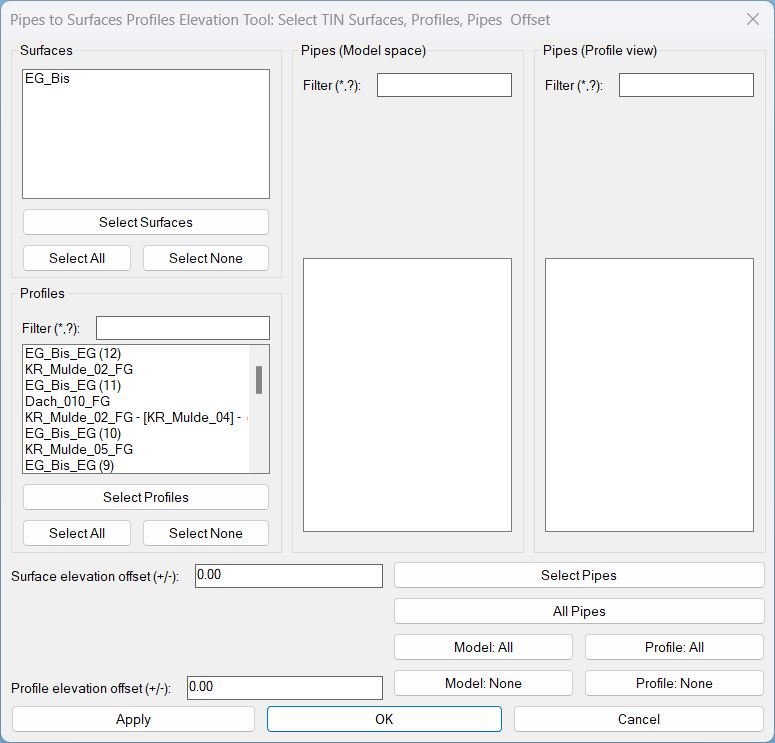
→ Opens the main dialog to select TIN Surfaces, Profiles, and Pipes, define offsets, and apply invert elevations.
Description:
Global state & structure:
• Counts:
Main behaviour: • On command start, it auto-collects: – All
*PipeSurf-surfCount*, *PipeSurf-profCount*,
*PipeSurf-pipeModelCount*, *PipeSurf-pipeProfileCount* – cached counts for UI.
• Selections (by index in master lists):
– *PipeSurf-surfSelectedIdxs* – selected surfaces.
– *PipeSurf-profSelectedIdxs* – selected profiles.
– *PipeSurf-pipeModelSelectedIdxs* – selected model-space pipes.
– *PipeSurf-pipeProfileSelectedIdxs* – selected profile-view pipes.
• Offsets:
– *PipeSurf-surfOffset* – ΔZ applied when using surfaces.
– *PipeSurf-profOffset* – ΔZ applied when using profiles.
• Object collections:
– *PipeSurf-surfObjs* – TIN surfaces (VLA objects).
– *PipeSurf-profObjs*, *PipeSurf-profNames* – profile VLA objects + DisplayNames.
– *PipeSurf-pipeModelObjs*, *PipeSurf-pipeModelLabels* – model-space pipes + compact labels (P40, P41…).
– *PipeSurf-pipeProfileObjs*, *PipeSurf-pipeProfileLabels* – profile-view pipes linked back to model pipes + labels.
• Filters (simple wildcard):
– *PipeSurf-profFilter* – profile name filter.
– *PipeSurf-mpipeFilter*, *PipeSurf-ppipeFilter* – pipe filters for model/profile lists.
• Visible-index maps (for filtered lists):
– *PipeSurf-profVisibleIdxs*, *PipeSurf-mpipeVisibleIdxs*, *PipeSurf-ppipeVisibleIdxs* – map list-box row index → original index in the master list, so selection survives filter changes.Main behaviour: • On command start, it auto-collects: – All
AECC_TIN_SURFACE entities → Surfaces tab.
– All AECC_ALIGNMENT → their Profiles collection → Profiles tab.
• Pipes are not collected automatically (except via “All Pipes”): you add them via “Select Pipes” or “All Pipes”.
• Dialog returns codes defining what to do next: Apply, Select Pipes, Select Surfaces, Select Profiles, All Pipes, OK, Cancel.
Helper function: (if any)
Key helper functions:
Labeling & indices
•
PipeSurf-ExtractDigits – pulls all digits from a string (e.g. “Pipe – 40” → “40”).
• PipeSurf-MakeShortPipeLabel – builds compact labels P<number> using DisplayName’s digits; falls back to list index if no digits.
• PipeSurf-ParseIndexString / PipeSurf-MakeIndexString – convert between list_box selection strings (“0 2 3”) and integer lists (0 2 3).
• PipeSurf-SelectAllList – fills a list_box with all indices 0..N-1 (Select All behaviour).
• PipeSurf-HandleInList / PipeSurf-FindIndexByHandle – dedup and locate objects using their AutoCAD handle.
Filtering & list rebuild:
• PipeSurf-FilterPattern – if user text includes * or ?, use as-is; otherwise wraps with *text* for “contains” matching.
• PipeSurf-UpdateProfList – rebuilds Profiles list based on filter; maintains *PipeSurf-profVisibleIdxs* and re-selects still-visible items.
• PipeSurf-UpdateMPipeList / PipeSurf-UpdatePPipeList – same idea for Model and Profile pipes, using pipe labels.
• PipeSurf-ReadMainSelections – reads UI state (surface indices, filtered indices for profiles/pipes, offsets, filter strings) and writes back into globals.
Pipe collection & dedup:
• PipeSurf-AddPipe – adds a pipe to either model or profile list, checks duplicates by handle to avoid double entries.
• PipeSurf-SelectAllPipes – after pipes are added, marks all as selected by default (both lists).
• PipeSurf-BuildPipeList – merges selected model and profile pipes into one unique list (by handle) so each pipe is processed once.^
Selection from drawing:
• PipeSurf-AddPipesFromDrawing – ssget, looks for:
– AeccDbPipe → model pipes.
– AeccDbGraphProfileNetworkPart → resolves back to model pipe via GetModelNetworkPart, treated as profile-view pipes.
• PipeSurf-AddAllPipes – ssget "X", collects all AeccDbPipe in the drawing as model pipes.
• PipeSurf-SelectSurfacesFromDrawing / PipeSurf-SelectProfilesFromDrawing – let user pick TIN surfaces or AECC_PROFILE entities, then map their handles to indices and auto-check those items.
DCL & dialog orchestration:
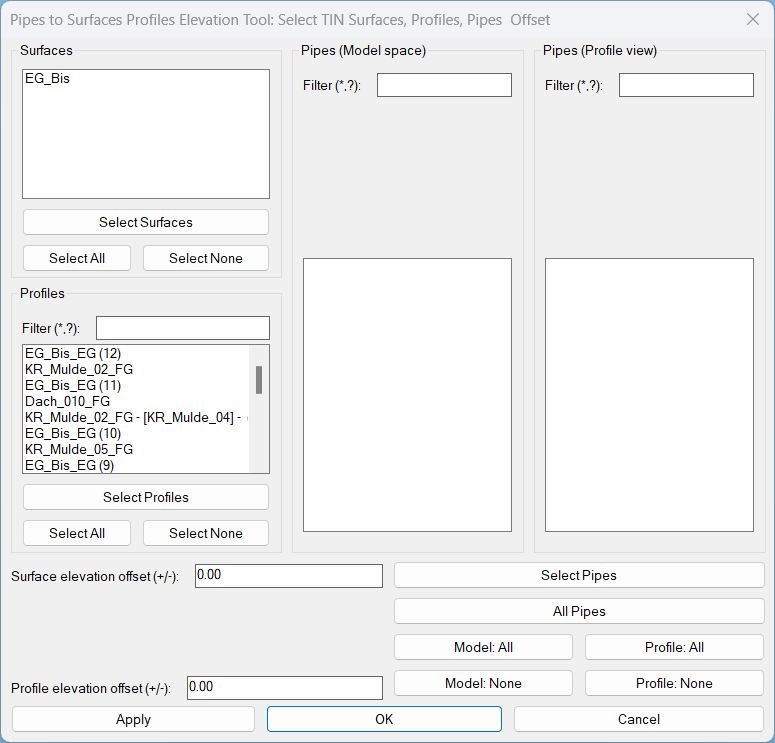
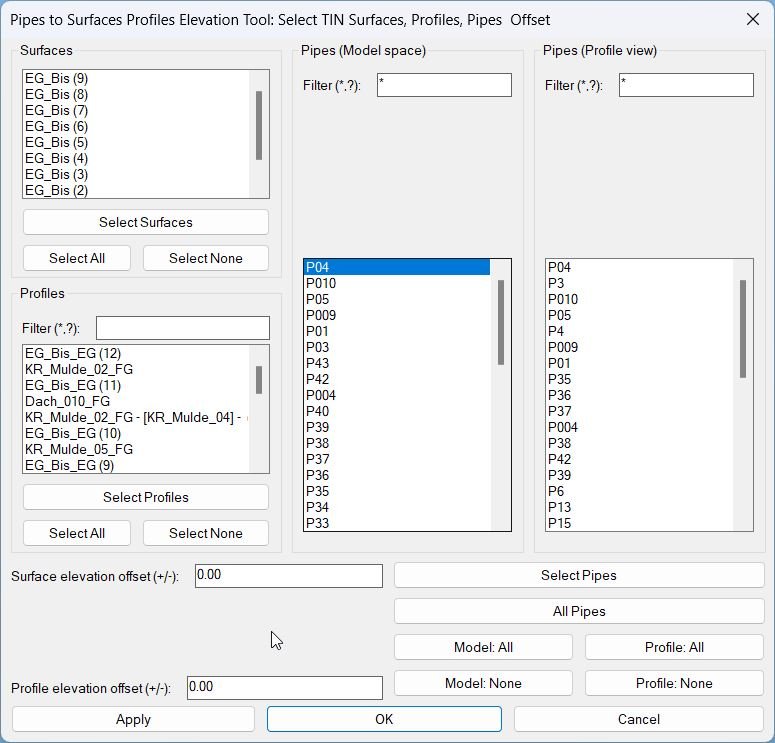
• PipeSurf-MakeMainDCL – writes a temporary DCL file with three scrollable lists (Surfaces, Profiles, Pipes Model/Profile) plus offsets and buttons.
• PipeSurf-ShowMainDialog – loads DCL, populates all lists, wires action_tile callbacks, and returns a result code:
– 0 Cancel, 1 OK, 2 Select Pipes, 3 Select Surfaces, 4 Select Profiles, 5 Apply (stay), 6 All Pipes.
Geometry core:
• SetPipeInvertsToElevSources – for a single pipe, does:
1) Gets endpoints (param 0 and 1) and pipe inner radius (half inner diameter).
2) Tries each profile in profList:
• Uses alignment’s StationOffset to get stations for pipe endpoints.
• Gets profile elevations ElevationAt station.
• If both ends succeed → sets pipe start/end Z = profile elev + profOffset + halfdia (so pipe invert follows profile plus offset).
3) If no profile fits, loops surfaces in surfList:
• Uses FindElevationAtXY for each end.
• On success → sets pipe start/end Z = surface elev + surfOffset + halfdia and assigns pipe.Surface to the chosen TIN.
4) Returns T on success, nil otherwise.
Apply wrapper:
• PipeSurf-ApplyCurrent – reads selected indices, resolves surfaces and profiles, builds unique pipe list, then calls the geometry core for each pipe and finally performs a REGEN.
Functionalities:
Main functionalities:
1. Surfaces & Profiles discovery
• On command start it auto-collects:
– All TIN surfaces (
AECC_TIN_SURFACE) into *PipeSurf-surfObjs* and the Surfaces list.
– For each Alignment (AECC_ALIGNMENT), all Profiles into *PipeSurf-profObjs* + name list for the Profiles list.
• Profiles list has a wildcard filter (*, ?) so you can quickly narrow down by name (e.g. “*FG*”, “*EXIST*”).
2. Pipes selection (model & profile)
• “Select Pipes” – user picks any objects in drawing; the routine collects:
– Model pipes (AeccDbPipe) into the Model list.
– Profile-view network parts (AeccDbGraphProfileNetworkPart), resolves back to model pipe, into the Profile pipes list.
• “All Pipes” – automatically scans the drawing (SSGET X) and adds all AeccDbPipe as model pipes.
• Both lists have their own wildcard filter on the compact pipe label (P40, P41…), plus “Model: All/None” and “Profile: All/None” buttons to mass-toggle selection.
• By design, all pipes are checked when first added (default ON) so you’re opt-out instead of opt-in for pipes.
3. Selecting Surfaces & Profiles from drawing
• “Select Surfaces” – lets you pick any AECC_TIN_SURFACE; matching items in the Surfaces list are auto-checked via handle match.
• “Select Profiles” – same for AECC_PROFILE entities in the drawing; matched to internal profile list by handle and auto-checked.
• Surfaces and Profiles are default unchecked until the user explicitly selects them (or uses Select All).
4. Separate elevation offsets
• Two edit boxes:
– “Surface elevation offset (+/-)” → *PipeSurf-surfOffset*.
– “Profile elevation offset (+/-)” → *PipeSurf-profOffset*.
• This lets you do, for example:
– Profiles at design invert (offset 0).
– Surfaces at “cover” (e.g. +1.20m above surface).
5. Apply vs OK semantics
• Apply:
– Reads current checked Surfaces / Profiles / Pipes + offsets.
– Adjusts pipe inverts via PipeSurf-ApplyCurrent.
– Executes REGEN for visual update.
– Returns to the dialog to tweak filters, offsets, or pipe selection again.
• OK:
– Performs the same apply logic once, then exits the command.
• Cancel:
– Exits the command without applying anything new (whatever was applied on previous Apply remains, since there’s no undo wrapper in this tool).
6. Elevation source priority (per pipe)
• For each selected pipe, SetPipeInvertsToElevSources does:
1) Profiles first: tries to project both ends onto each selected profile’s alignment; if both ends succeed, uses that profile for invert elevations + profOffset.
2) If no valid profile, tries Surfaces: finds elevation at XY for both ends on each selected surface; if success, uses that surface elev + surfOffset and also sets pipe.Surface property.
3) If neither works, the pipe is left unchanged and a message is printed saying no valid profile/surface elevation at ends.
Result:
Result / Usage (02):
1. Run Pipes2SurfacesProfilesElevationTool_00.
2. In the dialog:
– Check the Surfaces you want to use (or use “Select Surfaces” from drawing).
– Check the Profiles you want (use filter to narrow and/or “Select Profiles” from drawing).
– Add pipes by “Select Pipes” (model + profile views) and/or “All Pipes”, then use filters and All/None buttons to refine selection.
– Set Surface offset and Profile offset as needed (positive or negative).
3. Click Apply to test settings; the routine adjusts pipe inverts and regens, while keeping the dialog open so you can refine filters, selections, and offsets.
4. When satisfied, click OK to apply once more (if desired) and close the dialog.
End result: your selected pipes have their inverts snapped to the chosen Profiles (preferred) or TIN Surfaces (fallback), with separate adjustable elevation offsets for each source, all controlled from a scrollable, filterable UI tailored for heavy networks.
End result: your selected pipes have their inverts snapped to the chosen Profiles (preferred) or TIN Surfaces (fallback), with separate adjustable elevation offsets for each source, all controlled from a scrollable, filterable UI tailored for heavy networks.
Images, animations etc.
Additional info:
Based on / Source code:
Open Website
Share this page:
Subscribe
Login
0 Comments
Oldest