
Short description
Sort / Purpose:
Civil 3D utility to set structure (manhole) elevations based on
TIN Surfaces and/or Profiles, using a scrollable dialog with filters.
• Scope: Works with
AeccDbStructure and profile-view network parts, using profiles or surfaces as elevation sources, with separate offsets.
• Priority: For each manhole, it tries Profiles first; if no valid profile elevation, it falls back to Surfaces.
Command:
Main Command:
• MH2SurfacesProfilesElevationTool_00
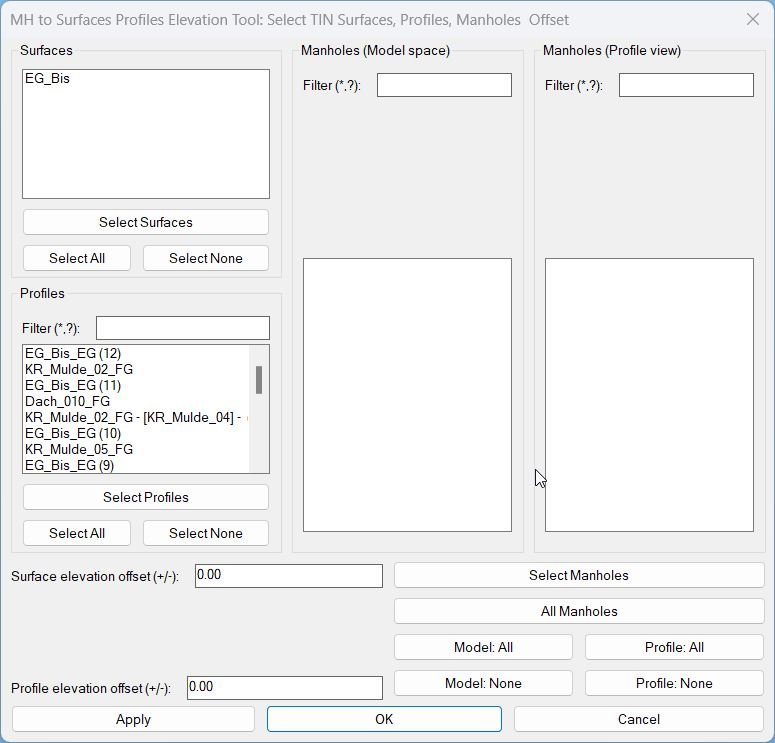
→ Opens the dialog to choose TIN Surfaces, Profiles, and Manholes (model & profile view) and apply elevation offsets.
Description:
Global state & lists:
• Objects:
–
Command flow: • On start, it scans the drawing and builds: – All
*MH-surfObjs* – TIN surface VLA objects.
– *MH-profObjs*, *MH-profNames* – profile objects + display names.
– *MH-strModelObjs*, *MH-strModelLabels* – model-space manholes + labels.
– *MH-strProfileObjs*, *MH-strProfileLabels* – profile-view manholes (mapped to model structures) + labels.
• Selections (indices in the above lists):
– *MH-surfSelectedIdxs* – checked surfaces.
– *MH-profSelectedIdxs* – checked profiles.
– *MH-strModelSelectedIdxs* – checked model manholes.
– *MH-strProfileSelectedIdxs* – checked profile manholes.
• Offsets:
– *MH-surfOffset* – ΔZ added when using surfaces.
– *MH-profOffset* – ΔZ added when using profiles.
• Filters (wildcard text):
– *MH-profFilter* – profile filter.
– *MH-mstrFilter*, *MH-pstrFilter* – filters for model/profile manhole lists.
• Visible index maps (filtered view → original list):
– *MH-profVisibleIdxs*, *MH-mstrVisibleIdxs*, *MH-pstrVisibleIdxs* – list of original indices that are currently visible in each list_box.Command flow: • On start, it scans the drawing and builds: – All
AECC_TIN_SURFACE → surface list.
– All AECC_ALIGNMENT and their Profiles → profile lists.
• Manholes are added via “Select Manholes” (picked) or “All Manholes” (entire drawing).
• A loop keeps reopening the dialog until user cancels or presses OK, handling Apply / selection actions between dialog runs.
Helper function: (if any)
Key helper functions:
String & selection utilities
•
MH-EscapeDCL – escapes quotes for safe DCL display (replaces " with ").
• MH-ExtractDigits – collects numeric characters from a string (not used in final label, but kept as a generic helper).
• MH-MakeShortLabel – returns structure name using DisplayName if available, else Name (used as list label).
• MH-HandleInList – checks if a structure with given handle is already in a list (prevents duplicates).
• MH-FilterPattern – converts user filter text to a wildcard pattern: if no * or ?, wraps with *text*.
• MH-ParseIndexString / MH-MakeIndexString – convert between “0 1 3” and (0 1 3) for list_box selection handling.
• MH-SelectAllList – selects all indices 0..N-1 in a list_box (Select All behaviour).
Manhole list & dedup
• MH-AddStructure – adds structures either to model list or profile list, deduped by handle; also adds a label via MH-MakeShortLabel.
• MH-SelectAllStructures – after structures change, auto-selects all model and profile manholes.
• MH-BuildStructureList – merges selected model and profile structures into a unique list (by handle) so each manhole is processed once.
Selection from drawing
• MH-AddStructuresFromDrawing – lets user pick entities; collects:
– AeccDbStructure (model) → model list.
– AeccDbGraphProfileNetworkPart → resolves GetModelNetworkPart and if it’s a structure, adds to profile list.
• MH-AddAllStructures – global ssget "X", gathers all AeccDbStructure and adds to model list.
• MH-SelectSurfacesFromDrawing – user picks AECC_TIN_SURFACE; matches by handle against *MH-surfObjs* to mark indices as selected.
• MH-SelectProfilesFromDrawing – similar for AECC_PROFILE; matches by handle to *MH-profObjs* and marks the corresponding indices.
DCL & list refresh
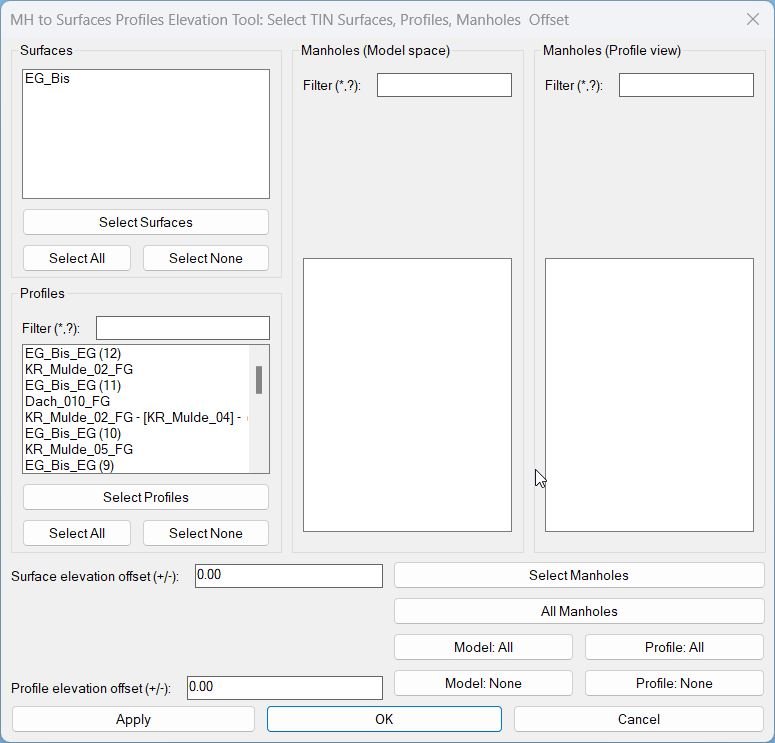
• MH-MakeMainDCL – writes the main temporary DCL with:
– Surfaces list + Select/All/None.
– Profiles list + filter + Select/All/None.
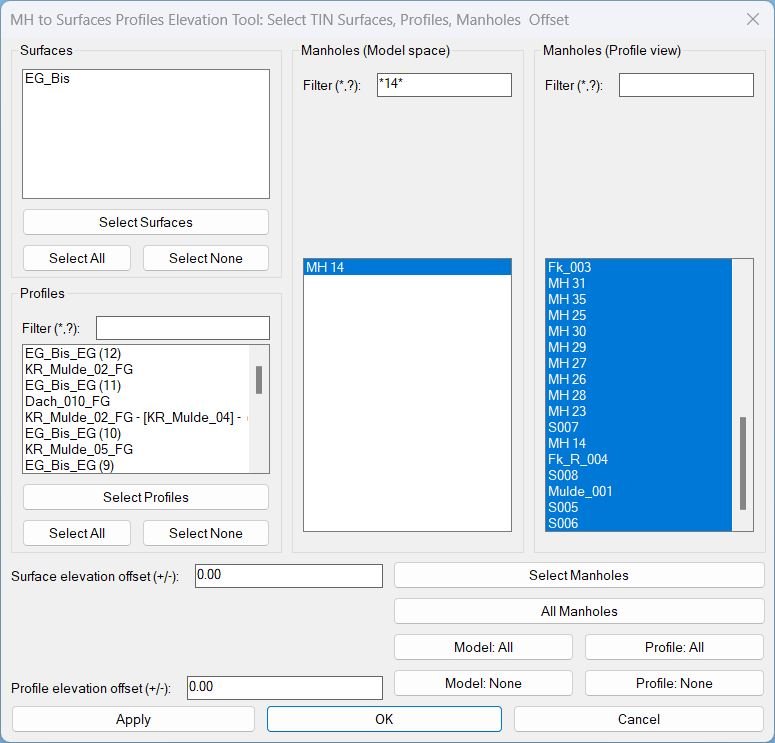
– Manholes (Model & Profile view) each with filter and list.
– Offsets and command buttons (Apply/OK/Cancel, Select Manholes/All Manholes, Model: All/None, Profile: All/None).
• MH-UpdateProfList / MH-UpdateMStrList / MH-UpdatePStrList – rebuild each list according to its filter, update visible-index arrays, and re-apply previous selections where still visible.
• MH-ReadMainSelections – reads list_box selections (using visible-index maps), offsets and filters from the dialog and stores them back into globals.
• MH-ShowMainDialog – shows the dialog, wires all action_tile callbacks and returns:
0 = Cancel, 1 = OK, 2 = Select manholes, 3 = Select surfaces, 4 = Select profiles, 5 = Apply, 6 = All manholes.
Elevation core
• MH-SetStructureElevToSources – main calculation for a single structure:
1) Gets XY of the structure from its Position point.
2) Tries each selected profile:
• Uses alignment StationOffset(x,y) to get station along alignment.
• Uses ElevationAt(sta) on the profile.
• On success → elev = profileElev + profOffset.
3) If no profile works, tries each selected surface via FindElevationAtXY(x,y) and uses elev = surfElev + surfOffset.
4) On valid elev, sets RimElevation and the Z of Position to that elevation.
5) Returns T on success, nil otherwise.
Apply wrapper
• MH-ApplyCurrent – builds lists of selected surfaces, profiles, and manholes, runs the elevation core for each selected manhole, prints per-structure messages, and ends with REGEN.
Functionalities:
Main functionalities:
1. Discover surfaces & profiles automatically
• On command start, the routine scans:
– All
AECC_TIN_SURFACE → fills the Surfaces list.
– All AECC_ALIGNMENT and their Profiles → fills Profiles list + names.
• Profiles are filterable by name using simple wildcard patterns like “*FG*”, “*EXIST*”, etc.
2. Manhole collection (model & profile views)
• “Select Manholes” lets the user pick:
– AeccDbStructure (model-space manholes).
– AeccDbGraphProfileNetworkPart whose GetModelNetworkPart is an AeccDbStructure (profile manholes).
• “All Manholes” runs a global search and adds all AeccDbStructure objects in the drawing as model-space manholes.
• Both model and profile manhole lists have:
– Wildcard filters on structure label (name).
– “Model: All/None” and “Profile: All/None” buttons for quick selection toggling.
• Newly added manholes are all selected by default (opt-out behaviour).
3. Selecting surfaces and profiles from drawing
• “Select Surfaces” – user picks TIN surfaces in the drawing; each is matched by handle and its index is checked in the Surfaces list.
• “Select Profiles” – user picks profile entities; matched by handle to the collected profile list and checked accordingly.
• Surfaces and profiles are initially unselected, so user explicitly chooses which sources to use.
4. Separate offsets for surfaces vs profiles
• Two independent offset fields:
– Surface elevation offset (e.g. to add cover or adjust to finish grade).
– Profile elevation offset (e.g. to shift to a design rim level).
• Offsets are applied only when the respective source type is used (profile first, then surface fallback).
5. Apply vs OK
• Apply:
– Reads current selections + offsets.
– Adjusts all selected manholes, prints messages, regenerates the drawing.
– Returns to the dialog for further tuning of filters, selections, offsets.
• OK:
– Same as Apply (runs MH-ApplyCurrent) but then exits the loop/command.
• Cancel:
– Exits without another apply (any previous applies remain as already committed changes).
6. Elevation source logic (per manhole)
• For each selected structure, the tool:
1) Uses the Profiles list first: project XY to selected alignment(s), get station, then profile ElevationAt.
– If successful, elevation = profile elevation + profile offset.
2) If no profile matches, it tries each selected Surface using FindElevationAtXY.
– If successful, elevation = surface elevation + surface offset.
3) On success, updates RimElevation and the Position point’s Z.
4) Otherwise prints a message that no valid elevation was found for that manhole.
Result:
Result / Usage (02):
1. Run MH2SurfacesProfilesElevationTool_00.
2. In the dialog:
– Check the TIN Surfaces you want (or use “Select Surfaces”).
– Filter and check the Profiles you need, or pick them from drawing.
– Add manholes with “Select Manholes” (model & profile views) and/or “All Manholes”, refine with filters and All/None buttons.
– Set Surface offset and Profile offset (positive or negative) as required by your design criteria.
3. Press Apply to preview results while keeping the dialog open; the command updates selected manholes and regenerates the view.
4. When satisfied, press OK to apply once more (if needed) and close the tool.
Final outcome: all selected manholes are adjusted so their rim (and position Z) follows the chosen Profiles (preferred) or TIN Surfaces (fallback), with independent profile/surface offsets, managed via a scrollable filterable UI tuned for large networks.
Final outcome: all selected manholes are adjusted so their rim (and position Z) follows the chosen Profiles (preferred) or TIN Surfaces (fallback), with independent profile/surface offsets, managed via a scrollable filterable UI tuned for large networks.
Images, animations etc.
Additional info:
Based on / Source code:
Open Website
Share this page:
Subscribe
Login
0 Comments
Oldest