
Short description
Purpose: Offset curves inward or outward and assign the results to a selected layer Supported geometry: *POLYLINE, ARC, CIRCLE, ELLIPSE, SPLINE (planar only) Session memory: Remembers last offset distance, last chosen layer, and last direction for faster repetitive usage
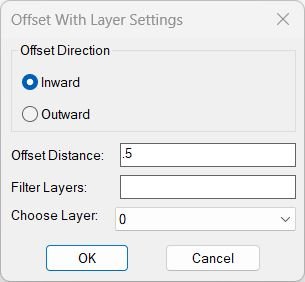
Command:
Command name: OffsetAndLayer Run method: Type OffsetAndLayer and press Enter Dialog controls: • Offset Direction — Inward or Outward • Offset Distance — numeric input parsed using distof • Filter Layers — wildcard text filter • Choose Layer — popup list populated from filtered layers Cancel behaviour: If dialog is canceled, no offset is performed and the routine ends immediately
Description:
This routine displays a dialog where the user picks a direction (In/Out), sets the offset distance, filters and selects a target layer, and then applies the offset operation to selected planar curves. It offsets each entity one by one and checks the resulting area to confirm whether the offset went inward or outward. If the offset direction is wrong, it deletes the result and automatically re-runs the offset with the reversed sign. After a valid offset is created, the new curve is placed on the selected layer. Objects that cannot be offset (e.g., too small) are counted and reported after processing.
Helper function: (if any)
• *error* — Handles unexpected errors, prints messages, and closes the undo mark • get-all-layers — Collects all user layers (excluding xref layers) and sorts them alphabetically • update-layer-list — Filters layer names using wildcard matching and repopulates the popup list • DCL generator — Creates a temporary DCL file defining the dialog UI with direction radios, edit boxes, and popup list • Environment storage — Saves OFFSETVAL, OFFSETLAYER, and OFFSETDIR for future sessions • Offset attempt logic — Tries offset, compares areas, deletes incorrect output, and retries with reversed sign when needed
Functionalities:
• Dialog-driven offset — Combines direction, distance, and layer control in one interface • Distance parsing — Converts the distance input from text to a numeric value using distof • Layer filtering — Allows narrowing down layer selection using wildcard text input • Planarity check — Only offsets 2D planar entities and skips 3D polylines or non-planar objects • Area-based direction check — Determines if offset is Inward or Outward by comparing the new area with the original • Automatic direction correction — Deletes and recreates the offset if wrong direction was applied • Layer assignment — Puts every created offset curve onto the selected layer • Failure counting — Tracks objects too small to offset inward and reports the number • Undo-safe execution — Encloses all operations within a single undo group • Temporary file handling — Deletes the temporary DCL file after the dialog closes
Result:
• Geometric result New offset curves are created for each valid planar object based on the chosen inward or outward offset • Layer result Every newly created offset entity is placed on the selected layer while the originals remain unchanged • Direction verification If the resulting area contradicts the chosen direction, the offset is reversed and recreated correctly • Failure report Objects that cannot be offset (typically too small for inward offset) are counted and reported to the user • Undo safety All operations are bracketed inside a single undo mark so the entire offset procedure can be undone at once
Images, animations etc.
Log in to download.
Log in
Log in
XAML code:
<ResourceDictionary
xmlns="http://schemas.microsoft.com/winfx/2006/xaml/presentation"
xmlns:x="http://schemas.microsoft.com/winfx/2006/xaml"
xmlns:src="clr-namespace:Autodesk.Windows;assembly=AdWindows">
<src:RibbonToolTip x:Key="OffsetAndLayer">
<src:RibbonToolTip.ExpandedContent>
<StackPanel>
<TextBlock Background="AntiqueWhite" TextAlignment="Left">
<Bold>Function Syntax: OffsetAndLayer</Bold>
<LineBreak/>
<Bold>Version: 1 Date: 05.08.2025</Bold>
<LineBreak/>
<LineBreak/>
<Hyperlink>N/A</Hyperlink>
<LineBreak/>
<Bold>Description</Bold><LineBreak/>
This routine defines a command <Run Foreground="Red">OffsetAndLayer</Run> that offsets selected planar curve objects by a user-specified distance, forces the offset result to the user-chosen direction (<Run Foreground="DarkRed">Inward</Run> or <Run Foreground="DarkRed">Outward</Run>), and places the newly created offset entity on a user-selected layer. It uses a runtime-generated DCL dialog for direction/distance/layer selection and stores the last used values in environment variables for reuse.<LineBreak/>
<LineBreak/>
<Bold>User workflow</Bold><LineBreak/>
1) Run <Run Foreground="Red">OffsetAndLayer</Run>.<LineBreak/>
2) A dialog appears to set:<LineBreak/>
- <Run Foreground="DarkRed">Offset Direction</Run>: Inward / Outward (radio buttons).<LineBreak/>
- <Run Foreground="DarkRed">Offset Distance</Run> (string parsed by <Run Foreground="DarkRed">distof</Run>).<LineBreak/>
- <Run Foreground="DarkRed">Layer filter</Run> (text filter).<LineBreak/>
- <Run Foreground="DarkRed">Layer list</Run> (popup of matching non-xref layers).<LineBreak/>
3) After OK, you select objects to offset using a selection set limited to curve types.<LineBreak/>
4) Each selected object is offset; the newly created offset entity is moved to the chosen layer.<LineBreak/>
5) One UNDO mark is started at the beginning and ended at completion, so the entire command should undo as a single step (subject to how internal command calls behave in your environment).<LineBreak/>
<LineBreak/>
<Bold>Supported selection types</Bold><LineBreak/>
The selection filter is:<LineBreak/>
<Run Foreground="DarkRed">((0 . "*POLYLINE,ARC,CIRCLE,ELLIPSE,SPLINE"))</Run><LineBreak/>
Meaning it targets:<LineBreak/>
- LWPOLYLINE / POLYLINE (and other “*POLYLINE” types),<LineBreak/>
- ARC, CIRCLE, ELLIPSE, SPLINE.<LineBreak/>
Additionally it explicitly skips 3D polylines by testing for the subclass marker:<LineBreak/>
- Skips if <Run Foreground="DarkRed">(100 . "AcDb3dPolyline")</Run> is found in <Run Foreground="DarkRed">(entget ent)</Run>.<LineBreak/>
It also requires the curve be planar via <Run Foreground="DarkRed">(vlax-curve-isPlanar ent)</Run>.<LineBreak/>
<LineBreak/>
<Bold>Dialog (DCL) behavior</Bold><LineBreak/>
The DCL file is written to a temporary file at runtime and deleted after use. The dialog contains:<LineBreak/>
- A boxed radio column for direction: “Inward” and “Outward”.<LineBreak/>
- An edit box for offset distance (<Run Foreground="DarkRed">offset</Run>).<LineBreak/>
- An edit box for layer filtering (<Run Foreground="DarkRed">filter</Run>).<LineBreak/>
- A popup list of layers (<Run Foreground="DarkRed">layerlist</Run>).<LineBreak/>
- OK/Cancel buttons (via <Run Foreground="DarkRed">ok_cancel;</Run>).<LineBreak/>
Layer list population:<LineBreak/>
- Layers are collected from the drawing excluding xref-dependent names containing <Run Foreground="DarkRed">"|"</Run>.<LineBreak/>
- The filter edit box applies a wildcard match <Run Foreground="DarkRed">*filter*</Run> (case-insensitive).<LineBreak/>
- The popup is repopulated on each filter change.<LineBreak/>
<LineBreak/>
<Bold>Persistence (last used settings)</Bold><LineBreak/>
The routine stores and restores its settings using environment variables:<LineBreak/>
- <Run Foreground="DarkRed">OFFSETVAL</Run> : last offset distance (string). Default is "0.20" if missing.<LineBreak/>
- <Run Foreground="DarkRed">OFFSETLAYER</Run> : last chosen target layer (string).<LineBreak/>
- <Run Foreground="DarkRed">OFFSETDIR</Run> : direction flag: "0" = Inward, "1" = Outward. Default is "0".<LineBreak/>
On dialog load, it attempts to preselect the last layer by locating it in the currently matched layer list.<LineBreak/>
<LineBreak/>
<Bold>Offset-direction enforcement logic</Bold><LineBreak/>
The routine offsets using COM (<Run Foreground="DarkRed">vla-offset</Run>) and then verifies whether the resulting entity went the requested direction by comparing areas.<LineBreak/>
<LineBreak/>
For each selected entity:<LineBreak/>
1) It computes the original area:<LineBreak/>
- <Run Foreground="DarkRed">(setq oarea (vla-get-Area obj))</Run><LineBreak/>
2) It attempts <Run Foreground="DarkRed">(vla-offset obj *OIOdist)</Run>.<LineBreak/>
3) It takes the newly created offset entity as <Run Foreground="DarkRed">(entlast)</Run> and compares area:<LineBreak/>
- If direction requested is <Run Foreground="DarkRed">In</Run>, it expects the new area to be <Run Foreground="DarkRed">smaller</Run> than the original.<LineBreak/>
- If direction requested is <Run Foreground="DarkRed">Out</Run>, it expects the new area to be <Run Foreground="DarkRed">larger</Run> than the original.<LineBreak/>
4) If the comparison shows the offset went the wrong way, it deletes that offset result and retries with the negative distance <Run Foreground="DarkRed">(- *OIOdist)</Run>.<LineBreak/>
5) Once the correct-direction offset is produced, it assigns the new entity to the chosen layer using <Run Foreground="DarkRed">(vla-put-layer newEnt layername)</Run>.<LineBreak/>
<LineBreak/>
This “area-based direction check” is a pragmatic way to decide inside/outside for closed planar curves. It is most reliable when the input object supports area in a meaningful way and is closed (or otherwise yields a stable area value).<LineBreak/>
<LineBreak/>
<Bold>Failure handling and “too small” tracking</Bold><LineBreak/>
- The variable <Run Foreground="DarkRed">nogo</Run> counts objects that could not be offset inward (or failed the retry path), and prints a message at the end if <Run Foreground="DarkRed">nogo > 0</Run>.<LineBreak/>
- Offsetting is wrapped with <Run Foreground="DarkRed">vl-catch-all-apply</Run> in one branch, but there are also direct <Run Foreground="DarkRed">vla-offset</Run> calls (not wrapped) in the fallback branch, which can raise errors for certain objects/distances depending on geometry constraints.<LineBreak/>
<LineBreak/>
<Bold>UNDO behavior</Bold><LineBreak/>
- The code calls <Run Foreground="DarkRed">(vla-startundomark doc)</Run> at the start and <Run Foreground="DarkRed">(vla-endundomark doc)</Run> at the end.<LineBreak/>
- The error handler also calls <Run Foreground="DarkRed">(vla-endundomark doc)</Run> to avoid leaving an open mark.<LineBreak/>
- Note: Because the routine uses entity creation and deletion and may invoke offset multiple times per entity, what constitutes “one undo step” can vary slightly by AutoCAD version and settings, but the intent is clearly a single-grouped operation for the user.<LineBreak/>
<LineBreak/>
<Bold>Key limitations and edge cases</Bold><LineBreak/>
1) <Bold>Area dependency</Bold>: The direction check depends on <Run Foreground="DarkRed">vla-get-Area</Run>. If the object does not support Area (or is open such that area is not meaningful), this can error or misclassify direction. The selection filter includes SPLINE/ELLIPSE/ARC, which may or may not have a stable Area interpretation depending on closure and object type.<LineBreak/>
2) <Bold>Open curves</Bold>: For open curves, “inward/outward” is not well-defined geometrically; the area test can be unreliable or fail. Practically, this routine is best suited to closed planar curves where offsetting produces a similar closed curve with comparable area semantics.<LineBreak/>
3) <Bold>Offset results from vla-offset</Bold>: For some entities, <Run Foreground="DarkRed">vla-offset</Run> can return multiple entities or produce results not captured by <Run Foreground="DarkRed">(entlast)</Run> the way you expect, especially in more complex cases. Your implementation assumes one new entity per offset attempt.<LineBreak/>
4) <Bold>Layer list refresh</Bold>: When the filter changes, the popup resets selection to index 0. If the user previously had a different layer selected, that selection is not preserved across filter edits unless you add logic to retain it when present in <Run Foreground="DarkRed">matched_layers</Run>.<LineBreak/>
5) <Bold>Dialog Cancel / exit paths</Bold>: The routine uses <Run Foreground="DarkRed">(exit)</Run> in several places. In AutoLISP, <Run Foreground="DarkRed">exit</Run> can terminate the calling context abruptly; if you want safer behavior inside commands, returning cleanly (with <Run Foreground="DarkRed">(princ)</Run>) is usually preferred.<LineBreak/>
<LineBreak/>
<Bold>Summary</Bold><LineBreak/>
<Run Foreground="Red">OffsetAndLayer</Run> is a dialog-driven offset utility that (a) remembers last distance/layer/direction via environment variables, (b) offsets planar curve entities via COM, (c) uses an area comparison to force “Inward” vs “Outward” behavior, and (d) assigns the newly created offset entity to a user-selected layer. It is most dependable on closed planar curves where Area is well-defined and stable.<LineBreak/>
</TextBlock>
<Grid>
<Image Source="PNG" Stretch="Uniform"/>
</Grid>
<Grid>
<MediaElement
Source="GIF"
Stretch="Uniform"
Visibility="Visible"/>
</Grid>
</StackPanel>
</src:RibbonToolTip.ExpandedContent>
</src:RibbonToolTip>
</ResourceDictionary>
Additional info:
Learn more:
Open Website
Share this page:
Subscribe
Login
0 Comments
Oldest
Tags: 🏷️ Autocad Lisps, 🏷️ Polyline menu
Tags: 🏷️ Autocad Lisps, 🏷️ Polyline menu