
Short description
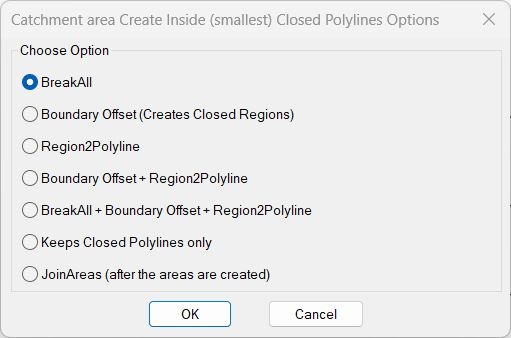
🧩 InteriorPolylinesArea is a DCL catchment area and closed polyline generation suite combining seven boundary cleanup and area creation workflows.
🎛️ The BR2P launcher can run BreakAll Boundary Offset Region2Polyline combined sequences closed polyline cleanup or JoinAreas.
🗺️ The toolset is intended for creating the smallest useful closed areas from intersecting planar curve networks.
Command:
Main launcher: BR2P
Break intersections: BreakAll
Boundary Offset: boffset
Region to Polyline: Region2Polyline
Delete open lines and polylines: DEL_OPEN_PL
Union areas: JoinAreas
Description:
🎛️ BR2P remembers the last selected radio option during the AutoCAD session.
✂️ BreakAll breaks selected LINE ARC SPLINE LWPOLYLINE POLYLINE CIRCLE and ELLIPSE geometry at intersections.
📐 Boundary Offset creates closed region style boundary results from selected planar path geometry.
🔄 Region2Polyline converts region boundaries into lightweight polyline geometry.
🧩 Combined options can run Boundary Offset plus Region2Polyline or BreakAll plus Boundary Offset plus Region2Polyline.
🧹 Keeps Closed Polylines only deletes LINE entities and open polyline geometry from a selected window while retaining closed polylines.
🔗 JoinAreas closes selected lightweight polylines converts them to regions performs ACUNION and rebuilds the result as joined polyline geometry.
Helper function: (if any)
GetBoundingBox and spline bounding box helpers support the boundary offset workflow.
Region2Polyline explodes region boundaries and creates closed lightweight polylines.
JoinAreas uses AddRegion ACUNION explode and PEDIT Join.
DEL_OPEN_PL tests vlax-curve-isClosed before deleting polyline geometry.
Functionalities:
✅ Seven option DCL launcher – centralizes the complete area creation workflow.
✅ BreakAll – breaks selected curve objects at mutual intersections.
✅ Boundary Offset – creates closed region based boundaries.
✅ Region2Polyline – converts region boundaries back to polylines.
✅ Combined boundary workflow – runs Boundary Offset followed by Region2Polyline.
✅ Combined full workflow – runs BreakAll Boundary Offset and Region2Polyline in sequence.
✅ Closed polyline cleanup – removes lines and open polyline geometry while retaining closed polylines.
✅ JoinAreas – unions closed polyline areas and rebuilds joined boundaries.
✅ Session option memory – remembers the last selected BR2P radio option.
Result:
🎯 The result can be broken curve networks closed boundary regions lightweight polylines cleaned closed areas or a unioned area outline depending on the selected option.
🗺️ The suite is suited to catchment parcel and enclosed area preprocessing.
Images, animations etc.
XAML code:
<ResourceDictionary
xmlns="http://schemas.microsoft.com/winfx/2006/xaml/presentation"
xmlns:x="http://schemas.microsoft.com/winfx/2006/xaml"
xmlns:src="clr-namespace:Autodesk.Windows;assembly=AdWindows">

<src:RibbonToolTip x:Key="InteriorPolylinesArea">
<src:RibbonToolTip.ExpandedContent>
<StackPanel>
<TextBlock Background="AntiqueWhite" TextAlignment="Left">
<Bold>Function Syntax: BR2P / BreakAll / boffset / Region2Polyline / DEL_OPEN_PL / JoinAreas</Bold>
<LineBreak/>
<Bold>Version: 1.0 Date: 20.06.2026 6:38:59PM</Bold>
<LineBreak/>
<Bold>BreakAll:</Bold>
<LineBreak/>
<Hyperlink>AI+http://www.theswamp.org/index.php?topic=10370.0</Hyperlink>
<LineBreak/>

<Bold><Run Foreground="DodgerBlue">Description</Run></Bold><LineBreak/>
<Run Foreground="White">🧩 InteriorPolylinesArea is a DCL catchment area and closed polyline generation suite combining seven boundary cleanup and area creation workflows.</Run><LineBreak/>
<Run Foreground="White">🎛️ The BR2P launcher can run BreakAll Boundary Offset Region2Polyline combined sequences closed polyline cleanup or JoinAreas.</Run><LineBreak/>
<Run Foreground="White">🗺️ The toolset is intended for creating the smallest useful closed areas from intersecting planar curve networks.</Run><LineBreak/>
<LineBreak/>
<Bold><Run Foreground="DodgerBlue">Function Syntax</Run></Bold><LineBreak/>
<Run Foreground="White">Main launcher: </Run><Bold><Run Foreground="Orange">BR2P</Run></Bold><LineBreak/>
<Run Foreground="White">Break intersections: </Run><Bold><Run Foreground="Orange">BreakAll</Run></Bold><LineBreak/>
<Run Foreground="White">Boundary Offset: </Run><Bold><Run Foreground="Orange">boffset</Run></Bold><LineBreak/>
<Run Foreground="White">Region to Polyline: </Run><Bold><Run Foreground="Orange">Region2Polyline</Run></Bold><LineBreak/>
<Run Foreground="White">Delete open lines and polylines: </Run><Bold><Run Foreground="Orange">DEL_OPEN_PL</Run></Bold><LineBreak/>
<Run Foreground="White">Union areas: </Run><Bold><Run Foreground="Orange">JoinAreas</Run></Bold><LineBreak/>
<LineBreak/>
<Bold><Run Foreground="DodgerBlue">SEO Optimized Overview</Run></Bold><LineBreak/>
<Run Foreground="White">🎛️ BR2P remembers the last selected radio option during the AutoCAD session.</Run><LineBreak/>
<Run Foreground="White">✂️ BreakAll breaks selected LINE ARC SPLINE LWPOLYLINE POLYLINE CIRCLE and ELLIPSE geometry at intersections.</Run><LineBreak/>
<Run Foreground="White">📐 Boundary Offset creates closed region style boundary results from selected planar path geometry.</Run><LineBreak/>
<Run Foreground="White">🔄 Region2Polyline converts region boundaries into lightweight polyline geometry.</Run><LineBreak/>
<Run Foreground="White">🧩 Combined options can run Boundary Offset plus Region2Polyline or BreakAll plus Boundary Offset plus Region2Polyline.</Run><LineBreak/>
<Run Foreground="White">🧹 Keeps Closed Polylines only deletes LINE entities and open polyline geometry from a selected window while retaining closed polylines.</Run><LineBreak/>
<Run Foreground="White">🔗 JoinAreas closes selected lightweight polylines converts them to regions performs ACUNION and rebuilds the result as joined polyline geometry.</Run><LineBreak/>
<LineBreak/>
<Bold><Run Foreground="LimeGreen">Primary Workflow</Run></Bold><LineBreak/>
<Run Foreground="White">• Run BR2P.</Run><LineBreak/>
<Run Foreground="White">• Choose one of the seven catchment area processing options.</Run><LineBreak/>
<Run Foreground="White">• Select the planar curve or area geometry requested by the selected module.</Run><LineBreak/>
<Run Foreground="White">• Enter offset or boundary information when required.</Run><LineBreak/>
<Run Foreground="White">• The selected module creates or cleans closed area geometry.</Run><LineBreak/>
<Run Foreground="White">• Use JoinAreas after area creation when several closed areas must be unioned.</Run><LineBreak/>
<LineBreak/>
<Bold><Run Foreground="LimeGreen">Functionalities</Run></Bold><LineBreak/>
<Run Foreground="White">✅ </Run><Bold><Run Foreground="LimeGreen">Seven option DCL launcher</Run></Bold><Run Foreground="White"> - centralizes the complete area creation workflow.</Run><LineBreak/>
<Run Foreground="White">✅ </Run><Bold><Run Foreground="LimeGreen">BreakAll</Run></Bold><Run Foreground="White"> - breaks selected curve objects at mutual intersections.</Run><LineBreak/>
<Run Foreground="White">✅ </Run><Bold><Run Foreground="LimeGreen">Boundary Offset</Run></Bold><Run Foreground="White"> - creates closed region based boundaries.</Run><LineBreak/>
<Run Foreground="White">✅ </Run><Bold><Run Foreground="LimeGreen">Region2Polyline</Run></Bold><Run Foreground="White"> - converts region boundaries back to polylines.</Run><LineBreak/>
<Run Foreground="White">✅ </Run><Bold><Run Foreground="LimeGreen">Combined boundary workflow</Run></Bold><Run Foreground="White"> - runs Boundary Offset followed by Region2Polyline.</Run><LineBreak/>
<Run Foreground="White">✅ </Run><Bold><Run Foreground="LimeGreen">Combined full workflow</Run></Bold><Run Foreground="White"> - runs BreakAll Boundary Offset and Region2Polyline in sequence.</Run><LineBreak/>
<Run Foreground="White">✅ </Run><Bold><Run Foreground="LimeGreen">Closed polyline cleanup</Run></Bold><Run Foreground="White"> - removes lines and open polyline geometry while retaining closed polylines.</Run><LineBreak/>
<Run Foreground="White">✅ </Run><Bold><Run Foreground="LimeGreen">JoinAreas</Run></Bold><Run Foreground="White"> - unions closed polyline areas and rebuilds joined boundaries.</Run><LineBreak/>
<Run Foreground="White">✅ </Run><Bold><Run Foreground="LimeGreen">Session option memory</Run></Bold><Run Foreground="White"> - remembers the last selected BR2P radio option.</Run><LineBreak/>
<LineBreak/>
<Bold><Run Foreground="DodgerBlue">Important Commands and Aspects</Run></Bold><LineBreak/>
<Run Foreground="White">🧩 GetBoundingBox and spline bounding box helpers support the boundary offset workflow.</Run><LineBreak/>
<Run Foreground="White">🧩 Region2Polyline explodes region boundaries and creates closed lightweight polylines.</Run><LineBreak/>
<Run Foreground="White">🧩 JoinAreas uses AddRegion ACUNION explode and PEDIT Join.</Run><LineBreak/>
<Run Foreground="White">🧩 DEL_OPEN_PL tests vlax-curve-isClosed before deleting polyline geometry.</Run><LineBreak/>
<LineBreak/>
<Bold><Run Foreground="DodgerBlue">Result</Run></Bold><LineBreak/>
<Run Foreground="White">🎯 The result can be broken curve networks closed boundary regions lightweight polylines cleaned closed areas or a unioned area outline depending on the selected option.</Run><LineBreak/>
<Run Foreground="White">🗺️ The suite is suited to catchment parcel and enclosed area preprocessing.</Run><LineBreak/>
<LineBreak/>
<Bold><Run Foreground="DarkRed">Important Notes</Run></Bold><LineBreak/>
<Run Foreground="White">⚠️ </Run><Bold><Run Foreground="DarkRed">The DCL title identifies the workflow as Catchment area Create Inside smallest Closed Polylines Options.</Run></Bold><LineBreak/>
<Run Foreground="White">⚠️ </Run><Bold><Run Foreground="DarkRed">Different modules have different supported curve types and planarity requirements.</Run></Bold><LineBreak/>
<Run Foreground="White">⚠️ </Run><Bold><Run Foreground="DarkRed">JoinAreas modifies selected closed lightweight polylines by converting and unioning their regions.</Run></Bold><LineBreak/>
<LineBreak/>
<Bold><Run Foreground="Yellow">SEO Keywords</Run></Bold><LineBreak/>
<Run Foreground="Yellow">🏷️ AutoCAD, 🏷️ Civil 3D, 🏷️ AutoLISP, 🏷️ InteriorPolylinesArea, 🏷️ BR2P, 🏷️ BreakAll, 🏷️ Boundary Offset, 🏷️ Region2Polyline, 🏷️ JoinAreas, 🏷️ Catchment area, 🏷️ Closed polylines, 🏷️ REGION, 🏷️ ACUNION</Run><LineBreak/>


</TextBlock>

<Grid>
<Image Source="Image_000.jpg" Stretch="Uniform"/>
</Grid>

</StackPanel>
</src:RibbonToolTip.ExpandedContent>
</src:RibbonToolTip>
</ResourceDictionary>