
Short description
- ChangeLayerToCurrent — DCL filtered layer chooser + optional “pick layer from drawing”, then move selected objects to that layer
- Filters layer names (non-Xref only) using a substring-style match and remembers last filter + last chosen layer
- After choosing a layer, prompts for a multi-selection of objects and runs CHPROP to change their layer
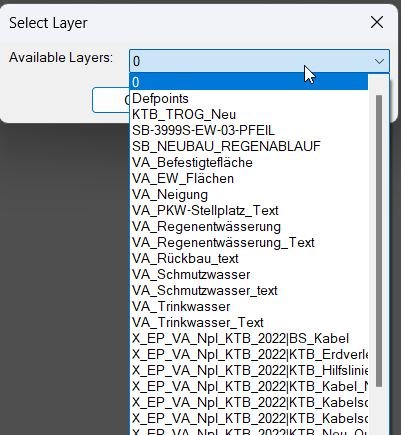
Command:
- ChangeLayerToCurrent
Description:
- Reads the last used layer and last filter from environment variables ChangeLayer_LastLayer and ChangeLayer_LastFilter to initialize the dialog state.
- Builds a sorted list of all drawing layers excluding Xref layers (names matching *|*).
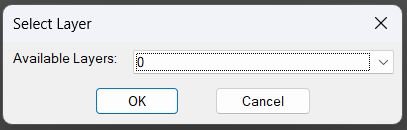
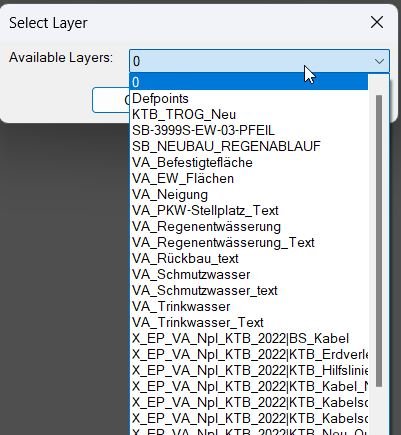
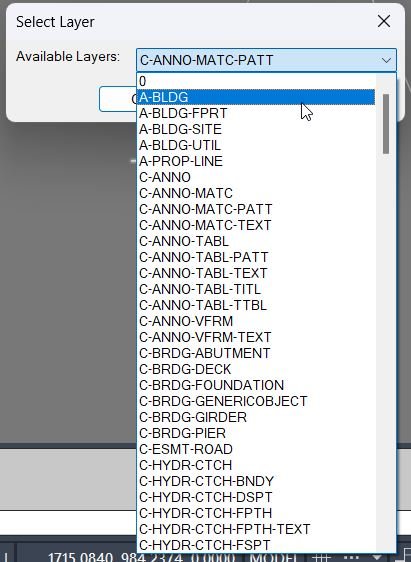
- Creates a temporary DCL dialog with a filter edit box, a popup list of matching layers, and a button to pick a layer from an object in the drawing.
- When the user clicks OK, stores the chosen layer and filter back to the environment, then proceeds to object selection and changes those objects to the chosen layer via CHPROP.
- If the user clicks Pick Layer From Drawing, the routine prompts for an object, captures its layer, and reopens the dialog with that layer preselected (while retaining the last filter text).
Helper function: (if any)
- • get-all-layers — collects all non-Xref layer names from the document’s Layers collection and sorts them alphabetically.
- • update-layer-list — filters the layer list using a case-insensitive “contains” match (*filter*), repopulates the popup list, and sets a preselection (picked layer, else last layer, else first item).
- • Environment persistence — uses setenv / getenv to remember last filter and last selected layer between runs.
Functionalities:
- • Layer scope — enumerates layers from the active document and excludes Xref layers by rejecting names matching *|*.
- • Temporary DCL generation — writes a dialog definition to a temp .dcl file and loads it each loop iteration.
- • Filter behavior — filter text is applied as a substring match using wcmatch against *filter* (case-insensitive); empty filter shows all layers.
- • Preselection rules — if a picked layer exists in the filtered list, it is selected; else if the last used layer exists, it is selected; otherwise the first entry is selected.
- • OK handler — captures current filter and selected popup index, resolves the layer name, saves ChangeLayer_LastFilter and ChangeLayer_LastLayer, then closes dialog with result 1.
- • Pick-from-drawing handler — closes dialog with result 2, prompts for an entity via entsel, reads group code 8 (layer), validates it exists in the non-Xref layer list, then reopens the dialog.
- • Final object selection — after OK, prompts for a multi-selection using ssget (no single-select flags), allowing window/crossing and add/remove selection gestures.
- • Apply layer change — runs _.CHPROP on the selected set and sets property LA to the chosen layer name.
- • Cleanup — unloads the dialog each loop and deletes the temporary DCL file at the end of the routine.
Result:
- The user chooses a target layer from a filtered popup list (optionally seeded by picking an object’s layer), and the last filter/selection are remembered for the next run.
- After confirming the layer, the user selects multiple objects and those entities are moved to the chosen layer using CHPROP.
- If the user cancels the dialog or selects no objects, no changes are made and the routine prints a cancel/no-selection message.
Images, animations etc.
Log in to download.
Log in
Log in
XAML code:
<ResourceDictionary
xmlns="http://schemas.microsoft.com/winfx/2006/xaml/presentation"
xmlns:x="http://schemas.microsoft.com/winfx/2006/xaml"
xmlns:src="clr-namespace:Autodesk.Windows;assembly=AdWindows">

<src:RibbonToolTip x:Key="ChangeLayerToSelected">
<src:RibbonToolTip.ExpandedContent>
<StackPanel>
<TextBlock Background="AntiqueWhite" TextAlignment="Left">
<Bold>Function Syntax: ChangeLayerToSelected</Bold>
<LineBreak/>
<Bold>Version: 1 Date: 28.10.2025</Bold>
<LineBreak/>
<LineBreak/>
<Hyperlink>N/A</Hyperlink>
<LineBreak/>
<Bold>Command name</Bold><LineBreak/>
<Run>ChangeLayerToCurrent (type </Run><Run Foreground="DarkRed">ChangeLayerToCurrent</Run><Run> at the AutoCAD command line)</Run><LineBreak/>
<LineBreak/>

<Bold>Description</Bold><LineBreak/>
<Run>This routine lets the user choose a target layer using a </Run><Run Foreground="DarkRed">filtered dialog</Run><Run> or by </Run><Run Foreground="DarkRed">picking an object in the drawing</Run><Run> to capture its layer, and then moves a user-selected set of objects to that chosen layer using CHPROP.</Run><LineBreak/>
<LineBreak/>

<Bold>User interaction</Bold><LineBreak/>
<Run>• The routine opens a dialog titled </Run><Run Foreground="DarkRed">Select Layer (Filtered)</Run><Run>.</Run><LineBreak/>
<Run>• The dialog provides:</Run><LineBreak/>
<Run>  • Edit box: </Run><Run Foreground="DarkRed">Filter by Name</Run><Run> (live filters layer list).</Run><LineBreak/>
<Run>  • Dropdown: </Run><Run Foreground="DarkRed">Matching Layers</Run><Run> (choose target layer).</Run><LineBreak/>
<Run>  • Button: </Run><Run Foreground="DarkRed">Pick Layer From Drawing</Run><Run> (select an entity to use its layer).</Run><LineBreak/>
<Run>  • OK and Cancel buttons.</Run><LineBreak/>
<LineBreak/>
<Run>• After a layer is confirmed, the user is prompted to </Run><Run Foreground="DarkRed">select objects</Run><Run> to move, with multi-selection enabled.</Run><LineBreak/>
<LineBreak/>

<Bold>High-level workflow</Bold><LineBreak/>
<Run>• Loads the last used target layer from </Run><Run Foreground="DarkRed">ChangeLayer_LastLayer</Run><Run>.</Run><LineBreak/>
<Run>• Loads the last used filter text from </Run><Run Foreground="DarkRed">ChangeLayer_LastFilter</Run><Run>.</Run><LineBreak/>
<Run>• Builds a list of all non-xref layers in the drawing by iterating the Layers collection and excluding names matching </Run><Run Foreground="DarkRed">*|*</Run><Run>.</Run><LineBreak/>
<Run>• Writes a temporary DCL file and enters a dialog loop.</Run><LineBreak/>
<Run>• In the dialog, it maintains a live list of matching layers based on the current filter string.</Run><LineBreak/>
<Run>• Supports an alternate selection path where the user clicks Pick Layer From Drawing and then selects an entity to capture its layer.</Run><LineBreak/>
<Run>• Persists the chosen layer and the current filter back to environment variables for next time.</Run><LineBreak/>
<Run>• After the dialog completes with OK, it prompts for object selection and moves those objects to the chosen layer using CHPROP.</Run><LineBreak/>
<LineBreak/>

<Bold>Functionalities</Bold><LineBreak/>
<Run>• Displays a layer-selection dialog with a live name filter.</Run><LineBreak/>
<Run>• Excludes xref layers from the selectable list by pattern </Run><Run Foreground="DarkRed">*|*</Run><Run>.</Run><LineBreak/>
<Run>• Remembers the </Run><Run Foreground="DarkRed">last filter</Run><Run> and </Run><Run Foreground="DarkRed">last selected layer</Run><Run> across runs using getenv and setenv.</Run><LineBreak/>
<Run>• Allows choosing a target layer by:</Run><LineBreak/>
<Run>  • Selecting it from the filtered dropdown list.</Run><LineBreak/>
<Run>  • Picking an object in the drawing and using that object layer.</Run><LineBreak/>
<Run>• Moves selected entities to the chosen layer using CHPROP with the LA option.</Run><LineBreak/>
<Run>• Supports multi-selection of entities to move (window, crossing, shift-add and remove, etc.).</Run><LineBreak/>
<LineBreak/>

<Bold>Dialog logic details</Bold><LineBreak/>
<Run>• The dialog is rebuilt in a loop to allow the Pick Layer From Drawing workflow without losing state.</Run><LineBreak/>
<Run>• The layer list is filtered using wildcard matching:</Run><LineBreak/>
<Run>  • It compares names using </Run><Run Foreground="DarkRed">strcase</Run><Run> and </Run><Run Foreground="DarkRed">wcmatch</Run><Run> against pattern *filter*.</Run><LineBreak/>
<Run>• Default dropdown selection priority:</Run><LineBreak/>
<Run>  • Picked layer, if set and present in the filtered list.</Run><LineBreak/>
<Run>  • Last used layer, if present in the filtered list.</Run><LineBreak/>
<Run>  • Otherwise the first entry in the filtered list.</Run><LineBreak/>
<LineBreak/>

<Bold>Important commands and calls highlighted</Bold><LineBreak/>
<Run>• <Run Foreground="DarkRed">getenv</Run> and <Run Foreground="DarkRed">setenv</Run> — stores and recalls the last layer and filter text.</Run><LineBreak/>
<Run>• <Run Foreground="DarkRed">vlax-for</Run> with Layers — enumerates all layer names from the drawing.</Run><LineBreak/>
<Run>• <Run Foreground="DarkRed">wcmatch "*|*"</Run> — filters out xref layers.</Run><LineBreak/>
<Run>• <Run Foreground="DarkRed">load_dialog</Run>, <Run Foreground="DarkRed">new_dialog</Run>, <Run Foreground="DarkRed">start_dialog</Run> — runs the temporary DCL dialog.</Run><LineBreak/>
<Run>• <Run Foreground="DarkRed">action_tile</Run> — implements live filtering and captures user decisions.</Run><LineBreak/>
<Run>• <Run Foreground="DarkRed">entsel</Run> and <Run Foreground="DarkRed">assoc 8</Run> — reads the layer of a picked entity.</Run><LineBreak/>
<Run>• <Run Foreground="DarkRed">ssget</Run> — selects the objects that will be moved to the chosen layer.</Run><LineBreak/>
<Run>• <Run Foreground="DarkRed">CHPROP</Run> with LA — moves the selected objects to the chosen layer.</Run><LineBreak/>
<LineBreak/>

<Bold>Outputs and messages</Bold><LineBreak/>
<Run>• If the dialog fails to load: prints </Run><Run Foreground="DarkRed">Unable to load dialog</Run><Run>.</Run><LineBreak/>
<Run>• If the user cancels: prints </Run><Run Foreground="DarkRed">Operation cancelled</Run><Run>.</Run><LineBreak/>
<Run>• If the user picks an object but its layer is not in the non-xref list: prints </Run><Run Foreground="DarkRed">Picked layer not found in list</Run><Run>.</Run><LineBreak/>
<Run>• If no objects are selected for the final move: prints </Run><Run Foreground="DarkRed">No objects selected</Run><Run>.</Run><LineBreak/>
<Run>• On success: prints that the entities were moved to the selected layer and echoes the layer name.</Run><LineBreak/>
<LineBreak/>

<Bold>Operational notes and limitations</Bold><LineBreak/>
<Run>• Filtering is case-insensitive due to the use of </Run><Run Foreground="DarkRed">strcase</Run><Run> on both the layer name and filter pattern.</Run><LineBreak/>
<Run>• Xref filtering is based solely on the presence of a pipe character in the name; any non-xref layer containing a pipe will be excluded.</Run><LineBreak/>
<Run>• The routine uses AutoCAD commands for property changes; command localization or command overrides could affect behavior in some environments.</Run><LineBreak/>
<Run>• The dialog is written to a temporary file and deleted afterward; if the temp folder is not writable, the dialog cannot be created.</Run><LineBreak/>


</TextBlock>

<Grid>
<Image Source="ChangeLayerToSelected_000.jpg" Stretch="Uniform"/>
</Grid>
<Grid>
<Image Source="ChangeLayerToSelected_001.jpg" Stretch="Uniform"/>
</Grid>
<Grid>
<Image Source="ChangeLayerToSelected_002.jpg" Stretch="Uniform"/>
</Grid>


<Grid>
<MediaElement
 Source="GIF"
 Stretch="Uniform"
 Visibility="Visible"/>
 </Grid>

</StackPanel>
</src:RibbonToolTip.ExpandedContent>
</src:RibbonToolTip>
</ResourceDictionary>
Additional info:
Based on / Source code:
Open Website