
Short description
🧩 MultiOffsetBothSidesWithLayer is the M_07 C# AutoCAD and Civil 3D offset project for generating structured left and right parallel geometry from selected centerline objects.
🎛️ The current project uses a modeless WinForms interface with profiles pipe counts left and right offsets extra ducts target layers closing centerline source handling live preview Apply and Undo last controls.
📦 The current source build number is 1.0.006 and the physical Visual Studio project name is shortened to MOBSWLE.
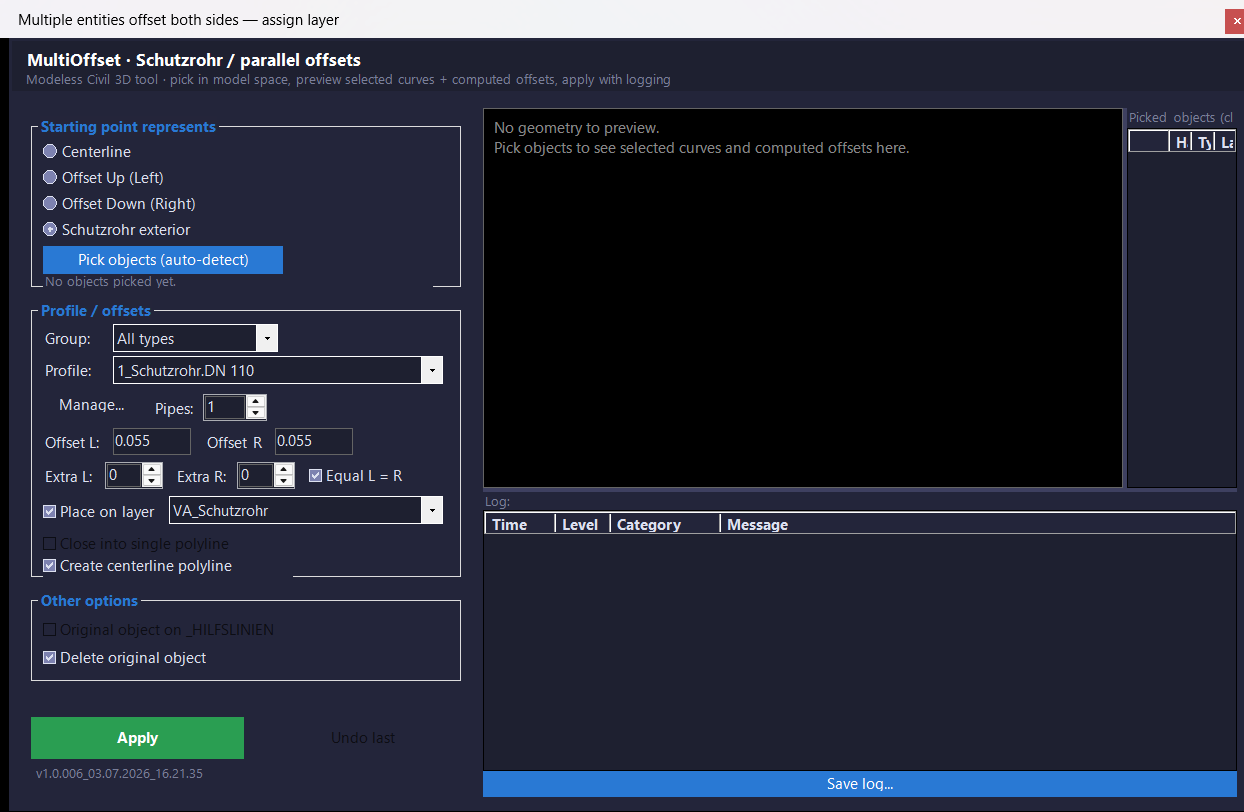
Command:
Main command: MultiOffsetBothSidesWithLayerExtra
Alias: MOBSWLE
Dock: MOBSWLEDOCK
Undock: MOBSWLEUNDOCK
Predefined profiles: OLPredefinedProfiles
Diagnostics: OLDebug
Description:
📚 The profile store contains Profile_000 Profile_003 Profile_000 Profile_003 cable channel Profile_002 and Profile_003 bundle profile groups.
🔢 Pipe Count controls the planned repeated pipe or duct boundary offsets.
↔️ Offset L and Offset R provide independent left and right distances.
➕ Extra L and Extra R add additional parallel offsets outside the main planned boundaries.
📍 Starting point represents supports Centerline Offset Up Left Offset Down Right and Profile_000 Exterior modes in the settings model.
🗂️ Place on layer assigns generated geometry to a selected target layer and LayerManager can create the layer using profile color linetype and lineweight.
🔗 Close into single polyline connects and joins the left and right result pair when applicable.
➗ Create centerline polyline builds a midpoint centerline on _HILFSLINIEN.
🧯 Profile_000 profiles can generate pipe centerline helper geometry on _HILFSLINIEN.
🗑️ Delete original object allows the picked source geometry to be erased after Apply.
👁️ Live AutoCAD transient preview uses the same OffsetPlan model as the final Apply workflow.
✅ Apply commits the generated geometry and records created entity and original source state.
↩️ Undo last erases the entities created by the latest Apply and restores source layers and erased source objects.
💾 UI preferences and profile data are persisted in XML files under the user AppData MultiOffsetBothSidesWithLayerExtra folder.
⊞ The modeless form can be docked into an AutoCAD PaletteSet and undocked back to a floating form.
Helper function: (if any)
OffsetPlan calculates pipe boundaries extras and start shift from RunSettings.
OffsetEngine generates offsets closes pairs creates centerlines and tracks changes.
OffsetRunResult stores created ids original layers and erased source state for Undo last.
ProfileStore manages built in and user saved profile configuration.
ModelSpacePreviewController manages transient preview graphics.
LayerManager creates target layers and resolves missing linetypes.
Functionalities:
✅ Profile based offsets – uses configurable Profile_000 Profile_002 and Profile_003 profile definitions.
✅ Independent left and right offsets – supports different boundary distances.
✅ Pipe count planning – creates structured repeated duct or pipe geometry.
✅ Extra ducts – adds additional left and right parallel offsets.
✅ Four start modes – interprets the picked source as centerline left edge right edge or Profile_000 exterior.
✅ Target layer assignment – creates or assigns output geometry to selected layers.
✅ Profile layer styling – supports profile color linetype and lineweight when creating layers.
✅ Linetype fallback loading – attempts acadiso.lin then acad.lin before Continuous fallback.
✅ Parallel close and join – closes one left and right pair into a single polyline when enabled.
✅ Centerline helper – creates averaged centerline geometry on _HILFSLINIEN.
✅ Profile_000 centerlines – creates pipe centerline helper offsets for Profile_000 profiles.
✅ Delete original – can erase selected source objects after generation.
✅ Live transient preview – shows planned offsets in model space before Apply.
✅ Apply – commits all planned geometry in one processing run.
✅ Undo last – restores the latest Apply through explicit entity tracking.
✅ Persistent profiles – stores profiles and group checkbox defaults in XML.
✅ Persistent UI preferences – stores window position size splitters selected profile target layer and preview zoom.
✅ Docking support – provides floating and PaletteSet hosted interface modes.
✅ Diagnostic commands – includes profile management and debug entry points.
Result:
🎯 The result is a structured set of parallel offset geometry based on the selected engineering profile and object interpretation.
📐 Depending on options the output can include duct boundaries extra offsets one closed outer polyline helper centerlines and target layer assignment.
Images, animations etc.


XAML code:
<ResourceDictionary
xmlns="http://schemas.microsoft.com/winfx/2006/xaml/presentation"
xmlns:x="http://schemas.microsoft.com/winfx/2006/xaml"
xmlns:src="clr-namespace:Autodesk.Windows;assembly=AdWindows">

<src:RibbonToolTip x:Key="MultiOffsetBothSidesWithLayer">
<src:RibbonToolTip.ExpandedContent>
<StackPanel>
<TextBlock Background="AntiqueWhite" TextAlignment="Left">
<Bold>Function Syntax: MultiOffsetBothSidesWithLayerExtra / MOBSWLE / MOBSWLEDOCK / MOBSWLEUNDOCK / OLPredefinedProfiles / OLDebug</Bold>
<LineBreak/>
<Bold>Version: 1.0 Date: 04.08.2026 1:05:15PM</Bold>
<LineBreak/>
<Hyperlink>AI</Hyperlink>
<LineBreak/>

<Bold><Run Foreground="DodgerBlue">Description</Run></Bold><LineBreak/>
<Run Foreground="White">🧩 MultiOffsetBothSidesWithLayer is the M_07 C# AutoCAD and Civil 3D offset project for generating structured left and right parallel geometry from selected centerline objects.</Run><LineBreak/>
<Run Foreground="White">🎛️ The current project uses a modeless WinForms interface with profiles pipe counts left and right offsets extra ducts target layers closing centerline source handling live preview Apply and Undo last controls.</Run><LineBreak/>
<Run Foreground="White">📦 The current source build number is 1.0.006 and the physical Visual Studio project name is shortened to MOBSWLE.</Run><LineBreak/>
<LineBreak/>
<Bold><Run Foreground="DodgerBlue">Function Syntax</Run></Bold><LineBreak/>
<Run Foreground="White">Main command: </Run><Bold><Run Foreground="Orange">MultiOffsetBothSidesWithLayerExtra</Run></Bold><LineBreak/>
<Run Foreground="White">Alias: </Run><Bold><Run Foreground="Orange">MOBSWLE</Run></Bold><LineBreak/>
<Run Foreground="White">Dock: </Run><Bold><Run Foreground="Orange">MOBSWLEDOCK</Run></Bold><LineBreak/>
<Run Foreground="White">Undock: </Run><Bold><Run Foreground="Orange">MOBSWLEUNDOCK</Run></Bold><LineBreak/>
<Run Foreground="White">Predefined profiles: </Run><Bold><Run Foreground="Orange">OLPredefinedProfiles</Run></Bold><LineBreak/>
<Run Foreground="White">Diagnostics: </Run><Bold><Run Foreground="Orange">OLDebug</Run></Bold><LineBreak/>
<LineBreak/>
<Bold><Run Foreground="DodgerBlue">SEO Optimized Overview</Run></Bold><LineBreak/>
<Run Foreground="White">📚 The profile store contains Schutzrohr DN110 Schutzrohr DN160 cable channel KK and DN bundle profile groups.</Run><LineBreak/>
<Run Foreground="White">🔢 Pipe Count controls the planned repeated pipe or duct boundary offsets.</Run><LineBreak/>
<Run Foreground="White">↔️ Offset L and Offset R provide independent left and right distances.</Run><LineBreak/>
<Run Foreground="White">➕ Extra L and Extra R add additional parallel offsets outside the main planned boundaries.</Run><LineBreak/>
<Run Foreground="White">📍 Starting point represents supports Centerline Offset Up Left Offset Down Right and Schutzrohr Exterior modes in the settings model.</Run><LineBreak/>
<Run Foreground="White">🗂️ Place on layer assigns generated geometry to a selected target layer and LayerManager can create the layer using profile color linetype and lineweight.</Run><LineBreak/>
<Run Foreground="White">🔗 Close into single polyline connects and joins the left and right result pair when applicable.</Run><LineBreak/>
<Run Foreground="White">➗ Create centerline polyline builds a midpoint centerline on _HILFSLINIEN.</Run><LineBreak/>
<Run Foreground="White">🧯 Schutzrohr profiles can generate pipe centerline helper geometry on _HILFSLINIEN.</Run><LineBreak/>
<Run Foreground="White">🗑️ Delete original object allows the picked source geometry to be erased after Apply.</Run><LineBreak/>
<Run Foreground="White">👁️ Live AutoCAD transient preview uses the same OffsetPlan model as the final Apply workflow.</Run><LineBreak/>
<Run Foreground="White">✅ Apply commits the generated geometry and records created entity and original source state.</Run><LineBreak/>
<Run Foreground="White">↩️ Undo last erases the entities created by the latest Apply and restores source layers and erased source objects.</Run><LineBreak/>
<Run Foreground="White">💾 UI preferences and profile data are persisted in XML files under the user AppData MultiOffsetBothSidesWithLayerExtra folder.</Run><LineBreak/>
<Run Foreground="White">⊞ The modeless form can be docked into an AutoCAD PaletteSet and undocked back to a floating form.</Run><LineBreak/>
<LineBreak/>
<Bold><Run Foreground="LimeGreen">Primary Workflow</Run></Bold><LineBreak/>
<Run Foreground="White">• NETLOAD the compiled MOBSWLE DLL.</Run><LineBreak/>
<Run Foreground="White">• Run MOBSWLE or MultiOffsetBothSidesWithLayerExtra.</Run><LineBreak/>
<Run Foreground="White">• Pick one or more source centerline objects.</Run><LineBreak/>
<Run Foreground="White">• Choose the profile group and profile.</Run><LineBreak/>
<Run Foreground="White">• Set pipe count Offset L Offset R and any extra left or right counts.</Run><LineBreak/>
<Run Foreground="White">• Choose starting point interpretation target layer close centerline and delete source options.</Run><LineBreak/>
<Run Foreground="White">• Review the live transient model space preview.</Run><LineBreak/>
<Run Foreground="White">• Click Apply to create the actual geometry.</Run><LineBreak/>
<Run Foreground="White">• Use Undo last when the most recent Apply must be reverted.</Run><LineBreak/>
<Run Foreground="White">• Dock or undock the modeless interface when required.</Run><LineBreak/>
<LineBreak/>
<Bold><Run Foreground="LimeGreen">Functionalities</Run></Bold><LineBreak/>
<Run Foreground="White">✅ </Run><Bold><Run Foreground="LimeGreen">Profile based offsets</Run></Bold><Run Foreground="White"> - uses configurable Schutzrohr KK and DN profile definitions.</Run><LineBreak/>
<Run Foreground="White">✅ </Run><Bold><Run Foreground="LimeGreen">Independent left and right offsets</Run></Bold><Run Foreground="White"> - supports different boundary distances.</Run><LineBreak/>
<Run Foreground="White">✅ </Run><Bold><Run Foreground="LimeGreen">Pipe count planning</Run></Bold><Run Foreground="White"> - creates structured repeated duct or pipe geometry.</Run><LineBreak/>
<Run Foreground="White">✅ </Run><Bold><Run Foreground="LimeGreen">Extra ducts</Run></Bold><Run Foreground="White"> - adds additional left and right parallel offsets.</Run><LineBreak/>
<Run Foreground="White">✅ </Run><Bold><Run Foreground="LimeGreen">Four start modes</Run></Bold><Run Foreground="White"> - interprets the picked source as centerline left edge right edge or Schutzrohr exterior.</Run><LineBreak/>
<Run Foreground="White">✅ </Run><Bold><Run Foreground="LimeGreen">Target layer assignment</Run></Bold><Run Foreground="White"> - creates or assigns output geometry to selected layers.</Run><LineBreak/>
<Run Foreground="White">✅ </Run><Bold><Run Foreground="LimeGreen">Profile layer styling</Run></Bold><Run Foreground="White"> - supports profile color linetype and lineweight when creating layers.</Run><LineBreak/>
<Run Foreground="White">✅ </Run><Bold><Run Foreground="LimeGreen">Linetype fallback loading</Run></Bold><Run Foreground="White"> - attempts acadiso.lin then acad.lin before Continuous fallback.</Run><LineBreak/>
<Run Foreground="White">✅ </Run><Bold><Run Foreground="LimeGreen">Parallel close and join</Run></Bold><Run Foreground="White"> - closes one left and right pair into a single polyline when enabled.</Run><LineBreak/>
<Run Foreground="White">✅ </Run><Bold><Run Foreground="LimeGreen">Centerline helper</Run></Bold><Run Foreground="White"> - creates averaged centerline geometry on _HILFSLINIEN.</Run><LineBreak/>
<Run Foreground="White">✅ </Run><Bold><Run Foreground="LimeGreen">Schutzrohr centerlines</Run></Bold><Run Foreground="White"> - creates pipe centerline helper offsets for Schutzrohr profiles.</Run><LineBreak/>
<Run Foreground="White">✅ </Run><Bold><Run Foreground="LimeGreen">Delete original</Run></Bold><Run Foreground="White"> - can erase selected source objects after generation.</Run><LineBreak/>
<Run Foreground="White">✅ </Run><Bold><Run Foreground="LimeGreen">Live transient preview</Run></Bold><Run Foreground="White"> - shows planned offsets in model space before Apply.</Run><LineBreak/>
<Run Foreground="White">✅ </Run><Bold><Run Foreground="LimeGreen">Apply</Run></Bold><Run Foreground="White"> - commits all planned geometry in one processing run.</Run><LineBreak/>
<Run Foreground="White">✅ </Run><Bold><Run Foreground="LimeGreen">Undo last</Run></Bold><Run Foreground="White"> - restores the latest Apply through explicit entity tracking.</Run><LineBreak/>
<Run Foreground="White">✅ </Run><Bold><Run Foreground="LimeGreen">Persistent profiles</Run></Bold><Run Foreground="White"> - stores profiles and group checkbox defaults in XML.</Run><LineBreak/>
<Run Foreground="White">✅ </Run><Bold><Run Foreground="LimeGreen">Persistent UI preferences</Run></Bold><Run Foreground="White"> - stores window position size splitters selected profile target layer and preview zoom.</Run><LineBreak/>
<Run Foreground="White">✅ </Run><Bold><Run Foreground="LimeGreen">Docking support</Run></Bold><Run Foreground="White"> - provides floating and PaletteSet hosted interface modes.</Run><LineBreak/>
<Run Foreground="White">✅ </Run><Bold><Run Foreground="LimeGreen">Diagnostic commands</Run></Bold><Run Foreground="White"> - includes profile management and debug entry points.</Run><LineBreak/>
<LineBreak/>
<Bold><Run Foreground="DodgerBlue">Important Commands and Aspects</Run></Bold><LineBreak/>
<Run Foreground="White">🧩 OffsetPlan calculates pipe boundaries extras and start shift from RunSettings.</Run><LineBreak/>
<Run Foreground="White">🧩 OffsetEngine generates offsets closes pairs creates centerlines and tracks changes.</Run><LineBreak/>
<Run Foreground="White">🧩 OffsetRunResult stores created ids original layers and erased source state for Undo last.</Run><LineBreak/>
<Run Foreground="White">🧩 ProfileStore manages built in and user saved profile configuration.</Run><LineBreak/>
<Run Foreground="White">🧩 ModelSpacePreviewController manages transient preview graphics.</Run><LineBreak/>
<Run Foreground="White">🧩 LayerManager creates target layers and resolves missing linetypes.</Run><LineBreak/>
<LineBreak/>
<Bold><Run Foreground="DodgerBlue">Result</Run></Bold><LineBreak/>
<Run Foreground="White">🎯 The result is a structured set of parallel offset geometry based on the selected engineering profile and object interpretation.</Run><LineBreak/>
<Run Foreground="White">📐 Depending on options the output can include duct boundaries extra offsets one closed outer polyline helper centerlines and target layer assignment.</Run><LineBreak/>
<LineBreak/>
<Bold><Run Foreground="DarkRed">Important Notes</Run></Bold><LineBreak/>
<Run Foreground="White">⚠️ </Run><Bold><Run Foreground="DarkRed">The user identifies M_07 as MultiOffsetBothSidesWithLayer.</Run></Bold><LineBreak/>
<Run Foreground="White">⚠️ </Run><Bold><Run Foreground="DarkRed">The current source namespace and primary long command include the Extra suffix while MOBSWLE is the short command alias.</Run></Bold><LineBreak/>
<Run Foreground="White">⚠️ </Run><Bold><Run Foreground="DarkRed">The current build number in VersionInfo.cs is 1.0.006.</Run></Bold><LineBreak/>
<Run Foreground="White">⚠️ </Run><Bold><Run Foreground="DarkRed">The RunSettings model contains TwoPoints SelectCenterlines and ChangeExisting modes but the visible MainForm workflow is centered on Pick objects auto detect and the available implementation should be tested before documenting every enum value as a complete user workflow.</Run></Bold><LineBreak/>
<Run Foreground="White">⚠️ </Run><Bold><Run Foreground="DarkRed">The project uses standard AutoCAD database geometry APIs and does not require Civil 3D specific API calls for its core offset engine.</Run></Bold><LineBreak/>
<LineBreak/>
<Bold><Run Foreground="Yellow">SEO Keywords</Run></Bold><LineBreak/>
<Run Foreground="Yellow">🏷️ AutoCAD, 🏷️ Civil 3D, 🏷️ C#, 🏷️ MultiOffsetBothSidesWithLayer, 🏷️ MOBSWLE, 🏷️ Multiple offset, 🏷️ Schutzrohr, 🏷️ Cable channel, 🏷️ DN bundle, 🏷️ Parallel polylines, 🏷️ Centerline, 🏷️ Live preview, 🏷️ Apply, 🏷️ Undo, 🏷️ Profiles, 🏷️ Layer management</Run><LineBreak/>


</TextBlock>

<Grid>
<Image Source="Image_000.png" Stretch="Uniform"/>
</Grid>

<Grid>
<Image Source="Image_001.png" Stretch="Uniform"/>
</Grid>

<Grid>
<Image Source="Image_002.png" Stretch="Uniform"/>
</Grid>

<Grid>
<Image Source="Image_003.png" Stretch="Uniform"/>
</Grid>

<Grid>
<Image Source="Image_004.png" Stretch="Uniform"/>
</Grid>

<Grid>
<MediaElement
 Source="Animation_000.gif"
 Stretch="Uniform"
 Visibility="Visible"/>
 </Grid>

</StackPanel>
</src:RibbonToolTip.ExpandedContent>
</src:RibbonToolTip>
</ResourceDictionary>
C# code:
// ===== FILE: ExtensionApplication.cs =====
using System;
using System.IO;
using Autodesk.AutoCAD.ApplicationServices;
using Autodesk.AutoCAD.Runtime;
using MultiOffsetBothSidesWithLayerExtra.Services;
using Application = Autodesk.AutoCAD.ApplicationServices.Application;
[assembly: ExtensionApplication(typeof(MultiOffsetBothSidesWithLayerExtra.ExtensionApplication))]
namespace MultiOffsetBothSidesWithLayerExtra
{
/// <summary>
/// Runs once when the DLL is loaded (NETLOAD or via a bundle/autoload
/// entry). Prints the version banner requested — build number plus the
/// DLL's actual build/copy timestamp, e.g.:
/// MultiOffsetBothSidesWithLayerExtra v1.0.001_03.07.2026_05.29.43 loaded.
/// so you always know exactly which build is active in a session,
/// the same role *ol-version* played in the LISP header/footer.
/// </summary>
public class ExtensionApplication : IExtensionApplication
{
public void Initialize()
{
string appData = Environment.GetFolderPath(Environment.SpecialFolder.ApplicationData);
string logFolder = Path.Combine(appData, "MultiOffsetBothSidesWithLayerExtra", "logs");
Logger.EnableFileLogging(logFolder);
ProfileStore.Load();
string banner = "MultiOffsetBothSidesWithLayerExtra v" + VersionInfo.GetBanner() + " loaded.";
var ed = Application.DocumentManager.MdiActiveDocument?.Editor;
ed?.WriteMessage("\n" + banner);
ed?.WriteMessage("\nCommands: MultiOffsetBothSidesWithLayerExtra MOBSWLE OLPredefinedProfiles OLDebug MOBSWLEDOCK MOBSWLEUNDOCK");
Logger.Info("ExtensionApplication", banner);
}
public void Terminate()
{
try
{
ProfileStore.Save();
}
catch
{
// best-effort on unload
}
}
}
}
// ===== FILE: Services\Logger.cs =====
using System;
using System.Collections.Generic;
using System.IO;
using System.Text;
namespace MultiOffsetBothSidesWithLayerExtra.Services
{
public enum LogLevel { INFO, WARN, ERROR, DEBUG }
public class LogEntry
{
public DateTime Timestamp { get; }
public LogLevel Level { get; }
public string Category { get; }
public string Message { get; }
public LogEntry(LogLevel level, string category, string message)
{
Timestamp = DateTime.Now;
Level = level;
Category = category;
Message = message;
}
/// <summary>
/// Matches the requested display format:
/// 05:29:43 [INFO] [PvSplitApi] SplitDataLines.Add(Double rawStation, Double datum)
/// </summary>
public override string ToString()
{
return string.Format("{0:HH:mm:ss} [{1,-5}] [{2}] {3}",
Timestamp, Level, Category, Message);
}
}
/// <summary>
/// Central, in-memory run log for the whole session. MainForm binds its
/// log DataGridView to Entries and repaints on LogAdded. Entries are
/// also optionally written straight through to a rolling file so a run
/// can be reviewed/diagnosed later (or fed back in to improve the tool),
/// without needing the AutoCAD session to still be open.
///
/// Design note: this class deliberately does NOT attempt to "learn"
/// from the log automatically. Auto-modifying code from a runtime log
/// is a reliability risk in a CAD production tool — the log is meant
/// to be reviewed by a human (or pasted to an LLM) to drive the next
/// manual code change, same as any other diagnostic log.
/// </summary>
public static class Logger
{
public static List<LogEntry> Entries { get; } = new List<LogEntry>();
/// <summary>Raised after a new entry is appended, so the UI can refresh.</summary>
public static event Action<LogEntry> LogAdded;
private static readonly object _sync = new object();
private static string _logFilePath;
/// <summary>
/// Call once at startup (see ExtensionApplication) to enable
/// automatic append-to-file logging in addition to the in-memory list.
/// </summary>
public static void EnableFileLogging(string folder)
{
try
{
Directory.CreateDirectory(folder);
_logFilePath = Path.Combine(folder,
"MultiOffset_" + DateTime.Now.ToString("yyyy-MM-dd") + ".log");
}
catch
{
_logFilePath = null; // file logging is best-effort only
}
}
public static void Info(string category, string message) => Add(LogLevel.INFO, category, message);
public static void Warn(string category, string message) => Add(LogLevel.WARN, category, message);
public static void Error(string category, string message) => Add(LogLevel.ERROR, category, message);
public static void Debug(string category, string message) => Add(LogLevel.DEBUG, category, message);
public static void Add(LogLevel level, string category, string message)
{
var entry = new LogEntry(level, category, message);
lock (_sync)
{
Entries.Add(entry);
AppendToFile(entry);
}
LogAdded?.Invoke(entry);
}
private static void AppendToFile(LogEntry entry)
{
if (string.IsNullOrEmpty(_logFilePath)) return;
try
{
File.AppendAllText(_logFilePath, entry + Environment.NewLine, Encoding.UTF8);
}
catch
{
// Never let logging failures break the actual command.
}
}
/// <summary>Explicit "Save log as..." for the current in-memory session.</summary>
public static void SaveAs(string filePath)
{
var sb = new StringBuilder();
lock (_sync)
{
foreach (var e in Entries)
sb.AppendLine(e.ToString());
}
File.WriteAllText(filePath, sb.ToString(), Encoding.UTF8);
}
public static void Clear()
{
lock (_sync) { Entries.Clear(); }
}
}
}
// ===== FILE: Services\InputValidator.cs =====
using System.Globalization;
namespace MultiOffsetBothSidesWithLayerExtra.Services
{
public static class InputValidator
{
public static bool TryParsePositiveDistance(string text, string fieldName, out double value, out string error)
{
value = 0.0;
error = null;
if (string.IsNullOrWhiteSpace(text))
{
error = fieldName + " is required.";
return false;
}
string normalized = text.Trim();
bool parsed = double.TryParse(normalized, NumberStyles.Float, CultureInfo.InvariantCulture, out value) ||
double.TryParse(normalized, NumberStyles.Float, CultureInfo.CurrentCulture, out value) ||
double.TryParse(normalized.Replace(',', '.'), NumberStyles.Float, CultureInfo.InvariantCulture, out value);
if (!parsed)
{
error = fieldName + " must be a number, e.g. 0.055.";
return false;
}
if (value <= 0.0 || double.IsNaN(value) || double.IsInfinity(value))
{
error = fieldName + " must be greater than zero.";
return false;
}
return true;
}
}
}
// ===== FILE: Services\ProfileStore.cs =====
using System;
using System.Collections.Generic;
using System.IO;
using System.Xml.Serialization;
using MultiOffsetBothSidesWithLayerExtra.Models;
namespace MultiOffsetBothSidesWithLayerExtra.Services
{
/// <summary>
/// Loads/saves the profile list and per-group checkbox defaults.
///
/// This replaces the LISP approach of rewriting the tool's own .lsp
/// source file between sentinel comments — clever, but fragile (breaks
/// if the file gets reformatted/moved, no schema validation, no easy
/// diffing). Here it's a plain XML file in %APPDATA%, which:
/// - survives a DLL update/reinstall (it's not inside the DLL)
/// - is human-readable/editable if something goes wrong
/// - never risks corrupting the tool's own code
/// </summary>
public static class ProfileStore
{
[Serializable]
public class StoreData
{
public List<ProfileEntry> Profiles { get; set; } = new List<ProfileEntry>();
public List<GroupOptions> GroupOptions { get; set; } = new List<GroupOptions>();
}
private static string DefaultPath =>
Path.Combine(
Environment.GetFolderPath(Environment.SpecialFolder.ApplicationData),
"MultiOffsetBothSidesWithLayerExtra", "profiles.xml");
public static List<ProfileEntry> Profiles { get; private set; }
public static List<GroupOptions> GroupOpts { get; private set; }
public static void Load(string path = null)
{
path = path ?? DefaultPath;
if (File.Exists(path))
{
try
{
var serializer = new XmlSerializer(typeof(StoreData));
using (var stream = File.OpenRead(path))
{
var data = (StoreData)serializer.Deserialize(stream);
Profiles = data.Profiles ?? SeedProfiles();
GroupOpts = (data.GroupOptions != null && data.GroupOptions.Count > 0)
? data.GroupOptions
: GroupOptions.Defaults();
}
Logger.Info("ProfileStore", $"Loaded {Profiles.Count} profile(s) from {path}");
return;
}
catch (Exception ex)
{
Logger.Error("ProfileStore", $"Failed to load {path}: {ex.Message}. Falling back to defaults.");
}
}
Profiles = SeedProfiles();
GroupOpts = GroupOptions.Defaults();
Logger.Info("ProfileStore", "No saved profile file found — using built-in defaults.");
}
public static void Save(string path = null)
{
path = path ?? DefaultPath;
try
{
Directory.CreateDirectory(Path.GetDirectoryName(path));
var data = new StoreData { Profiles = Profiles, GroupOptions = GroupOpts };
var serializer = new XmlSerializer(typeof(StoreData));
using (var stream = File.Create(path))
{
serializer.Serialize(stream, data);
}
Logger.Info("ProfileStore", $"Saved {Profiles.Count} profile(s) to {path}");
}
catch (Exception ex)
{
Logger.Error("ProfileStore", $"Failed to save {path}: {ex.Message}");
}
}
public static GroupOptions RowFor(string groupKey)
{
foreach (var g in GroupOpts)
if (g.GroupKey == groupKey)
return g;
// Safe fallback: everything editable, nothing locked.
return new GroupOptions(groupKey, GroupCheckMode.Checked, GroupCheckMode.Checked,
GroupCheckMode.Checked, GroupCheckMode.Checked);
}
/// <summary>Built-in profile catalogue — ported 1:1 from the LISP *ol-profiles*.</summary>
private static List<ProfileEntry> SeedProfiles()
{
var list = new List<ProfileEntry>();
for (int n = 1; n <= 9; n++)
list.Add(new ProfileEntry($"{n}_Schutzrohr.DN 110", 0.0550, 0.0550,
"VA_Schutzrohr", n, 11, "STRICHLINIE", 25));
for (int n = 1; n <= 9; n++)
list.Add(new ProfileEntry($"{n}_Schutzrohr.DN 160", 0.0800, 0.0800,
"VA_Schutzrohr_160", n, 11, "STRICHLINIE", 25));
list.Add(new ProfileEntry("KK Gr. I i.F_220X275", 0.1100, 0.1100,
"VA_KTB_KK_Gr._I_i.F_220X275", 1, 11, "Continuous", -3));
list.Add(new ProfileEntry("KK Gr. II i.F_400X275", 0.2000, 0.2000,
"VA_KTB_KK_Gr._II_i.F_400X275", 1, 11, "Continuous", -3));
list.Add(new ProfileEntry("KK Gr. IIIa i.F_515X275", 0.2575, 0.2575,
"VA_KTB_KK_Gr._IIIa_i.F_515X275", 1, 11, "Continuous", -3));
list.Add(new ProfileEntry("KK Gr. IV i.F_700X285", 0.3500, 0.3500,
"VA_KTB_KK_Gr._IV_i.F_700X285", 1, 11, "Continuous", -3));
(string name, double off)[] dn =
{
("DN300_4xDN110x6.3", 0.1500), ("DN400_7xDN110x6.3", 0.2000),
("DN500_11xDN110x6.3", 0.2500), ("DN600_17xDN110x6.3", 0.3000),
("DN700_23xDN110x6.3", 0.3500), ("DN800_29xDN110x6.3", 0.4000),
("DN900_38xDN110x6.3", 0.4500), ("DN1000_50xDN110x6.3", 0.5000),
};
foreach (var d in dn)
list.Add(new ProfileEntry(d.name, d.off, d.off,
"VA_KTB_" + d.name, 1, 11, "STRICHLINIE", -3));
return list;
}
}
}
// ===== FILE: Services\VersionInfo.cs =====
using System;
using System.IO;
using System.Reflection;
namespace MultiOffsetBothSidesWithLayerExtra.Services
{
/// <summary>
/// Produces the "each time a new version is loaded" banner:
/// 1.0.001_03.07.2026_05.29.43
/// Format: {BuildNumber}_{dd.MM.yyyy}_{HH.mm.ss}
///
/// BuildNumber is a hand-maintained constant (bump it yourself per
/// release, same spirit as the LISP *ol-version* string). The date/time
/// suffix is the DLL file's last-write timestamp, so it reflects when
/// THIS build was actually produced/copied — not just "now" — which is
/// what "each time a new version is loaded" is really asking for: proof
/// you're running the build you think you're running.
/// </summary>
public static class VersionInfo
{
/// <summary>Bump this by hand on every release, e.g. "1.0.001" -> "1.0.002".</summary>
public const string BuildNumber = "1.0.006";
public static string GetBanner()
{
string stamp;
try
{
string dllPath = Assembly.GetExecutingAssembly().Location;
DateTime built = File.GetLastWriteTime(dllPath);
stamp = built.ToString("dd.MM.yyyy_HH.mm.ss");
}
catch
{
stamp = DateTime.Now.ToString("dd.MM.yyyy_HH.mm.ss");
}
return $"{BuildNumber}_{stamp}";
}
}
}
// ===== FILE: Services\UserPreferences.cs =====
using System;
using System.IO;
using System.Xml.Serialization;
namespace MultiOffsetBothSidesWithLayerExtra.Services
{
[Serializable]
public sealed class UserPreferences
{
public int WindowWidth { get; set; } = 1260;
public int WindowHeight { get; set; } = 820;
public int WindowLeft { get; set; } = int.MinValue;
public int WindowTop { get; set; } = int.MinValue;
public string SelectedGroup { get; set; }
public string SelectedProfile { get; set; }
public string TargetLayer { get; set; }
public float PreviewZoom { get; set; } = 1.0f;
public int RightHorizontalSplitDistance { get; set; } = 380;
public int PreviewPickedSplitDistance { get; set; } = 640;
private static string DefaultPath => Path.Combine(
Environment.GetFolderPath(Environment.SpecialFolder.ApplicationData),
"MultiOffsetBothSidesWithLayerExtra", "ui-preferences.xml");
public static UserPreferences Load()
{
try
{
if (!File.Exists(DefaultPath)) return new UserPreferences();
var serializer = new XmlSerializer(typeof(UserPreferences));
using (var stream = File.OpenRead(DefaultPath))
return (UserPreferences)serializer.Deserialize(stream) ?? new UserPreferences();
}
catch (Exception ex)
{
Logger.Warn("UserPreferences", "Could not load UI preferences: " + ex.Message);
return new UserPreferences();
}
}
public void Save()
{
try
{
Directory.CreateDirectory(Path.GetDirectoryName(DefaultPath));
var serializer = new XmlSerializer(typeof(UserPreferences));
using (var stream = File.Create(DefaultPath))
serializer.Serialize(stream, this);
}
catch (Exception ex)
{
Logger.Warn("UserPreferences", "Could not save UI preferences: " + ex.Message);
}
}
}
}
// ===== FILE: Services\AcadDocumentService.cs =====
using System;
using System.Windows.Forms;
using Autodesk.AutoCAD.ApplicationServices;
using Autodesk.AutoCAD.EditorInput;
using Application = Autodesk.AutoCAD.ApplicationServices.Application;
namespace MultiOffsetBothSidesWithLayerExtra.Services
{
/// <summary>
/// Small adapter around AutoCAD document/editor interactions. Keeping these
/// calls out of the form makes modeless WinForms behaviour easier to audit.
/// </summary>
public static class AcadDocumentService
{
public static Document ActiveDocument => Application.DocumentManager.MdiActiveDocument;
public static void WithActiveDocumentLock(Action<Document> action)
{
var doc = ActiveDocument;
if (doc == null || action == null) return;
using (doc.LockDocument())
action(doc);
}
public static PromptSelectionResult GetSelectionWithHiddenOwner(Form owner, SelectionFilter filter)
{
var doc = ActiveDocument;
if (doc == null)
return null;
bool wasVisible = owner != null && owner.Visible;
try
{
if (wasVisible) owner.Hide();
return doc.Editor.GetSelection(filter);
}
finally
{
if (wasVisible && owner != null && !owner.IsDisposed)
{
owner.Show();
owner.Activate();
}
}
}
}
}
// ===== FILE: Services\LayerManager.cs =====
using Autodesk.AutoCAD.DatabaseServices;
using Autodesk.AutoCAD.Colors;
namespace MultiOffsetBothSidesWithLayerExtra.Services
{
/// <summary>
/// Layer creation/assignment helper. Equivalent of the LISP
/// OL-EnsureLayer / OL-SetEntityLayer, but transaction-based.
/// </summary>
public static class LayerManager
{
/// <summary>Creates the layer (with color/linetype/lineweight) if it doesn't exist yet.</summary>
public static void EnsureLayer(Database db, Transaction tr, string name,
int colorIndex = 7, string linetype = "Continuous", int lineweight = -3)
{
if (string.IsNullOrEmpty(name)) return;
var lt = (LayerTable)tr.GetObject(db.LayerTableId, OpenMode.ForRead);
if (lt.Has(name)) return;
lt.UpgradeOpen();
var ltr = new LayerTableRecord
{
Name = name,
Color = Color.FromColorIndex(ColorMethod.ByAci, (short)colorIndex)
};
ObjectId lineTypeId = TryResolveLinetype(db, tr, linetype);
ltr.LinetypeObjectId = lineTypeId.IsNull ? ContinuousLinetypeId(db, tr) : lineTypeId;
ltr.LineWeight = (LineWeight)lineweight;
lt.Add(ltr);
tr.AddNewlyCreatedDBObject(ltr, true);
Logger.Info("LayerManager", $"Created layer '{name}'.");
}
public static void SetEntityLayer(Transaction tr, ObjectId id, string layerName)
{
if (string.IsNullOrEmpty(layerName) || id == ObjectId.Null) return;
var ent = (Entity)tr.GetObject(id, OpenMode.ForWrite, true);
ent.Layer = layerName;
}
private static ObjectId TryResolveLinetype(Database db, Transaction tr, string linetype)
{
if (string.IsNullOrEmpty(linetype) || linetype == "Continuous")
return ContinuousLinetypeId(db, tr);
if (TryGetLinetypeId(db, tr, linetype, out ObjectId id))
return id;
// Best-effort auto-load. STRICHLINIE is normally in the ISO linetype
// file; acad.lin is tried as fallback for non-ISO templates.
string[] files = { "acadiso.lin", "acad.lin" };
foreach (string file in files)
{
try
{
db.LoadLineTypeFile(linetype, file);
if (TryGetLinetypeId(db, tr, linetype, out id))
{
Logger.Info("LayerManager", $"Loaded linetype '{linetype}' from {file}.");
return id;
}
}
catch
{
// Try the next known linetype source.
}
}
Logger.Warn("LayerManager", $"Linetype '{linetype}' not loaded and could not be loaded — using Continuous instead.");
return ContinuousLinetypeId(db, tr);
}
private static bool TryGetLinetypeId(Database db, Transaction tr, string linetype, out ObjectId id)
{
id = ObjectId.Null;
var table = (LinetypeTable)tr.GetObject(db.LinetypeTableId, OpenMode.ForRead);
if (!table.Has(linetype)) return false;
id = table[linetype];
return true;
}
private static ObjectId ContinuousLinetypeId(Database db, Transaction tr)
{
var table = (LinetypeTable)tr.GetObject(db.LinetypeTableId, OpenMode.ForRead);
return table["Continuous"];
}
}
}
// ===== FILE: Geometry\OffsetRunResult.cs =====
using System.Collections.Generic;
using Autodesk.AutoCAD.DatabaseServices;
namespace MultiOffsetBothSidesWithLayerExtra.Geometry
{
/// <summary>
/// Captures the database changes made by one Apply/Run operation so the
/// modeless WinForms tool can implement its own "Undo last" button without
/// relying on the command-line UNDO stack. Created entities are erased; the
/// picked source objects have their original layers restored and are unerased
/// when the run deleted them.
/// </summary>
public class OffsetRunResult
{
public List<ObjectId> CreatedIds { get; } = new List<ObjectId>();
public List<ObjectId> ErasedOriginalIds { get; } = new List<ObjectId>();
public Dictionary<ObjectId, string> OriginalLayers { get; } = new Dictionary<ObjectId, string>();
public void RememberOriginalLayer(ObjectId id, string layerName)
{
if (id.IsNull || OriginalLayers.ContainsKey(id)) return;
OriginalLayers[id] = layerName;
}
public void RememberCreated(ObjectId id)
{
if (!id.IsNull) CreatedIds.Add(id);
}
public void RememberErasedOriginal(ObjectId id)
{
if (!id.IsNull) ErasedOriginalIds.Add(id);
}
}
}
// ===== FILE: Geometry\OffsetEngine.cs =====
using System;
using System.Collections.Generic;
using Autodesk.AutoCAD.DatabaseServices;
using Autodesk.AutoCAD.Geometry;
using MultiOffsetBothSidesWithLayerExtra.Models;
using MultiOffsetBothSidesWithLayerExtra.Services;
namespace MultiOffsetBothSidesWithLayerExtra.Geometry
{
/// <summary>
/// Core pipe/duct offset engine. This is the direct port of the LISP
/// "MODE B: SELECT CENTERLINES PROCESSING LOOP" plus the Schutzrohr
/// post-offset logic (even-pipe-count inner-touch line, optional
/// pipe-centerline lines) and OL-ProcessParallelOptions (close/join).
///
/// Mode A (2 points) and Mode C (change existing KK/parallel pair) are
/// intentionally NOT ported yet — stubbed at the bottom with a clear
/// NotImplementedException so nothing silently does the wrong thing.
/// Select-centerlines (Mode B) is the flow the Schutzrohr/group-options
/// work targets, so it gets full fidelity first.
/// </summary>
public class OffsetEngine
{
private readonly Database _db;
public OffsetEngine(Database db)
{
_db = db;
}
public OffsetRunResult RunSelectCenterlines(RunSettings s, IEnumerable<ObjectId> pickedIds)
{
var result = new OffsetRunResult();
using (var tr = _db.TransactionManager.StartTransaction())
{
var plan = OffsetPlan.FromSettings(s);
int pipeNum = plan.PipeCount;
double startShift = plan.StartShift;
Logger.Debug("OffsetEngine", $"StartMode={s.StartMode} startShift={startShift:F6}");
if (s.UseTargetLayer && !string.IsNullOrEmpty(s.TargetLayer))
LayerManager.EnsureLayer(_db, tr, s.TargetLayer, s.Profile?.ColorIndex ?? 7,
s.Profile?.Linetype ?? "Continuous", s.Profile?.Lineweight ?? -3);
if (s.PpoCenter || (s.Profile?.IsSchutzrohr ?? false))
LayerManager.EnsureLayer(_db, tr, RunSettings.HilfLayer, 6, "Continuous", -3);
bool schutz = s.Profile?.IsSchutzrohr ?? false;
double? diam = s.Profile?.SchutzrohrDiameter;
string layerName = (s.UseTargetLayer && !string.IsNullOrEmpty(s.TargetLayer)) ? s.TargetLayer : null;
foreach (ObjectId objId in pickedIds)
{
if (!objId.IsValid || objId.IsErased) continue;
Logger.Info("OffsetEngine", $"Processing {objId} ({DescribeType(tr, objId)})");
if (tr.GetObject(objId, OpenMode.ForRead) is Entity originalEnt)
result.RememberOriginalLayer(objId, originalEnt.Layer);
// Original object layer handling.
if (schutz)
{
if (layerName != null) LayerManager.SetEntityLayer(tr, objId, layerName);
}
else if (s.OrigOnHilf)
{
LayerManager.SetEntityLayer(tr, objId, RunSettings.HilfLayer);
}
else if (layerName != null)
{
LayerManager.SetEntityLayer(tr, objId, layerName);
}
ObjectId entL = ObjectId.Null, entR = ObjectId.Null;
foreach (var planned in plan.PipeBoundaries)
{
var createdId = OffsetOrReuse(tr, objId, planned.Distance, layerName, !s.DeleteOriginal, result);
if (planned.IsOuterPipeBoundary)
{
if (planned.Side == OffsetPlan.OffsetSide.Left)
entL = createdId;
else if (planned.Side == OffsetPlan.OffsetSide.Right)
entR = createdId;
}
}
foreach (var planned in plan.Extras)
OffsetOrReuse(tr, objId, planned.Distance, layerName, !s.DeleteOriginal, result);
if (s.DeleteOriginal)
{
var ent = (Entity)tr.GetObject(objId, OpenMode.ForWrite);
ent.Erase();
result.RememberErasedOriginal(objId);
}
if (schutz && !s.DeleteOriginal)
{
if (pipeNum % 2 == 0)
{
if (s.StartMode == StartMode.Centerline)
DuplicateOnto(tr, objId, layerName, result);
else
OffsetOrReuse(tr, objId, -startShift, layerName, false, result);
}
if (s.PpoCenter && diam.HasValue)
SchutzrohrPipeCenterlines(tr, objId, plan, diam.Value, RunSettings.HilfLayer, result);
}
if (!schutz && entL != ObjectId.Null && entR != ObjectId.Null)
{
if (s.PpoCenter && s.PpoClose)
CreateCenterline(tr, entL, entR, RunSettings.HilfLayer, result);
ProcessParallelOptions(tr, entL, entR, s.PpoClose, result);
}
}
tr.Commit();
}
return result;
}
// ------------------------------------------------------------------
// Offset a curve by `distance`; if distance is ~0 and the original
// is being kept, reuse the original entity instead of creating a
// fully coincident duplicate (port of OL-OffsetOrReuse, v3.0 fix).
// ------------------------------------------------------------------
private ObjectId OffsetOrReuse(Transaction tr, ObjectId sourceId, double distance, string layerName, bool keepOriginal, OffsetRunResult result)
{
if (Math.Abs(distance) < 1e-9 && keepOriginal)
{
if (!string.IsNullOrEmpty(layerName))
LayerManager.SetEntityLayer(tr, sourceId, layerName);
return sourceId;
}
var curve = (Curve)tr.GetObject(sourceId, OpenMode.ForRead);
DBObjectCollection offsetCurves;
try
{
offsetCurves = curve.GetOffsetCurves(distance);
}
catch (Autodesk.AutoCAD.Runtime.Exception ex)
{
Logger.Warn("OffsetEngine", $"Offset failed at distance {distance:F4} for {sourceId}: {ex.Message}");
return ObjectId.Null;
}
if (offsetCurves.Count == 0) return ObjectId.Null;
var newEnt = (Entity)offsetCurves[0];
var btr = (BlockTableRecord)tr.GetObject(_db.CurrentSpaceId, OpenMode.ForWrite);
ObjectId id = btr.AppendEntity(newEnt);
tr.AddNewlyCreatedDBObject(newEnt, true);
result?.RememberCreated(id);
if (!string.IsNullOrEmpty(layerName))
newEnt.Layer = layerName;
for (int i = 1; i < offsetCurves.Count; i++)
offsetCurves[i].Dispose();
return id;
}
/// <summary>Literal duplicate of an entity onto (optionally) a target layer — the
/// Centerline-mode even-N inner-touch line, matching OL-SchutzrohrExtraCentreLine.</summary>
private void DuplicateOnto(Transaction tr, ObjectId sourceId, string layerName, OffsetRunResult result)
{
var src = (Entity)tr.GetObject(sourceId, OpenMode.ForRead);
var clone = (Entity)src.Clone();
var btr = (BlockTableRecord)tr.GetObject(_db.CurrentSpaceId, OpenMode.ForWrite);
ObjectId id = btr.AppendEntity(clone);
tr.AddNewlyCreatedDBObject(clone, true);
result?.RememberCreated(id);
if (!string.IsNullOrEmpty(layerName)) clone.Layer = layerName;
}
/// <summary>Places N pipe-axis reference lines on _HILFSLINIEN, one per pipe,
/// at offsets (k - (N+1)/2) * D for k=1..N. Port of OL-SchutzrohrPipeCenterlines.</summary>
private void SchutzrohrPipeCenterlines(Transaction tr, ObjectId sourceId, OffsetPlan plan,
double diameter, string hilfLayer, OffsetRunResult result)
{
foreach (double off in plan.SchutzrohrPipeCenterlineDistances(diameter))
OffsetOrReuse(tr, sourceId, off, hilfLayer, false, result);
}
/// <summary>Port of OL-ProcessParallelOptions: closes entL/entR into one polyline
/// with two connecting cap lines, choosing the shorter-total-distance pairing.</summary>
private void ProcessParallelOptions(Transaction tr, ObjectId entLId, ObjectId entRId, bool ppoClose, OffsetRunResult result)
{
if (!ppoClose) return;
if (!(tr.GetObject(entLId, OpenMode.ForWrite) is Polyline plL)) return;
if (!(tr.GetObject(entRId, OpenMode.ForWrite) is Polyline plR)) return;
if (plL.Closed) plL.Closed = false;
if (plR.Closed) plR.Closed = false;
Point3d s1 = plL.GetPoint3dAt(0), e1 = plL.GetPoint3dAt(plL.NumberOfVertices - 1);
Point3d s2 = plR.GetPoint3dAt(0), e2 = plR.GetPoint3dAt(plR.NumberOfVertices - 1);
double dA = s1.DistanceTo(s2) + e1.DistanceTo(e2);
double dB = s1.DistanceTo(e2) + e1.DistanceTo(s2);
string layer = plL.Layer;
var btr = (BlockTableRecord)tr.GetObject(_db.CurrentSpaceId, OpenMode.ForWrite);
ObjectId MakeLine(Point3d a, Point3d b)
{
var line = new Line(a, b) { Layer = layer };
var id = btr.AppendEntity(line);
tr.AddNewlyCreatedDBObject(line, true);
result?.RememberCreated(id);
return id;
}
ObjectId line1Id, line2Id;
if (dA <= dB)
{
line1Id = MakeLine(s1, s2);
line2Id = MakeLine(e1, e2);
}
else
{
line1Id = MakeLine(s1, e2);
line2Id = MakeLine(e1, s2);
}
try
{
var toJoin = new[]
{
(Entity)tr.GetObject(entRId, OpenMode.ForWrite),
(Entity)tr.GetObject(line1Id, OpenMode.ForWrite),
(Entity)tr.GetObject(line2Id, OpenMode.ForWrite),
};
plL.JoinEntities(toJoin);
Logger.Info("OffsetEngine", "Joined offset pair into a single closed polyline.");
}
catch (Autodesk.AutoCAD.Runtime.Exception ex)
{
Logger.Warn("OffsetEngine",
$"JoinEntities failed ({ex.Message}) — entities left unjoined. " +
"Verify with a live drawing: this is the one step in this port most likely to need tuning.");
}
}
private void CreateCenterline(Transaction tr, ObjectId entLId, ObjectId entRId, string hilfLayer, OffsetRunResult result)
{
var plL = (Polyline)tr.GetObject(entLId, OpenMode.ForRead);
var plR = (Polyline)tr.GetObject(entRId, OpenMode.ForRead);
if (plL.NumberOfVertices < 2 || plR.NumberOfVertices < 2) return;
Point2d a1 = plL.GetPoint2dAt(0), a2 = plL.GetPoint2dAt(plL.NumberOfVertices - 1);
Point2d b1 = plR.GetPoint2dAt(0), b2 = plR.GetPoint2dAt(plR.NumberOfVertices - 1);
var mid1 = new Point2d((a1.X + b1.X) / 2.0, (a1.Y + b1.Y) / 2.0);
var mid2 = new Point2d((a2.X + b2.X) / 2.0, (a2.Y + b2.Y) / 2.0);
var cl = new Polyline();
cl.AddVertexAt(0, mid1, 0, 0, 0);
cl.AddVertexAt(1, mid2, 0, 0, 0);
cl.Layer = hilfLayer;
var btr = (BlockTableRecord)tr.GetObject(_db.CurrentSpaceId, OpenMode.ForWrite);
ObjectId id = btr.AppendEntity(cl);
tr.AddNewlyCreatedDBObject(cl, true);
result?.RememberCreated(id);
}
private static string DescribeType(Transaction tr, ObjectId id)
{
try { return tr.GetObject(id, OpenMode.ForRead).GetType().Name; }
catch { return "?"; }
}
// ------------------------------------------------------------------
// NOT YET PORTED — see class remarks.
// ------------------------------------------------------------------
public void RunTwoPoints(RunSettings s, Point3d p1, Point3d p2) =>
throw new NotImplementedException("Mode A (2 Points) is not ported yet.");
public void RunChangeExisting(RunSettings s, IEnumerable<ObjectId> ids) =>
throw new NotImplementedException("Mode C (Change existing) is not ported yet.");
}
}
// ===== FILE: Geometry\GeometryUtils.cs =====
using System.Collections.Generic;
using Autodesk.AutoCAD.DatabaseServices;
using Autodesk.AutoCAD.Geometry;
namespace MultiOffsetBothSidesWithLayerExtra.Geometry
{
/// <summary>
/// Geometry helpers shared by the offset engine and the preview panel.
/// Port of the LISP OL-IsStraightGeometry plus a point-sampling helper
/// for the 2D preview (Curve.GetPointAtParameter / Polyline.GetPoint2dAt).
/// </summary>
public static class GeometryUtils
{
/// <summary>
/// True only if the entity is composed ENTIRELY of straight segments:
/// - Line -> always true
/// - Polyline (LWPOLYLINE) with no bulge -> true, else false
/// - Polyline2d (old-style) with no bulge/ -> true, else false
/// fit/spline flag
/// - Spline, Arc, anything else -> false
/// </summary>
public static bool IsStraightGeometry(Transaction tr, ObjectId id)
{
var obj = tr.GetObject(id, OpenMode.ForRead);
if (obj is Line)
return true;
if (obj is Polyline pl)
{
for (int i = 0; i < pl.NumberOfVertices; i++)
{
if (pl.GetBulgeAt(i) != 0.0)
return false;
}
return true;
}
if (obj is Polyline2d pl2d)
{
if (pl2d.PolyType == Poly2dType.FitCurvePoly ||
pl2d.PolyType == Poly2dType.CubicSplinePoly ||
pl2d.PolyType == Poly2dType.QuadSplinePoly)
return false;
foreach (ObjectId vId in pl2d)
{
var v = (Vertex2d)tr.GetObject(vId, OpenMode.ForRead);
if (v.Bulge != 0.0)
return false;
}
return true;
}
// Spline, Arc, Polyline3d, or anything else: not straight-only.
return false;
}
/// <summary>
/// Sample a DB-resident curve into a list of 2D world points suitable for
/// the preview panel (Graphics.DrawLines after world->pixel transform).
/// </summary>
public static List<Point2d> SamplePoints(Transaction tr, ObjectId id, int arcSegments = 24)
{
var obj = tr.GetObject(id, OpenMode.ForRead);
return obj is Curve curve ? SampleCurve(curve, arcSegments) : new List<Point2d>();
}
/// <summary>
/// Sample an in-memory curve. This overload is used for previewing
/// Curve.GetOffsetCurves() results before they are appended to the DWG.
/// </summary>
public static List<Point2d> SampleCurve(Curve curve, int arcSegments = 24)
{
var pts = new List<Point2d>();
if (curve == null) return pts;
if (curve is Line line)
{
pts.Add(new Point2d(line.StartPoint.X, line.StartPoint.Y));
pts.Add(new Point2d(line.EndPoint.X, line.EndPoint.Y));
return pts;
}
if (curve is Polyline pl)
{
for (int i = 0; i < pl.NumberOfVertices; i++)
{
pts.Add(pl.GetPoint2dAt(i));
if (i < pl.NumberOfVertices - 1 || pl.Closed)
{
double bulge = pl.GetBulgeAt(i);
if (bulge != 0.0)
{
// Arc segment: densify with a few extra points.
int next = (i + 1) % pl.NumberOfVertices;
var p1 = pl.GetPoint3dAt(i);
var p2 = pl.GetPoint3dAt(next);
AppendArcSamples(pts, p1, p2, bulge, arcSegments / 4);
}
}
}
return pts;
}
// Generic fallback for Arc / Spline / Polyline2d / Polyline3d:
// sample evenly along the parameter range.
double sp = curve.StartParam;
double ep = curve.EndParam;
int n = System.Math.Max(2, arcSegments);
for (int i = 0; i <= n; i++)
{
double t = sp + (ep - sp) * i / n;
Point3d p = curve.GetPointAtParameter(t);
pts.Add(new Point2d(p.X, p.Y));
}
return pts;
}
private static void AppendArcSamples(List<Point2d> pts, Point3d p1, Point3d p2, double bulge, int segments)
{
segments = System.Math.Max(2, segments);
double included = 4.0 * System.Math.Atan(bulge);
double chord = p1.DistanceTo(p2);
if (chord < 1e-9) return;
double radius = chord / (2.0 * System.Math.Sin(included / 2.0));
double midBulgeSign = bulge < 0 ? -1 : 1;
Point3d mid = new Point3d((p1.X + p2.X) / 2.0, (p1.Y + p2.Y) / 2.0, 0);
Vector3d chordVec = (p2 - p1).GetNormal();
Vector3d perp = new Vector3d(-chordVec.Y, chordVec.X, 0) * midBulgeSign;
double sagitta = radius - System.Math.Sqrt(System.Math.Max(0, radius * radius - (chord / 2.0) * (chord / 2.0)));
Point3d apex = mid + perp * sagitta;
for (int i = 1; i < segments; i++)
{
double t = (double)i / segments;
// Quadratic Bezier-ish approximation through the bulge apex —
// fine for a lightweight preview, not for production geometry.
double x = (1 - t) * (1 - t) * p1.X + 2 * (1 - t) * t * apex.X + t * t * p2.X;
double y = (1 - t) * (1 - t) * p1.Y + 2 * (1 - t) * t * apex.Y + t * t * p2.Y;
pts.Add(new Point2d(x, y));
}
}
}
}
// ===== FILE: Geometry\OffsetPlan.cs =====
using System;
using System.Collections.Generic;
using MultiOffsetBothSidesWithLayerExtra.Models;
namespace MultiOffsetBothSidesWithLayerExtra.Geometry
{
/// <summary>
/// Immutable offset plan shared by the WinForms preview, model-space transient
/// preview, and final DWG Apply operation. Keeping the distance calculation in
/// one place prevents preview/apply drift when pipe count, extras, or start
/// mode logic changes.
/// </summary>
public sealed class OffsetPlan
{
public const double ZeroTolerance = 1e-9;
public sealed class PlannedOffset
{
public PlannedOffset(double distance, OffsetSide side, bool isOuterPipeBoundary)
{
Distance = distance;
Side = side;
IsOuterPipeBoundary = isOuterPipeBoundary;
}
public double Distance { get; }
public OffsetSide Side { get; }
public bool IsOuterPipeBoundary { get; }
}
public enum OffsetSide
{
Left,
Right,
ExtraLeft,
ExtraRight
}
private readonly List<PlannedOffset> _pipeBoundaries = new List<PlannedOffset>();
private readonly List<PlannedOffset> _extras = new List<PlannedOffset>();
private OffsetPlan() { }
public double OffsetLeft { get; private set; }
public double OffsetRight { get; private set; }
public double Width { get; private set; }
public int PipeCount { get; private set; }
public int ExtraLeft { get; private set; }
public int ExtraRight { get; private set; }
public double TotalOutLeft { get; private set; }
public double TotalOutRight { get; private set; }
public double StartShift { get; private set; }
public double OutermostLeft { get; private set; }
public double OutermostRight { get; private set; }
public IReadOnlyList<PlannedOffset> PipeBoundaries => _pipeBoundaries;
public IReadOnlyList<PlannedOffset> Extras => _extras;
public IEnumerable<PlannedOffset> AllOffsets
{
get
{
foreach (var item in _pipeBoundaries) yield return item;
foreach (var item in _extras) yield return item;
}
}
public static OffsetPlan FromSettings(RunSettings settings)
{
if (settings == null) throw new ArgumentNullException(nameof(settings));
Validate(settings);
var plan = new OffsetPlan
{
OffsetLeft = settings.OffsetLeft,
OffsetRight = settings.OffsetRight,
Width = settings.OffsetLeft + settings.OffsetRight,
PipeCount = Math.Max(1, settings.PipeCount),
ExtraLeft = Math.Max(0, settings.ExtraLeft),
ExtraRight = Math.Max(0, settings.ExtraRight)
};
plan.OutermostLeft = plan.PipeCount % 2 == 0
? (plan.PipeCount / 2.0) * plan.Width
: plan.OffsetLeft + (plan.PipeCount - 1) / 2.0 * plan.Width;
plan.OutermostRight = plan.PipeCount % 2 == 0
? (plan.PipeCount / 2.0) * plan.Width
: plan.OffsetRight + (plan.PipeCount - 1) / 2.0 * plan.Width;
plan.TotalOutLeft = plan.OutermostLeft + plan.ExtraLeft * plan.Width;
plan.TotalOutRight = plan.OutermostRight + plan.ExtraRight * plan.Width;
plan.StartShift = ComputeStartShift(settings.StartMode, plan.TotalOutLeft, plan.TotalOutRight);
plan.BuildPipeBoundaryOffsets();
plan.BuildExtraOffsets();
return plan;
}
public IEnumerable<double> SchutzrohrPipeCenterlineDistances(double diameter)
{
if (diameter <= 0.0 || double.IsNaN(diameter) || double.IsInfinity(diameter))
yield break;
for (int k = 1; k <= PipeCount; k++)
yield return (k - (PipeCount + 1) / 2.0) * diameter - StartShift;
}
private void BuildPipeBoundaryOffsets()
{
if (PipeCount == 1)
{
AddBoundary(-(OffsetLeft) - StartShift, OffsetSide.Left, true);
AddBoundary(OffsetRight - StartShift, OffsetSide.Right, true);
}
else if (PipeCount % 2 == 0)
{
for (int i = 1; i <= PipeCount / 2; i++)
{
bool outer = i == PipeCount / 2;
double cur = i * Width;
AddBoundary(-cur - StartShift, OffsetSide.Left, outer);
AddBoundary(cur - StartShift, OffsetSide.Right, outer);
}
}
else
{
AddBoundary(-OffsetLeft - StartShift, OffsetSide.Left, PipeCount == 1);
AddBoundary(OffsetRight - StartShift, OffsetSide.Right, PipeCount == 1);
for (int i = 1; i <= (PipeCount - 1) / 2; i++)
{
bool outer = i == (PipeCount - 1) / 2;
AddBoundary(-(OffsetLeft + i * Width) - StartShift, OffsetSide.Left, outer);
AddBoundary((OffsetRight + i * Width) - StartShift, OffsetSide.Right, outer);
}
}
}
private void BuildExtraOffsets()
{
for (int k = 1; k <= ExtraRight; k++)
_extras.Add(new PlannedOffset((OutermostRight + k * Width) - StartShift, OffsetSide.ExtraRight, false));
for (int k = 1; k <= ExtraLeft; k++)
_extras.Add(new PlannedOffset(-(OutermostLeft + k * Width) - StartShift, OffsetSide.ExtraLeft, false));
}
private void AddBoundary(double distance, OffsetSide side, bool outer)
{
_pipeBoundaries.Add(new PlannedOffset(distance, side, outer));
}
public static double ComputeStartShift(StartMode mode, double totalOutLeft, double totalOutRight)
{
switch (mode)
{
case StartMode.OffsetUp:
case StartMode.SchutzrohrExterior:
return -totalOutLeft;
case StartMode.OffsetDown:
return totalOutRight;
default:
return 0.0;
}
}
private static void Validate(RunSettings settings)
{
if (settings.OffsetLeft <= 0.0 || double.IsNaN(settings.OffsetLeft) || double.IsInfinity(settings.OffsetLeft))
throw new ArgumentOutOfRangeException(nameof(settings.OffsetLeft), "Offset L must be a positive number.");
if (settings.OffsetRight <= 0.0 || double.IsNaN(settings.OffsetRight) || double.IsInfinity(settings.OffsetRight))
throw new ArgumentOutOfRangeException(nameof(settings.OffsetRight), "Offset R must be a positive number.");
double width = settings.OffsetLeft + settings.OffsetRight;
if (width <= 0.0 || double.IsNaN(width) || double.IsInfinity(width))
throw new ArgumentOutOfRangeException(nameof(width), "Offset L + Offset R must be a positive number.");
}
}
}
// ===== FILE: UI\ModelSpacePreviewController.cs =====
using System;
using System.Collections.Generic;
using System.Drawing;
using Autodesk.AutoCAD.ApplicationServices;
using Autodesk.AutoCAD.DatabaseServices;
using Autodesk.AutoCAD.GraphicsInterface;
using Autodesk.AutoCAD.Geometry;
using AcadColor = Autodesk.AutoCAD.Colors.Color;
namespace MultiOffsetBothSidesWithLayerExtra.UI
{
/// <summary>
/// Live model-space preview made from real, database-detached AutoCAD entities
/// registered with TransientManager. It mirrors the WinForms preview while the
/// user edits pipe counts, offsets, start mode, extras, and profile options,
/// but writes nothing to the drawing until Apply is pressed.
/// </summary>
public sealed class ModelSpacePreviewController : IDisposable
{
private readonly IntegerCollection _viewports = new IntegerCollection();
private readonly List<Entity> _transients = new List<Entity>();
private bool _disposed;
public int Count => _transients.Count;
public bool Enabled { get; set; } = true;
public bool Add(Entity entity, Color color)
{
if (_disposed || !Enabled || entity == null) return false;
try
{
entity.Color = AcadColor.FromRgb(color.R, color.G, color.B);
entity.LineWeight = LineWeight.LineWeight030;
TransientManager.CurrentTransientManager.AddTransient(
entity, TransientDrawingMode.DirectShortTerm, 128, _viewports);
_transients.Add(entity);
return true;
}
catch
{
return false;
}
}
public void Clear(Document doc = null)
{
if (_transients.Count == 0) return;
var tm = TransientManager.CurrentTransientManager;
foreach (var entity in _transients)
{
try { tm.EraseTransient(entity, _viewports); } catch { /* already gone */ }
try { entity.Dispose(); } catch { /* best-effort cleanup */ }
}
_transients.Clear();
try { doc?.Editor.UpdateScreen(); } catch { /* AutoCAD may be closing */ }
}
public void Dispose()
{
if (_disposed) return;
_disposed = true;
Clear();
}
}
}
// ===== FILE: UI\LogPanel.cs =====
using System;
using System.Windows.Forms;
using MultiOffsetBothSidesWithLayerExtra.Services;
namespace MultiOffsetBothSidesWithLayerExtra.UI
{
public sealed class LogPanel : UserControl
{
private readonly DataGridView _grid;
private readonly Button _saveButton;
public LogPanel()
{
Dock = DockStyle.Fill;
_grid = new DataGridView
{
Dock = DockStyle.Fill,
AllowUserToAddRows = false,
ReadOnly = true,
SelectionMode = DataGridViewSelectionMode.FullRowSelect,
AutoSizeColumnsMode = DataGridViewAutoSizeColumnsMode.None,
RowHeadersVisible = false
};
_grid.Columns.Add("Time", "Time");
_grid.Columns.Add("Level", "Level");
_grid.Columns.Add("Category", "Category");
_grid.Columns.Add("Message", "Message");
_grid.Columns["Time"].Width = 70;
_grid.Columns["Level"].Width = 55;
_grid.Columns["Category"].Width = 110;
_grid.Columns["Message"].AutoSizeMode = DataGridViewAutoSizeColumnMode.Fill;
_saveButton = C3DTheme.Role(new Button { Text = "Save log...", Dock = DockStyle.Bottom, Height = 26 }, C3DTheme.RoleRefresh);
_saveButton.Click += (s, e) => SaveLog();
Controls.Add(_grid);
Controls.Add(_saveButton);
Controls.Add(C3DTheme.Role(new Label { Text = "Log:", Dock = DockStyle.Top, Height = 18 }, C3DTheme.RoleMuted));
Logger.LogAdded += OnLogAdded;
}
protected override void Dispose(bool disposing)
{
if (disposing)
Logger.LogAdded -= OnLogAdded;
base.Dispose(disposing);
}
private void OnLogAdded(LogEntry entry)
{
if (IsDisposed) return;
if (InvokeRequired)
BeginInvoke(new Action(() => AppendLogRow(entry)));
else
AppendLogRow(entry);
}
private void AppendLogRow(LogEntry entry)
{
int i = _grid.Rows.Add(entry.Timestamp.ToString("HH:mm:ss"), entry.Level.ToString(), entry.Category, entry.Message);
if (i >= 0)
_grid.FirstDisplayedScrollingRowIndex = i;
}
private void SaveLog()
{
using (var sfd = new SaveFileDialog
{
Filter = "Log files (*.log)|*.log|All files (*.*)|*.*",
FileName = "MultiOffset_" + DateTime.Now.ToString("yyyy-MM-dd_HH-mm-ss") + ".log"
})
{
if (sfd.ShowDialog(this) == DialogResult.OK)
{
Logger.SaveAs(sfd.FileName);
Logger.Info("Log", "Log saved to " + sfd.FileName);
}
}
}
}
}
// ===== FILE: UI\C3DTheme.cs =====
using System;
using System.Drawing;
using System.Windows.Forms;
namespace MultiOffsetBothSidesWithLayerExtra.UI
{
/// <summary>
/// Civil 3D style WinForms theme ported from ParallelPipesNet_001.
/// Controls can opt into semantic roles through Control.Tag, e.g.
/// C3DTheme.Role(button, C3DTheme.RolePrimary).
/// </summary>
public class C3DPalette
{
public Color Bg, Panel, Border, HeaderBg, Bg2, Bg3, Fg, Muted, Accent, TextW,
SelBg, SelFg, CodeBg, CodeFg, Entry, Blue, Green, Red, Orange, Purple, Grey, Reload;
public static C3DPalette Dark { get; } = new C3DPalette
{
Bg = FromHex("#2b2d3e"),
Panel = FromHex("#23253a"),
Border = FromHex("#3e4060"),
HeaderBg = FromHex("#1e2030"),
Bg2 = FromHex("#23253a"),
Bg3 = FromHex("#1e2030"),
Fg = FromHex("#dde1f0"),
Muted = FromHex("#7a7f9a"),
Accent = FromHex("#2979d4"),
TextW = FromHex("#ffffff"),
SelBg = FromHex("#3a5fa0"),
SelFg = FromHex("#ffffff"),
CodeBg = FromHex("#1e2030"),
CodeFg = FromHex("#dde1f0"),
Entry = FromHex("#1e2030"),
Blue = FromHex("#2979d4"),
Green = FromHex("#2a9e52"),
Red = FromHex("#c0392b"),
Orange = FromHex("#e06c2a"),
Purple = FromHex("#7c4dbd"),
Grey = FromHex("#3e4060"),
Reload = FromHex("#4a5070"),
};
public static C3DPalette Light { get; } = new C3DPalette
{
Bg = FromHex("#ffffff"),
Panel = FromHex("#f6f8fa"),
Border = FromHex("#d0d7de"),
HeaderBg = FromHex("#f6f8fa"),
Bg2 = FromHex("#f6f8fa"),
Bg3 = FromHex("#eaeef2"),
Fg = FromHex("#1f2328"),
Muted = FromHex("#57606a"),
Accent = FromHex("#0969da"),
TextW = FromHex("#ffffff"),
SelBg = FromHex("#0969da"),
SelFg = FromHex("#ffffff"),
CodeBg = FromHex("#f6f8fa"),
CodeFg = FromHex("#1f2328"),
Entry = FromHex("#ffffff"),
Blue = FromHex("#0969da"),
Green = FromHex("#2a9e52"),
Red = FromHex("#c0392b"),
Orange = FromHex("#e06c2a"),
Purple = FromHex("#7c4dbd"),
Grey = FromHex("#d0d7de"),
Reload = FromHex("#afb8c1"),
};
private static Color FromHex(string hex) => ColorTranslator.FromHtml(hex);
}
public static class C3DFonts
{
public static readonly Font Normal = new Font("Segoe UI", 9f);
public static readonly Font Small = new Font("Segoe UI", 8f);
public static readonly Font Title = new Font("Segoe UI", 10f, FontStyle.Bold);
public static readonly Font Button = new Font("Segoe UI", 9f);
public static readonly Font ButtonBold = new Font("Segoe UI", 9f, FontStyle.Bold);
public static readonly Font Code = new Font("Consolas", 9.5f);
}
public static class C3DTheme
{
public const string RoleHeader = "header";
public const string RoleHeaderTitle = "header_title";
public const string RoleHeaderPath = "header_path";
public const string RoleMuted = "muted";
public const string RolePrimary = "primary";
public const string RoleRefresh = "refresh";
public const string RoleDanger = "danger";
public const string RoleWarn = "warn";
public const string RoleNeutral = "neutral";
public static Color Lighten(Color c, int amount = 22)
{
int r = Math.Min(255, c.R + amount);
int g = Math.Min(255, c.G + amount);
int b = Math.Min(255, c.B + amount);
return Color.FromArgb(c.A, r, g, b);
}
public static T Role<T>(T control, string roleName) where T : Control
{
control.Tag = roleName;
return control;
}
public static string GetRole(Control c) => c.Tag as string ?? string.Empty;
public static void Apply(Control root, C3DPalette C)
{
if (root == null) return;
string roleName = GetRole(root);
try
{
if (root is PreviewControl)
{
// The preview owns its own black model-space-like canvas.
}
else if (root is Button btn)
{
StyleButton(btn, roleName, C);
}
else if (root is CheckBox cb)
{
cb.BackColor = C.Panel;
cb.ForeColor = cb.Enabled ? C.Fg : C.Muted;
cb.Font = C3DFonts.Normal;
cb.FlatStyle = FlatStyle.Flat;
}
else if (root is RadioButton rb)
{
rb.BackColor = C.Panel;
rb.ForeColor = rb.Enabled ? C.Fg : C.Muted;
rb.Font = C3DFonts.Normal;
rb.FlatStyle = FlatStyle.Flat;
}
else if (root is ComboBox combo)
{
combo.BackColor = C.Entry;
combo.ForeColor = C.Fg;
combo.FlatStyle = FlatStyle.Flat;
combo.Font = C3DFonts.Normal;
}
else if (root is NumericUpDown num)
{
num.BackColor = C.Entry;
num.ForeColor = C.Fg;
num.Font = C3DFonts.Normal;
num.BorderStyle = BorderStyle.FixedSingle;
}
else if (root is TextBox tb)
{
tb.BackColor = C.Entry;
tb.ForeColor = C.Fg;
tb.BorderStyle = BorderStyle.FixedSingle;
tb.Font = C3DFonts.Normal;
}
else if (root is DataGridView grid)
{
StyleGrid(grid, C);
}
else if (root is GroupBox gb)
{
gb.BackColor = C.Panel;
gb.ForeColor = C.Accent;
gb.Font = C3DFonts.ButtonBold;
}
else if (root is Label lbl)
{
StyleLabel(lbl, roleName, C);
}
else if (root is SplitContainer sc)
{
sc.BackColor = C.Border;
sc.Panel1.BackColor = C.Panel;
sc.Panel2.BackColor = C.Panel;
}
else if (root is Panel pnl)
{
pnl.BackColor = roleName == RoleHeader ? C.HeaderBg : C.Panel;
}
else if (root is Form frm)
{
frm.BackColor = C.Bg;
frm.Font = C3DFonts.Normal;
}
else if (root is TableLayoutPanel || root is FlowLayoutPanel)
{
root.BackColor = C.Panel;
}
}
catch
{
// Styling is best-effort; never break the CAD command because a
// platform control rejects one themed property.
}
foreach (Control child in root.Controls)
Apply(child, C);
}
private static void StyleLabel(Label lbl, string roleName, C3DPalette C)
{
switch (roleName)
{
case RoleHeaderTitle:
lbl.BackColor = C.HeaderBg;
lbl.ForeColor = C.TextW;
lbl.Font = C3DFonts.Title;
break;
case RoleHeaderPath:
lbl.BackColor = C.HeaderBg;
lbl.ForeColor = C.Muted;
lbl.Font = C3DFonts.Small;
break;
case RoleMuted:
case "hint":
lbl.BackColor = C.Panel;
lbl.ForeColor = C.Muted;
lbl.Font = C3DFonts.Small;
break;
default:
lbl.BackColor = C.Panel;
lbl.ForeColor = C.Fg;
lbl.Font = C3DFonts.Normal;
break;
}
}
public static Button StyleButton(Button button, string roleName, C3DPalette C)
{
roleName = string.IsNullOrEmpty(roleName) ? RoleNeutral : roleName.ToLowerInvariant();
button.FlatStyle = FlatStyle.Flat;
button.FlatAppearance.BorderSize = 0;
button.Font = C3DFonts.Button;
button.Cursor = Cursors.Hand;
button.Padding = new Padding(6, 2, 6, 2);
button.UseVisualStyleBackColor = false;
switch (roleName)
{
case RolePrimary:
case "ok":
case "success":
button.BackColor = C.Green;
button.ForeColor = C.TextW;
button.Font = C3DFonts.ButtonBold;
button.FlatAppearance.MouseOverBackColor = Lighten(C.Green);
button.FlatAppearance.MouseDownBackColor = Lighten(C.Green, 10);
break;
case RoleRefresh:
case "info":
case "blue":
button.BackColor = C.Blue;
button.ForeColor = C.TextW;
button.FlatAppearance.MouseOverBackColor = Lighten(C.Blue);
button.FlatAppearance.MouseDownBackColor = Lighten(C.Blue, 10);
break;
case RoleDanger:
case "delete":
case "revert":
button.BackColor = C.Panel;
button.ForeColor = C.Red;
button.FlatAppearance.MouseOverBackColor = C.Border;
button.FlatAppearance.MouseDownBackColor = Lighten(C.Border, 10);
break;
case RoleWarn:
case "warning":
button.BackColor = C.Orange;
button.ForeColor = C.TextW;
button.FlatAppearance.MouseOverBackColor = Lighten(C.Orange);
button.FlatAppearance.MouseDownBackColor = Lighten(C.Orange, 10);
break;
default:
button.BackColor = C.Panel;
button.ForeColor = C.Fg;
button.FlatAppearance.MouseOverBackColor = C.Border;
button.FlatAppearance.MouseDownBackColor = Lighten(C.Border, 10);
break;
}
return button;
}
private static void StyleGrid(DataGridView grid, C3DPalette C)
{
grid.BackgroundColor = C.CodeBg;
grid.ForeColor = C.Fg;
grid.GridColor = C.Border;
grid.BorderStyle = BorderStyle.FixedSingle;
grid.EnableHeadersVisualStyles = false;
grid.ColumnHeadersDefaultCellStyle.BackColor = C.Bg2;
grid.ColumnHeadersDefaultCellStyle.ForeColor = C.Fg;
grid.ColumnHeadersDefaultCellStyle.Font = C3DFonts.ButtonBold;
grid.DefaultCellStyle.BackColor = C.CodeBg;
grid.DefaultCellStyle.ForeColor = C.CodeFg;
grid.DefaultCellStyle.SelectionBackColor = C.SelBg;
grid.DefaultCellStyle.SelectionForeColor = C.SelFg;
grid.DefaultCellStyle.Font = C3DFonts.Normal;
grid.RowHeadersDefaultCellStyle.BackColor = C.Bg2;
grid.RowHeadersDefaultCellStyle.ForeColor = C.Fg;
grid.AlternatingRowsDefaultCellStyle.BackColor = C.Panel;
grid.RowHeadersVisible = grid.RowHeadersVisible;
}
}
}
// ===== FILE: UI\MainForm.cs =====
using System;
using System.Collections.Generic;
using System.Drawing;
using System.Drawing.Drawing2D;
using System.Linq;
using System.Windows.Forms;
using Autodesk.AutoCAD.ApplicationServices;
using Autodesk.AutoCAD.DatabaseServices;
using Autodesk.AutoCAD.EditorInput;
using Autodesk.AutoCAD.Windows;
using AcadApp = Autodesk.AutoCAD.ApplicationServices.Application;
using MultiOffsetBothSidesWithLayerExtra.Geometry;
using MultiOffsetBothSidesWithLayerExtra.Models;
using MultiOffsetBothSidesWithLayerExtra.Services;
namespace MultiOffsetBothSidesWithLayerExtra.UI
{
/// <summary>
/// Main tool window. Modeless (Application.ShowModelessDialog), stays
/// above AutoCAD, no taskbar entry, Escape does not close it. Combines:
/// - profile/settings controls (equivalent of the old DCL dialog)
/// - a live 2D preview (PreviewControl)
/// - a picked-objects grid that highlights the entity in the
/// viewport when a row is selected
/// - a live log grid (Logger)
/// </summary>
public class MainForm : Form
{
private readonly List<ObjectId> _pickedIds = new List<ObjectId>();
private readonly ModelSpacePreviewController _modelPreview = new ModelSpacePreviewController();
private readonly UserPreferences _preferences;
private WinFormsDebouncer _previewDebouncer;
private ErrorProvider _errors;
private OffsetRunResult _lastApplyResult;
private bool _suspendPreviewRefresh;
// ---- controls ----
private ComboBox _cboGroup, _cboProfile, _cboLayer;
private NumericUpDown _numPipes, _numExtL, _numExtR;
private TextBox _txtOffL, _txtOffR;
private CheckBox _chkEqualExt, _chkUseLayer, _chkPpoClose, _chkPpoCenter, _chkOrigHilf, _chkDelOrig;
private RadioButton _rbCenter, _rbUp, _rbDown, _rbSchutz;
private Button _btnPick, _btnManage, _btnRun, _btnUndoLast, _btnDockToolbar;
private Label _lblPickStatus, _lblVersion;
private PreviewControl _preview;
private SplitContainer _rightHorizontalSplit, _previewPickedSplit;
private PickedObjectsPanel _pickedPanel;
private LogPanel _logPanel;
// ── Dockable toolbar (PaletteSet) state ──────────────────────
// Toggles this same Form between:
// • floating modeless dialog (Sizable chrome, min/max boxes), and
// • hosted inside a real AutoCAD PaletteSet (dockable to any
// side of the drawing window, floatable, auto-hide).
// IMPORTANT: never dock the Form itself — AutoCAD's palette
// theme-sync sets the hosted control's BackColor to a themed
// color that can carry an alpha channel, and Form.BackColor's
// setter rejects any color with alpha != 255
// ("Control does not support transparent background colors").
// A plain Panel has no such restriction, so docking reparents
// the Form's single root layout (_rootLayout) into a bare Panel
// and docks THAT; the Form itself just sits hidden while docked.
private static readonly Guid PaletteSetId =
new Guid("A3F0C9E1-6E52-4C2D-9E9B-2F6A0D7B5C41");
private PaletteSet _paletteSet;
private Panel _dockHostPanel;
private TableLayoutPanel _rootLayout;
private bool _docked;
public MainForm()
{
_preferences = UserPreferences.Load();
BuildLayout();
_errors = new ErrorProvider { ContainerControl = this, BlinkStyle = ErrorBlinkStyle.NeverBlink };
_previewDebouncer = new WinFormsDebouncer(180, RefreshPreviewFromUi);
WireEvents();
LoadProfilesIntoUi();
ApplyUserPreferences();
C3DTheme.Apply(this, C3DPalette.Dark);
FormClosing += (s, e) => SaveUserPreferences();
FormClosed += (s, e) =>
{
_previewDebouncer?.Dispose();
_modelPreview.Dispose();
};
}
// ==================================================================
// Layout (hand-built — no designer file, easier to keep in sync
// with a text-only delivery like this one).
// ==================================================================
private void BuildLayout()
{
Text = "Multiple entities offset both sides — assign layer";
// Sizable (not SizableToolWindow) so the minimize/maximize
// boxes actually render and function — SizableToolWindow never
// shows a min/max box regardless of MinimizeBox/MaximizeBox.
// ShowInTaskbar = true so a minimized window can be restored
// from the Windows taskbar.
FormBorderStyle = FormBorderStyle.Sizable;
MinimizeBox = true;
MaximizeBox = true;
ControlBox = true;
ShowInTaskbar = true;
TopMost = true;
StartPosition = FormStartPosition.CenterParent;
MinimumSize = new Size(1120, 720);
Size = new Size(1260, 820);
KeyPreview = true;
_rootLayout = new TableLayoutPanel { Dock = DockStyle.Fill, ColumnCount = 1, RowCount = 2 };
_rootLayout.RowStyles.Add(new RowStyle(SizeType.Absolute, 56));
_rootLayout.RowStyles.Add(new RowStyle(SizeType.Percent, 100));
Controls.Add(_rootLayout);
var header = C3DTheme.Role(new Panel { Dock = DockStyle.Fill, Padding = new Padding(12, 7, 12, 6) }, C3DTheme.RoleHeader);
// Title/subtitle stack — same background role as the header
// itself so the dock button's host panel doesn't create a
// visible seam next to it.
var titleStack = C3DTheme.Role(new Panel { Dock = DockStyle.Fill }, C3DTheme.RoleHeader);
var title = C3DTheme.Role(new Label
{
Text = "MultiOffset · Schutzrohr / parallel offsets",
Dock = DockStyle.Top,
Height = 22
}, C3DTheme.RoleHeaderTitle);
var subtitle = C3DTheme.Role(new Label
{
Text = "Modeless Civil 3D tool · pick in model space, preview selected curves + computed offsets, apply with logging",
Dock = DockStyle.Top,
Height = 18
}, C3DTheme.RoleHeaderPath);
titleStack.Controls.Add(subtitle);
titleStack.Controls.Add(title);
// Dock-toggle button, pinned to the header's right edge.
var dockBtnHost = C3DTheme.Role(new Panel { Dock = DockStyle.Right, Width = 160 }, C3DTheme.RoleHeader);
_btnDockToolbar = C3DTheme.Role(new Button
{
Text = "⊞ Dock as Toolbar",
Width = 150,
Height = 26,
Left = 5,
Top = 9
}, C3DTheme.RoleNeutral);
_btnDockToolbar.Click += (s, e) => ToggleDock();
dockBtnHost.Controls.Add(_btnDockToolbar);
header.Controls.Add(titleStack);
header.Controls.Add(dockBtnHost);
_rootLayout.Controls.Add(header, 0, 0);
var root = new TableLayoutPanel { Dock = DockStyle.Fill, ColumnCount = 2, RowCount = 1, Padding = new Padding(8) };
root.ColumnStyles.Add(new ColumnStyle(SizeType.Absolute, 460));
root.ColumnStyles.Add(new ColumnStyle(SizeType.Percent, 100));
_rootLayout.Controls.Add(root, 0, 1);
root.Controls.Add(BuildSettingsPanel(), 0, 0);
root.Controls.Add(BuildRightPanel(), 1, 0);
C3DTheme.Apply(this, C3DPalette.Dark);
}
private Control BuildSettingsPanel()
{
var outer = new Panel { Dock = DockStyle.Fill, Padding = new Padding(0) };
// Keep Apply/Undo pinned at the bottom. The options area can scroll,
// but the action buttons are always reachable and no longer compete
// vertically with the profile controls.
var commandPanel = new TableLayoutPanel
{
Dock = DockStyle.Bottom,
Height = 88,
ColumnCount = 2,
RowCount = 2,
Padding = new Padding(8, 8, 8, 8)
};
commandPanel.ColumnStyles.Add(new ColumnStyle(SizeType.Percent, 50));
commandPanel.ColumnStyles.Add(new ColumnStyle(SizeType.Percent, 50));
commandPanel.RowStyles.Add(new RowStyle(SizeType.Absolute, 42));
commandPanel.RowStyles.Add(new RowStyle(SizeType.Absolute, 22));
_btnRun = C3DTheme.Role(new Button
{
Text = "Apply",
Dock = DockStyle.Fill,
Margin = new Padding(0, 0, 6, 0),
Font = new System.Drawing.Font(Font.FontFamily, Font.Size + 1.0f, FontStyle.Bold)
}, C3DTheme.RolePrimary);
_btnUndoLast = C3DTheme.Role(new Button
{
Text = "Undo last",
Dock = DockStyle.Fill,
Margin = new Padding(6, 0, 0, 0),
Enabled = false
}, C3DTheme.RoleDanger);
_lblVersion = C3DTheme.Role(new Label
{
Text = "v" + VersionInfo.GetBanner(),
Dock = DockStyle.Fill,
TextAlign = ContentAlignment.MiddleLeft,
ForeColor = Color.Gray
}, C3DTheme.RoleMuted);
commandPanel.Controls.Add(_btnRun, 0, 0);
commandPanel.Controls.Add(_btnUndoLast, 1, 0);
commandPanel.Controls.Add(_lblVersion, 0, 1);
commandPanel.SetColumnSpan(_lblVersion, 2);
var body = new FlowLayoutPanel
{
Dock = DockStyle.Fill,
AutoScroll = true,
FlowDirection = System.Windows.Forms.FlowDirection.TopDown,
WrapContents = false,
Padding = new Padding(8, 8, 8, 8)
};
body.SizeChanged += (s, e) =>
{
int w = Math.Max(360, body.ClientSize.Width - body.Padding.Horizontal - 8);
foreach (Control c in body.Controls)
c.Width = w;
};
var grpMode = new GroupBox { Text = "Starting point represents", Height = 172, Margin = new Padding(0, 0, 0, 12) };
_rbCenter = new RadioButton { Text = "Centerline", Left = 12, Top = 24, Width = 220, Checked = true };
_rbUp = new RadioButton { Text = "Offset Up (Left)", Left = 12, Top = 50, Width = 220 };
_rbDown = new RadioButton { Text = "Offset Down (Right)", Left = 12, Top = 76, Width = 220 };
_rbSchutz = new RadioButton { Text = "Schutzrohr exterior", Left = 12, Top = 102, Width = 240 };
_btnPick = C3DTheme.Role(new Button { Text = "Pick objects (auto-detect)", Left = 12, Top = 130, Width = 240, Height = 28 }, C3DTheme.RoleRefresh);
_lblPickStatus = C3DTheme.Role(new Label { Text = "No objects picked yet.", Left = 12, Top = 156, Width = 390, Height = 18 }, C3DTheme.RoleMuted);
grpMode.Controls.AddRange(new Control[] { _rbCenter, _rbUp, _rbDown, _rbSchutz, _btnPick, _lblPickStatus });
var grpProfile = new GroupBox { Text = "Profile / offsets", Height = 278, Margin = new Padding(0, 0, 0, 12) };
grpProfile.Controls.Add(new Label { Text = "Group:", Left = 12, Top = 28, Width = 62 });
_cboGroup = new ComboBox { Left = 82, Top = 24, Width = 165, DropDownStyle = ComboBoxStyle.DropDownList };
grpProfile.Controls.Add(new Label { Text = "Profile:", Left = 12, Top = 60, Width = 62 });
_cboProfile = new ComboBox { Left = 82, Top = 56, Width = 330, DropDownStyle = ComboBoxStyle.DropDownList };
_btnManage = C3DTheme.Role(new Button { Text = "Manage...", Left = 12, Top = 92, Width = 96, Height = 26 }, C3DTheme.RoleNeutral);
grpProfile.Controls.Add(new Label { Text = "Pipes:", Left = 122, Top = 98, Width = 48 });
_numPipes = new NumericUpDown { Left = 172, Top = 94, Width = 64, Minimum = 1, Maximum = 99, Value = 1 };
grpProfile.Controls.Add(new Label { Text = "Offset L:", Left = 12, Top = 132, Width = 62 });
_txtOffL = new TextBox { Left = 82, Top = 128, Width = 78, Text = "0.055" };
grpProfile.Controls.Add(new Label { Text = "Offset R:", Left = 174, Top = 132, Width = 62 });
_txtOffR = new TextBox { Left = 244, Top = 128, Width = 78, Text = "0.055" };
grpProfile.Controls.Add(new Label { Text = "Extra L:", Left = 12, Top = 166, Width = 58 });
_numExtL = new NumericUpDown { Left = 74, Top = 162, Width = 58, Minimum = 0, Maximum = 20 };
grpProfile.Controls.Add(new Label { Text = "Extra R:", Left = 144, Top = 166, Width = 58 });
_numExtR = new NumericUpDown { Left = 206, Top = 162, Width = 58, Minimum = 0, Maximum = 20 };
_chkEqualExt = new CheckBox { Text = "Equal L = R", Left = 278, Top = 164, Width = 120, Checked = true };
_chkUseLayer = new CheckBox { Text = "Place on layer:", Left = 12, Top = 200, Width = 118, Checked = true };
_cboLayer = new ComboBox { Left = 138, Top = 196, Width = 274, DropDownStyle = ComboBoxStyle.DropDownList };
_chkPpoClose = new CheckBox { Text = "Close into single polyline", Left = 12, Top = 232, Width = 240 };
_chkPpoCenter = new CheckBox { Text = "Create centerline polyline", Left = 12, Top = 254, Width = 250 };
grpProfile.Controls.AddRange(new Control[]
{
_cboGroup, _cboProfile, _btnManage, _numPipes, _txtOffL, _txtOffR,
_numExtL, _numExtR, _chkEqualExt, _chkUseLayer, _cboLayer, _chkPpoClose, _chkPpoCenter
});
var grpOther = new GroupBox { Text = "Other options", Height = 92, Margin = new Padding(0, 0, 0, 12) };
_chkOrigHilf = new CheckBox { Text = "Original object on _HILFSLINIEN", Left = 12, Top = 28, Width = 300 };
_chkDelOrig = new CheckBox { Text = "Delete original object", Left = 12, Top = 56, Width = 260 };
grpOther.Controls.AddRange(new Control[] { _chkOrigHilf, _chkDelOrig });
body.Controls.Add(grpMode);
body.Controls.Add(grpProfile);
body.Controls.Add(grpOther);
outer.Controls.Add(body);
outer.Controls.Add(commandPanel);
return outer;
}
private Control BuildRightPanel()
{
_rightHorizontalSplit = new SplitContainer { Dock = DockStyle.Fill, Orientation = Orientation.Horizontal, SplitterDistance = 380 };
_previewPickedSplit = new SplitContainer { Dock = DockStyle.Fill, Orientation = Orientation.Vertical, SplitterDistance = 640 };
_preview = new PreviewControl { Dock = DockStyle.Fill };
_previewPickedSplit.Panel1.Controls.Add(_preview);
_pickedPanel = new PickedObjectsPanel { Dock = DockStyle.Fill };
_previewPickedSplit.Panel2.Controls.Add(_pickedPanel);
_rightHorizontalSplit.Panel1.Controls.Add(_previewPickedSplit);
_logPanel = new LogPanel { Dock = DockStyle.Fill };
_rightHorizontalSplit.Panel2.Controls.Add(_logPanel);
return _rightHorizontalSplit;
}
// ==================================================================
// Events
// ==================================================================
private void WireEvents()
{
_cboGroup.SelectedIndexChanged += (s, e) => RefreshProfileList();
_cboProfile.SelectedIndexChanged += (s, e) => OnProfileChanged();
_chkEqualExt.CheckedChanged += (s, e) =>
{
if (_chkEqualExt.Checked) _numExtR.Value = _numExtL.Value;
RequestPreviewRefresh();
};
_numExtL.ValueChanged += (s, e) => { if (_chkEqualExt.Checked) _numExtR.Value = _numExtL.Value; RequestPreviewRefresh(); };
_numExtR.ValueChanged += (s, e) => RequestPreviewRefresh();
_numPipes.ValueChanged += (s, e) => RequestPreviewRefresh();
_txtOffL.TextChanged += (s, e) => { ValidateDistanceFields(false); RequestPreviewRefresh(); };
_txtOffR.TextChanged += (s, e) => { ValidateDistanceFields(false); RequestPreviewRefresh(); };
_rbCenter.CheckedChanged += (s, e) => RequestPreviewRefresh();
_rbUp.CheckedChanged += (s, e) => RequestPreviewRefresh();
_rbDown.CheckedChanged += (s, e) => RequestPreviewRefresh();
_rbSchutz.CheckedChanged += (s, e) => RequestPreviewRefresh();
_chkPpoCenter.CheckedChanged += (s, e) => RequestPreviewRefresh();
_chkPpoClose.CheckedChanged += (s, e) => RequestPreviewRefresh();
_chkUseLayer.CheckedChanged += (s, e) => { _cboLayer.Enabled = _chkUseLayer.Checked; RequestPreviewRefresh(); };
_btnPick.Click += (s, e) => PickObjects();
_btnManage.Click += (s, e) => OpenManageProfiles();
_btnRun.Click += (s, e) => RunOffset();
_btnUndoLast.Click += (s, e) => UndoLastApply();
_pickedPanel.SelectionChanged += (s, e) => HighlightSelectedPicks();
}
/// <summary>Escape must not close a modeless tool window while picking in the viewport.</summary>
protected override bool ProcessCmdKey(ref Message msg, Keys keyData)
{
const int WM_KEYDOWN = 0x0100;
if (msg.Msg == WM_KEYDOWN && keyData == Keys.Escape)
return true; // swallow it
return base.ProcessCmdKey(ref msg, keyData);
}
// ==================================================================
// Profile list wiring
// ==================================================================
private void LoadProfilesIntoUi()
{
_cboGroup.Items.Clear();
_cboGroup.Items.Add("All types");
_cboGroup.Items.AddRange(ProfileGroups.All);
_cboGroup.SelectedIndex = 0;
RefreshProfileList();
}
private void RefreshProfileList()
{
string group = _cboGroup.SelectedItem as string;
_cboProfile.Items.Clear();
IEnumerable<ProfileEntry> list = ProfileStore.Profiles;
if (group != null && group != "All types")
list = list.Where(p => p.GroupKey == group);
foreach (var p in list)
_cboProfile.Items.Add(p);
if (_cboProfile.Items.Count > 0)
_cboProfile.SelectedIndex = 0;
}
private void OnProfileChanged()
{
var profile = _cboProfile.SelectedItem as ProfileEntry;
if (profile == null) return;
_numPipes.Value = Math.Max(1, Math.Min(_numPipes.Maximum, profile.PipeCount));
_txtOffL.Text = profile.OffsetLeft.ToString("0.####");
_txtOffR.Text = profile.OffsetRight.ToString("0.####");
if (_chkUseLayer.Checked && !_cboLayer.Items.Contains(profile.LayerName))
_cboLayer.Items.Add(profile.LayerName);
_cboLayer.SelectedItem = profile.LayerName;
ApplyGroupCheckboxDefaults(profile.GroupKey);
ApplyStartModeDefault(profile);
RequestPreviewRefresh();
}
/// <summary>Port of OL-ApplyGroupCheckboxDefaults: apply Checked/Unchecked/Disabled
/// per the group's configured mode for all 4 checkboxes.</summary>
private void ApplyGroupCheckboxDefaults(string groupKey)
{
var row = ProfileStore.RowFor(groupKey);
Apply(_chkPpoClose, row.Close);
Apply(_chkPpoCenter, row.Center);
Apply(_chkOrigHilf, row.OrigHilf);
Apply(_chkDelOrig, row.DelOrig);
void Apply(CheckBox box, GroupCheckMode mode)
{
box.Checked = mode == GroupCheckMode.Checked;
box.Enabled = mode != GroupCheckMode.Disabled;
}
}
private void ApplyStartModeDefault(ProfileEntry profile)
{
_rbSchutz.Enabled = true; // always selectable; only the auto-default changes
if (profile.IsSchutzrohr)
_rbSchutz.Checked = true;
else if (_rbSchutz.Checked)
_rbCenter.Checked = true;
}
// ==================================================================
// Picking + preview + viewport highlight
// ==================================================================
private void PickObjects()
{
var doc = AcadDocumentService.ActiveDocument;
if (doc == null) return;
var ed = doc.Editor;
var filter = new SelectionFilter(new[]
{
new TypedValue((int)DxfCode.Start, "LINE,LWPOLYLINE,POLYLINE,SPLINE,ARC")
});
// Same model-space interaction pattern as ParallelPipesNet: get the
// tool window out of the way before AutoCAD prompts for selection,
// then restore it in finally so cancel/Escape never leaves it hidden.
PromptSelectionResult res = AcadDocumentService.GetSelectionWithHiddenOwner(this, filter);
if (res == null || res.Status != PromptStatus.OK)
{
Logger.Info("PickObjects", "Selection cancelled or empty.");
return;
}
_pickedIds.Clear();
_pickedIds.AddRange(res.Value.GetObjectIds());
Logger.Info("PickObjects", $"{_pickedIds.Count} object(s) picked.");
using (doc.LockDocument())
{
RefreshPickedGrid(doc);
_suspendPreviewRefresh = true;
try { UpdateStartModeFromPickedGeometry(doc); }
finally { _suspendPreviewRefresh = false; }
RefreshPreview(doc);
}
}
private void RefreshPickedGrid(Document doc)
{
_pickedPanel.RefreshRows(doc, _pickedIds);
}
private void RefreshPreview(Document doc, bool updateModelSpacePreview = true)
{
_preview.ClearGeometry();
_modelPreview.Clear(doc);
bool drawModelSpacePreview = updateModelSpacePreview && _pickedIds.Count > 0;
var profile = _cboProfile.SelectedItem as ProfileEntry;
RunSettings settings = null;
if (profile != null)
TryBuildSettings(profile, false, out settings);
using (var tr = doc.Database.TransactionManager.StartTransaction())
{
foreach (var id in _pickedIds)
{
if (!id.IsValid || id.IsErased) continue;
var sourcePts = GeometryUtils.SamplePoints(tr, id);
_preview.AddPolyline(sourcePts, Color.FromArgb(0, 190, 255), 1.4f, DashStyle.Dash);
if (settings != null)
AddComputedOffsetPreview(tr, id, settings, drawModelSpacePreview);
}
tr.Commit();
}
if (drawModelSpacePreview)
{
try { doc.Editor.UpdateScreen(); } catch { }
}
}
private void AddComputedOffsetPreview(Transaction tr, ObjectId sourceId, RunSettings s, bool drawModelSpacePreview)
{
if (!(tr.GetObject(sourceId, OpenMode.ForRead) is Curve)) return;
OffsetPlan plan;
try { plan = OffsetPlan.FromSettings(s); }
catch { return; }
foreach (var planned in plan.AllOffsets)
{
// The selected curve is already shown as a dashed reference line; avoid
// painting a coincident solid line over it for zero-distance cases.
if (Math.Abs(planned.Distance) < OffsetPlan.ZeroTolerance) continue;
AddOffsetCurvePreview(tr, sourceId, planned.Distance, Color.FromArgb(255, 80, 80), 1.5f, DashStyle.Solid, drawModelSpacePreview);
}
bool schutz = s.Profile?.IsSchutzrohr ?? false;
if (schutz && s.PpoCenter && s.Profile?.SchutzrohrDiameter != null)
{
double diameter = s.Profile.SchutzrohrDiameter.Value;
foreach (double off in plan.SchutzrohrPipeCenterlineDistances(diameter))
{
if (Math.Abs(off) < OffsetPlan.ZeroTolerance) continue;
AddOffsetCurvePreview(tr, sourceId, off, Color.FromArgb(0, 255, 255), 1.2f, DashStyle.Dot, drawModelSpacePreview);
}
}
}
private void AddOffsetCurvePreview(Transaction tr, ObjectId sourceId, double distance, Color color, float width, DashStyle dash, bool drawModelSpacePreview)
{
DBObjectCollection offsetCurves = null;
try
{
var curve = (Curve)tr.GetObject(sourceId, OpenMode.ForRead);
offsetCurves = curve.GetOffsetCurves(distance);
foreach (DBObject dbo in offsetCurves)
{
bool retainedByModelPreview = false;
try
{
if (dbo is Curve c)
{
var pts = GeometryUtils.SampleCurve(c);
_preview.AddPolyline(pts, color, width, dash);
if (drawModelSpacePreview && dbo is Entity ent)
retainedByModelPreview = _modelPreview.Add(ent, color);
}
}
finally
{
if (!retainedByModelPreview)
dbo.Dispose();
}
}
}
catch
{
// Preview must remain best-effort; the actual run still logs exact
// GetOffsetCurves failures from OffsetEngine.OffsetOrReuse.
}
}
/// <summary>Port of the LISP "Pick objects (auto-detect)" logic: if every picked
/// entity is straight-only, default to Centerline; if any has an arc/spline,
/// default to Schutzrohr exterior. Only applies for a Schutzrohr profile.</summary>
private void UpdateStartModeFromPickedGeometry(Document doc)
{
var profile = _cboProfile.SelectedItem as ProfileEntry;
bool allStraight = true;
using (var tr = doc.Database.TransactionManager.StartTransaction())
{
foreach (var id in _pickedIds)
{
if (!GeometryUtils.IsStraightGeometry(tr, id))
{
allStraight = false;
break;
}
}
tr.Commit();
}
_lblPickStatus.Text = _pickedIds.Count == 0
? "No objects picked yet."
: $"{_pickedIds.Count} object(s) picked — {(allStraight ? "all straight" : "contains arc/spline")}";
if (profile != null && profile.IsSchutzrohr)
(allStraight ? (RadioButton)_rbCenter : _rbSchutz).Checked = true;
}
private void HighlightSelectedPicks()
{
var doc = AcadDocumentService.ActiveDocument;
if (doc == null) return;
var ids = new List<ObjectId>();
foreach (int idx in _pickedPanel.SelectedIndexes())
{
if (idx >= 0 && idx < _pickedIds.Count)
ids.Add(_pickedIds[idx]);
}
if (ids.Count == 0) return;
using (doc.LockDocument())
{
doc.Editor.SetImpliedSelection(ids.ToArray());
doc.Editor.UpdateScreen();
}
}
private void RequestPreviewRefresh()
{
if (_suspendPreviewRefresh || _pickedIds.Count == 0 || _preview == null) return;
_previewDebouncer?.Request();
}
private void RefreshPreviewFromUi()
{
if (_suspendPreviewRefresh || _pickedIds.Count == 0 || _preview == null || IsDisposed) return;
var doc = AcadDocumentService.ActiveDocument;
if (doc == null) return;
try
{
using (doc.LockDocument())
RefreshPreview(doc);
}
catch
{
// Preview is best-effort while fields are being edited and while
// AutoCAD is busy with another command.
}
}
// ==================================================================
// Run
// ==================================================================
private bool TryBuildSettings(ProfileEntry profile, bool showMessage, out RunSettings settings)
{
settings = null;
if (profile == null) return false;
bool okL = InputValidator.TryParsePositiveDistance(_txtOffL.Text, "Offset L", out double offsetL, out string errL);
bool okR = InputValidator.TryParsePositiveDistance(_txtOffR.Text, "Offset R", out double offsetR, out string errR);
if (_errors != null)
{
_errors.SetError(_txtOffL, okL ? string.Empty : errL);
_errors.SetError(_txtOffR, okR ? string.Empty : errR);
}
if (!okL || !okR)
{
if (showMessage)
MessageBox.Show(this, string.Join(Environment.NewLine, new[] { errL, errR }.Where(x => !string.IsNullOrEmpty(x))),
"MultiOffset — invalid offsets", MessageBoxButtons.OK, MessageBoxIcon.Warning);
return false;
}
string targetLayer = _cboLayer.SelectedItem as string;
if (string.IsNullOrEmpty(targetLayer))
targetLayer = profile.LayerName;
settings = new RunSettings
{
SelectMode = SelectMode.SelectCenterlines,
StartMode = _rbCenter.Checked ? StartMode.Centerline
: _rbUp.Checked ? StartMode.OffsetUp
: _rbDown.Checked ? StartMode.OffsetDown
: StartMode.SchutzrohrExterior,
Profile = profile,
PipeCount = (int)_numPipes.Value,
OffsetLeft = offsetL,
OffsetRight = offsetR,
ExtraLeft = (int)_numExtL.Value,
ExtraRight = (int)_numExtR.Value,
EqualExtraCounts = _chkEqualExt.Checked,
DeleteOriginal = _chkDelOrig.Checked,
UseTargetLayer = _chkUseLayer.Checked,
TargetLayer = targetLayer,
PpoClose = _chkPpoClose.Checked,
PpoCenter = _chkPpoCenter.Checked,
OrigOnHilf = _chkOrigHilf.Checked,
};
return true;
}
private void ValidateDistanceFields(bool showMessage)
{
var profile = _cboProfile?.SelectedItem as ProfileEntry;
if (profile == null) return;
TryBuildSettings(profile, showMessage, out _);
}
private void RunOffset()
{
var profile = _cboProfile.SelectedItem as ProfileEntry;
if (profile == null)
{
MessageBox.Show(this, "Select a profile first.", "MultiOffset", MessageBoxButtons.OK, MessageBoxIcon.Warning);
return;
}
if (_pickedIds.Count == 0)
{
MessageBox.Show(this, "Pick at least one object first.", "MultiOffset", MessageBoxButtons.OK, MessageBoxIcon.Warning);
return;
}
if (!TryBuildSettings(profile, true, out RunSettings settings))
return;
_previewDebouncer?.Flush();
var doc = AcadDocumentService.ActiveDocument;
if (doc == null) return;
using (doc.LockDocument())
{
try
{
_modelPreview.Clear(doc);
Logger.Info("Apply", $"Starting apply: profile={profile.Name} pipes={settings.PipeCount} " +
$"startMode={settings.StartMode} objects={_pickedIds.Count}");
var engine = new OffsetEngine(doc.Database);
_lastApplyResult = engine.RunSelectCenterlines(settings, _pickedIds);
_btnUndoLast.Enabled = _lastApplyResult != null &&
(_lastApplyResult.CreatedIds.Count > 0 || _lastApplyResult.OriginalLayers.Count > 0);
Logger.Info("Apply", $"Apply completed. Created {_lastApplyResult?.CreatedIds.Count ?? 0} entity(s).");
}
catch (Exception ex)
{
Logger.Error("Apply", "Apply failed: " + ex.Message);
MessageBox.Show(this, ex.Message, "MultiOffset — error", MessageBoxButtons.OK, MessageBoxIcon.Error);
}
}
using (doc.LockDocument())
RefreshPreview(doc, false);
}
private void UndoLastApply()
{
var doc = AcadDocumentService.ActiveDocument;
if (doc == null) return;
if (_lastApplyResult == null)
{
Logger.Info("Undo", "Nothing to undo.");
_btnUndoLast.Enabled = false;
return;
}
int erasedCreated = 0;
int restoredSources = 0;
_modelPreview.Clear(doc);
using (doc.LockDocument())
{
using (var tr = doc.Database.TransactionManager.StartTransaction())
{
foreach (var id in _lastApplyResult.CreatedIds)
{
try
{
if (id.IsNull || !id.IsValid) continue;
var ent = tr.GetObject(id, OpenMode.ForWrite) as Entity;
if (ent == null || ent.IsErased) continue;
ent.Erase();
erasedCreated++;
}
catch
{
// Already erased, deleted by user, or inaccessible: ignore.
}
}
foreach (var kv in _lastApplyResult.OriginalLayers)
{
try
{
ObjectId id = kv.Key;
if (id.IsNull || !id.IsValid) continue;
var ent = tr.GetObject(id, OpenMode.ForWrite, true) as Entity;
if (ent == null) continue;
if (ent.IsErased)
ent.Erase(false);
if (!string.IsNullOrEmpty(kv.Value))
ent.Layer = kv.Value;
restoredSources++;
}
catch (Exception ex)
{
Logger.Warn("Undo", $"Could not restore source object {kv.Key}: {ex.Message}");
}
}
tr.Commit();
}
RefreshPickedGrid(doc);
RefreshPreview(doc, true);
}
Logger.Info("Undo", $"Undo last Apply: erased {erasedCreated} created entity(s), restored {restoredSources} source object(s).");
_lastApplyResult = null;
_btnUndoLast.Enabled = false;
}
private void OpenManageProfiles()
{
using (var f = new ManageProfilesForm())
{
f.ShowDialog(this);
LoadProfilesIntoUi();
ApplyUserPreferences();
}
}
private void ApplyUserPreferences()
{
if (_preferences == null) return;
_suspendPreviewRefresh = true;
try
{
if (_preferences.WindowWidth >= MinimumSize.Width && _preferences.WindowHeight >= MinimumSize.Height)
Size = new Size(_preferences.WindowWidth, _preferences.WindowHeight);
if (_preferences.WindowLeft != int.MinValue && _preferences.WindowTop != int.MinValue)
{
var proposed = new Rectangle(_preferences.WindowLeft, _preferences.WindowTop, Math.Max(100, Width), Math.Max(100, Height));
foreach (var screen in Screen.AllScreens)
{
if (screen.WorkingArea.IntersectsWith(proposed))
{
StartPosition = FormStartPosition.Manual;
Location = new Point(_preferences.WindowLeft, _preferences.WindowTop);
break;
}
}
}
SelectComboText(_cboGroup, _preferences.SelectedGroup);
SelectProfileByName(_preferences.SelectedProfile);
if (!string.IsNullOrEmpty(_preferences.TargetLayer))
{
if (!_cboLayer.Items.Contains(_preferences.TargetLayer))
_cboLayer.Items.Add(_preferences.TargetLayer);
_cboLayer.SelectedItem = _preferences.TargetLayer;
}
TrySetSplitter(_rightHorizontalSplit, _preferences.RightHorizontalSplitDistance);
TrySetSplitter(_previewPickedSplit, _preferences.PreviewPickedSplitDistance);
if (_preview != null && _preferences.PreviewZoom > 0.0f)
_preview.ZoomFactor = _preferences.PreviewZoom;
}
finally
{
_suspendPreviewRefresh = false;
}
}
private void SaveUserPreferences()
{
if (_preferences == null) return;
Rectangle bounds = WindowState == FormWindowState.Normal ? Bounds : RestoreBounds;
_preferences.WindowWidth = Math.Max(MinimumSize.Width, bounds.Width);
_preferences.WindowHeight = Math.Max(MinimumSize.Height, bounds.Height);
_preferences.WindowLeft = bounds.Left;
_preferences.WindowTop = bounds.Top;
_preferences.SelectedGroup = _cboGroup.SelectedItem as string;
_preferences.SelectedProfile = (_cboProfile.SelectedItem as ProfileEntry)?.Name;
_preferences.TargetLayer = _cboLayer.SelectedItem as string;
_preferences.PreviewZoom = _preview?.ZoomFactor ?? 1.0f;
if (_rightHorizontalSplit != null)
_preferences.RightHorizontalSplitDistance = _rightHorizontalSplit.SplitterDistance;
if (_previewPickedSplit != null)
_preferences.PreviewPickedSplitDistance = _previewPickedSplit.SplitterDistance;
_preferences.Save();
}
private static void SelectComboText(ComboBox combo, string text)
{
if (combo == null || string.IsNullOrEmpty(text)) return;
for (int i = 0; i < combo.Items.Count; i++)
{
if (string.Equals(combo.Items[i]?.ToString(), text, StringComparison.OrdinalIgnoreCase))
{
combo.SelectedIndex = i;
return;
}
}
}
private void SelectProfileByName(string profileName)
{
if (_cboProfile == null || string.IsNullOrEmpty(profileName)) return;
for (int i = 0; i < _cboProfile.Items.Count; i++)
{
if (_cboProfile.Items[i] is ProfileEntry profile &&
string.Equals(profile.Name, profileName, StringComparison.OrdinalIgnoreCase))
{
_cboProfile.SelectedIndex = i;
return;
}
}
}
private static void TrySetSplitter(SplitContainer split, int distance)
{
if (split == null || distance <= 0) return;
try
{
int min = split.Panel1MinSize;
int max = (split.Orientation == Orientation.Horizontal ? split.Height : split.Width) - split.Panel2MinSize - split.SplitterWidth;
if (max <= min) return;
split.SplitterDistance = Math.Max(min, Math.Min(max, distance));
}
catch
{
// Ignore persisted splitter values that no longer fit the screen.
}
}
// ─────────────────────────────────────────────────────────────
// DOCK / UNDOCK — host this same Form inside a real AutoCAD
// PaletteSet (dockable to any side, floatable, auto-hide) or
// back out to a normal floating modeless dialog.
// ─────────────────────────────────────────────────────────────
/// <summary>
/// Public show entry point for Commands.ShowMainFormCore(). Aware
/// of the dock state: while docked, ShowModelessDialog must NOT
/// be called on this Form — just reveal the PaletteSet instead.
/// </summary>
public void ShowPanel()
{
if (_docked && _paletteSet != null)
_paletteSet.Visible = true;
else
AcadApp.ShowModelessDialog(this);
}
public void ToggleDock()
{
if (_docked) UndockToFloating();
else DockAsToolbar();
}
/// <summary>Public entry point for the MOBSWLEDOCK command.</summary>
public void InvokeDock()
{
if (!_docked) DockAsToolbar();
}
/// <summary>Public entry point for the MOBSWLEUNDOCK command.</summary>
public void InvokeUndock()
{
if (_docked) UndockToFloating();
}
private void DockAsToolbar()
{
Logger.Info("MainForm", "DockAsToolbar()");
Hide();
// Reparent the Form's single root content control into a
// plain Panel — never dock the Form itself (see field
// comment above for why: Form.BackColor rejects the
// palette's themed alpha color and throws).
_rootLayout.Dock = DockStyle.Fill;
Controls.Remove(_rootLayout);
_dockHostPanel = new Panel { Dock = DockStyle.Fill, BackColor = C3DPalette.Dark.Bg };
_dockHostPanel.Controls.Add(_rootLayout);
_paletteSet?.Dispose();
_paletteSet = new PaletteSet("MultiOffset", PaletteSetId)
{
Style = PaletteSetStyles.ShowAutoHideButton
| PaletteSetStyles.ShowCloseButton
| PaletteSetStyles.ShowPropertiesMenu
| PaletteSetStyles.Snappable,
MinimumSize = new Size(420, 400)
};
_paletteSet.Add("MultiOffset", _dockHostPanel);
_paletteSet.Dock = DockSides.Left;
_paletteSet.Visible = true;
_docked = true;
_btnDockToolbar.Text = "⊟ Undock";
Logger.Info("MainForm", "DockAsToolbar() -> hosted Panel inside PaletteSet.");
}
private void UndockToFloating()
{
Logger.Info("MainForm", "UndockToFloating()");
if (_paletteSet != null)
{
try { _paletteSet.Remove(0); } catch { /* already detached */ }
_paletteSet.Visible = false;
_paletteSet.Dispose();
_paletteSet = null;
}
if (_dockHostPanel != null)
{
_dockHostPanel.Controls.Remove(_rootLayout);
_dockHostPanel.Dispose();
_dockHostPanel = null;
}
Controls.Add(_rootLayout);
_docked = false;
AcadApp.ShowModelessDialog(this);
_btnDockToolbar.Text = "⊞ Dock as Toolbar";
Logger.Info("MainForm", "UndockToFloating() -> back to floating modeless dialog.");
}
}
}
// ===== FILE: UI\PickedObjectsPanel.cs =====
using System;
using System.Collections.Generic;
using System.Windows.Forms;
using Autodesk.AutoCAD.ApplicationServices;
using Autodesk.AutoCAD.DatabaseServices;
namespace MultiOffsetBothSidesWithLayerExtra.UI
{
public sealed class PickedObjectsPanel : UserControl
{
private readonly DataGridView _grid;
public event EventHandler SelectionChanged;
public PickedObjectsPanel()
{
Dock = DockStyle.Fill;
_grid = new DataGridView
{
Dock = DockStyle.Fill,
AllowUserToAddRows = false,
AllowUserToDeleteRows = false,
ReadOnly = true,
SelectionMode = DataGridViewSelectionMode.FullRowSelect,
AutoSizeColumnsMode = DataGridViewAutoSizeColumnsMode.Fill
};
_grid.Columns.Add("Handle", "Handle");
_grid.Columns.Add("Type", "Type");
_grid.Columns.Add("Layer", "Layer");
_grid.SelectionChanged += (s, e) => SelectionChanged?.Invoke(this, EventArgs.Empty);
Controls.Add(_grid);
Controls.Add(C3DTheme.Role(new Label
{
Text = "Picked objects (click a row to highlight in the viewport):",
Dock = DockStyle.Top,
Height = 20
}, C3DTheme.RoleMuted));
}
public void RefreshRows(Document doc, IList<ObjectId> pickedIds)
{
_grid.Rows.Clear();
if (doc == null || pickedIds == null) return;
using (var tr = doc.Database.TransactionManager.StartTransaction())
{
foreach (var id in pickedIds)
{
if (!id.IsValid || id.IsErased) continue;
if (!(tr.GetObject(id, OpenMode.ForRead, true) is Entity ent)) continue;
_grid.Rows.Add(ent.Handle.ToString(), ent.GetType().Name, ent.Layer);
}
tr.Commit();
}
}
public List<int> SelectedIndexes()
{
var indexes = new List<int>();
foreach (DataGridViewRow row in _grid.SelectedRows)
{
if (row.Index >= 0)
indexes.Add(row.Index);
}
return indexes;
}
}
}
// ===== FILE: UI\WinFormsDebouncer.cs =====
using System;
using System.Windows.Forms;
namespace MultiOffsetBothSidesWithLayerExtra.UI
{
/// <summary>
/// Coalesces rapid TextChanged/ValueChanged bursts into one preview rebuild.
/// This keeps AutoCAD transient preview responsive while typing numbers.
/// </summary>
public sealed class WinFormsDebouncer : IDisposable
{
private readonly Timer _timer;
private readonly Action _action;
public WinFormsDebouncer(int intervalMilliseconds, Action action)
{
_action = action ?? throw new ArgumentNullException(nameof(action));
_timer = new Timer { Interval = Math.Max(50, intervalMilliseconds) };
_timer.Tick += (s, e) =>
{
_timer.Stop();
_action();
};
}
public void Request()
{
_timer.Stop();
_timer.Start();
}
public void Flush()
{
if (!_timer.Enabled) return;
_timer.Stop();
_action();
}
public void Dispose()
{
_timer.Stop();
_timer.Dispose();
}
}
}
// ===== FILE: UI\ManageProfilesForm.cs =====
using System;
using System.Windows.Forms;
using MultiOffsetBothSidesWithLayerExtra.Models;
using MultiOffsetBothSidesWithLayerExtra.Services;
namespace MultiOffsetBothSidesWithLayerExtra.UI
{
/// <summary>
/// Replaces c:OLPredefinedProfiles. Two editable grids instead of a
/// list_box + edit_box fields + 16 popup_lists:
/// - Profiles: a real DataGridView, edit cells directly, Add/Delete rows.
/// - Group checkbox defaults: 4 rows (one per group) x 4 combo columns
/// (Checked/Unchecked/Disabled) — the DCL version needed 16 separate
/// popup_list tiles for this; here it's one grid.
/// </summary>
public class ManageProfilesForm : Form
{
private DataGridView _dgvProfiles;
private DataGridView _dgvGroupOpts;
private Button _btnAdd, _btnDelete, _btnSave, _btnClose;
public ManageProfilesForm()
{
Text = "MultiOffset — Manage Predefined Profiles";
// Explicit even though these match WinForms' defaults —
// makes it clear this dialog is meant to have min/max boxes
// too, and guards against a future FormBorderStyle change
// silently dropping them (as happened on MainForm).
FormBorderStyle = FormBorderStyle.Sizable;
MinimizeBox = true;
MaximizeBox = true;
ControlBox = true;
Size = new System.Drawing.Size(900, 640);
StartPosition = FormStartPosition.CenterParent;
BuildLayout();
LoadData();
C3DTheme.Apply(this, C3DPalette.Dark);
}
private void BuildLayout()
{
var split = new SplitContainer { Dock = DockStyle.Fill, Orientation = Orientation.Horizontal, SplitterDistance = 380 };
Controls.Add(split);
// ---- Profiles grid ----
_dgvProfiles = new DataGridView
{
Dock = DockStyle.Fill,
AutoGenerateColumns = false,
AllowUserToAddRows = false,
AutoSizeColumnsMode = DataGridViewAutoSizeColumnsMode.Fill
};
_dgvProfiles.Columns.Add(new DataGridViewTextBoxColumn { DataPropertyName = "Name", HeaderText = "Name", Name = "Name" });
_dgvProfiles.Columns.Add(new DataGridViewTextBoxColumn { DataPropertyName = "OffsetLeft", HeaderText = "Offset L", Name = "OffsetLeft" });
_dgvProfiles.Columns.Add(new DataGridViewTextBoxColumn { DataPropertyName = "OffsetRight", HeaderText = "Offset R", Name = "OffsetRight" });
_dgvProfiles.Columns.Add(new DataGridViewTextBoxColumn { DataPropertyName = "PipeCount", HeaderText = "Pipes", Name = "PipeCount" });
_dgvProfiles.Columns.Add(new DataGridViewTextBoxColumn { DataPropertyName = "LayerName", HeaderText = "Layer", Name = "LayerName" });
_dgvProfiles.Columns.Add(new DataGridViewTextBoxColumn { DataPropertyName = "ColorIndex", HeaderText = "Color", Name = "ColorIndex" });
_dgvProfiles.Columns.Add(new DataGridViewTextBoxColumn { DataPropertyName = "Linetype", HeaderText = "Linetype", Name = "Linetype" });
_dgvProfiles.Columns.Add(new DataGridViewTextBoxColumn { DataPropertyName = "Lineweight", HeaderText = "Lineweight", Name = "Lineweight" });
var profilesPanel = new Panel { Dock = DockStyle.Fill };
profilesPanel.Controls.Add(_dgvProfiles);
profilesPanel.Controls.Add(C3DTheme.Role(new Label { Text = "Profiles:", Dock = DockStyle.Top, Height = 20 }, C3DTheme.RoleMuted));
split.Panel1.Controls.Add(profilesPanel);
// ---- Group checkbox defaults grid ----
_dgvGroupOpts = new DataGridView
{
Dock = DockStyle.Fill,
AutoGenerateColumns = false,
AllowUserToAddRows = false,
RowHeadersWidth = 130,
AutoSizeColumnsMode = DataGridViewAutoSizeColumnsMode.Fill
};
foreach (var pair in new[]
{
Tuple.Create("Close", "Close (join polyline)"),
Tuple.Create("Center", "Center (centerline poly)"),
Tuple.Create("OrigHilf", "Original -> _HILFSLINIEN"),
Tuple.Create("DelOrig", "Delete original")
})
{
var col = new DataGridViewComboBoxColumn
{
Name = pair.Item1,
HeaderText = pair.Item2,
DataSource = Enum.GetValues(typeof(GroupCheckMode)),
};
_dgvGroupOpts.Columns.Add(col);
}
var groupPanel = new Panel { Dock = DockStyle.Fill };
groupPanel.Controls.Add(_dgvGroupOpts);
groupPanel.Controls.Add(C3DTheme.Role(new Label
{
Text = "Group checkbox defaults (Checked = default ON & still editable, " +
"Unchecked = default OFF & still editable, Disabled = greyed out / locked OFF):",
Dock = DockStyle.Top,
Height = 34
}, C3DTheme.RoleMuted));
split.Panel2.Controls.Add(groupPanel);
// ---- buttons ----
var buttonPanel = new FlowLayoutPanel { Dock = DockStyle.Bottom, Height = 40, FlowDirection = System.Windows.Forms.FlowDirection.RightToLeft };
_btnClose = C3DTheme.Role(new Button { Text = "Close", Width = 90 }, C3DTheme.RoleNeutral);
_btnSave = C3DTheme.Role(new Button { Text = "Save to file", Width = 100 }, C3DTheme.RolePrimary);
_btnDelete = C3DTheme.Role(new Button { Text = "Delete row", Width = 100 }, C3DTheme.RoleDanger);
_btnAdd = C3DTheme.Role(new Button { Text = "Add profile", Width = 100 }, C3DTheme.RoleRefresh);
buttonPanel.Controls.AddRange(new Control[] { _btnClose, _btnSave, _btnDelete, _btnAdd });
Controls.Add(buttonPanel);
_btnAdd.Click += (s, e) => AddProfile();
_btnDelete.Click += (s, e) => DeleteSelectedProfile();
_btnSave.Click += (s, e) => SaveAll();
_btnClose.Click += (s, e) => Close();
}
private void LoadData()
{
_dgvProfiles.DataSource = null;
_dgvProfiles.DataSource = ProfileStore.Profiles;
_dgvGroupOpts.Rows.Clear();
foreach (var group in ProfileGroups.All)
{
var row = ProfileStore.RowFor(group);
int i = _dgvGroupOpts.Rows.Add(row.Close, row.Center, row.OrigHilf, row.DelOrig);
_dgvGroupOpts.Rows[i].HeaderCell.Value = group;
}
}
private void AddProfile()
{
ProfileStore.Profiles.Add(new ProfileEntry("NewProfile", 0.05, 0.05, "0", 1, 7, "Continuous", -3));
_dgvProfiles.DataSource = null;
_dgvProfiles.DataSource = ProfileStore.Profiles;
}
private void DeleteSelectedProfile()
{
if (_dgvProfiles.CurrentRow?.DataBoundItem is ProfileEntry entry)
{
ProfileStore.Profiles.Remove(entry);
_dgvProfiles.DataSource = null;
_dgvProfiles.DataSource = ProfileStore.Profiles;
}
}
private void SaveAll()
{
_dgvProfiles.EndEdit();
_dgvGroupOpts.EndEdit();
for (int i = 0; i < ProfileGroups.All.Length; i++)
{
string group = ProfileGroups.All[i];
var row = _dgvGroupOpts.Rows[i];
var opts = ProfileStore.RowFor(group);
opts.Close = (GroupCheckMode)row.Cells["Close"].Value;
opts.Center = (GroupCheckMode)row.Cells["Center"].Value;
opts.OrigHilf = (GroupCheckMode)row.Cells["OrigHilf"].Value;
opts.DelOrig = (GroupCheckMode)row.Cells["DelOrig"].Value;
}
ProfileStore.Save();
MessageBox.Show(this, "Saved.", "MultiOffset", MessageBoxButtons.OK, MessageBoxIcon.Information);
}
}
}
// ===== FILE: UI\PreviewControl.cs =====
using System;
using System.Collections.Generic;
using System.Drawing;
using System.Drawing.Drawing2D;
using System.Linq;
using System.Windows.Forms;
using Autodesk.AutoCAD.Geometry;
namespace MultiOffsetBothSidesWithLayerExtra.UI
{
/// <summary>
/// Model-space-style 2D preview panel. Ported from ParallelPipesNet's
/// zoomable preview control, but adapted to the selected/offset curve lists
/// used by this project.
///
/// Mouse wheel zooms the fitted preview (0.2x..12x); right-click resets to
/// fit-to-panel. The preview owns the wheel message so parent controls do not
/// accidentally scroll/switch focus while the user is zooming geometry.
/// </summary>
public class PreviewControl : Panel
{
private sealed class PreviewLayer
{
public List<Point2d> Points;
public Color Color;
public float Width;
public DashStyle DashStyle;
}
private readonly List<PreviewLayer> _layers = new List<PreviewLayer>();
private float _zoom = 1f;
private const float MinZoom = 0.2f;
private const float MaxZoom = 12f;
public event EventHandler ZoomChanged;
public float ZoomFactor
{
get { return _zoom; }
set { SetZoom(value); }
}
public PreviewControl()
{
DoubleBuffered = true;
BackColor = Color.Black;
BorderStyle = BorderStyle.FixedSingle;
TabStop = true;
SetStyle(ControlStyles.ResizeRedraw | ControlStyles.Selectable, true);
MouseEnter += (s, e) => Focus();
MouseDown += (s, e) =>
{
Focus();
if (e.Button == MouseButtons.Right)
{
SetZoom(1f);
}
};
}
public void ClearGeometry()
{
_layers.Clear();
Refresh();
}
/// <summary>Add one polyline (as world points) to be drawn in the given color.</summary>
public void AddPolyline(List<Point2d> worldPoints, Color color)
{
AddPolyline(worldPoints, color, 1.5f, DashStyle.Solid);
}
public void AddPolyline(List<Point2d> worldPoints, Color color, float width, DashStyle dashStyle)
{
if (worldPoints == null || worldPoints.Count < 2) return;
_layers.Add(new PreviewLayer
{
Points = worldPoints,
Color = color,
Width = width,
DashStyle = dashStyle
});
Refresh();
}
public void SetPolylines(IEnumerable<List<Point2d>> polylines, Color color)
{
foreach (var pts in polylines)
AddPolyline(pts, color);
}
protected override void OnMouseWheel(MouseEventArgs e)
{
float factor = e.Delta > 0 ? 1.15f : 1f / 1.15f;
SetZoom(_zoom * factor);
// Deliberately do not call base.OnMouseWheel(e), matching the
// ParallelPipesNet control: this keeps zooming local to the preview.
}
private void SetZoom(float value)
{
float next = Math.Max(MinZoom, Math.Min(MaxZoom, value));
if (Math.Abs(next - _zoom) < 0.001f) return;
_zoom = next;
Refresh();
ZoomChanged?.Invoke(this, EventArgs.Empty);
}
protected override void OnPaint(PaintEventArgs e)
{
base.OnPaint(e);
var g = e.Graphics;
g.SmoothingMode = SmoothingMode.AntiAlias;
if (_layers.Count == 0)
{
using (var f = new Font("Segoe UI", 9f))
using (var b = new SolidBrush(Color.FromArgb(150, 200, 200, 200)))
{
g.DrawString("No geometry to preview.\nPick objects to see selected curves and computed offsets here.",
f, b, new PointF(8, 8));
}
return;
}
DrawGeometry(g, ClientSize.Width, ClientSize.Height);
}
private void DrawGeometry(Graphics g, int w, int h)
{
if (w < 20 || h < 20) return;
var all = _layers.SelectMany(layer => layer.Points).ToList();
if (all.Count == 0) return;
double minX = all.Min(p => p.X), maxX = all.Max(p => p.X);
double minY = all.Min(p => p.Y), maxY = all.Max(p => p.Y);
double worldW = Math.Max(maxX - minX, 1e-6);
double worldH = Math.Max(maxY - minY, 1e-6);
const int margin = 12;
double availW = Math.Max(1.0, w - 2.0 * margin);
double availH = Math.Max(1.0, h - 2.0 * margin);
double scale = Math.Min(availW / worldW, availH / worldH) * _zoom;
double drawW = worldW * scale;
double drawH = worldH * scale;
double padX = margin + (availW - drawW) / 2.0;
double padY = margin + (availH - drawH) / 2.0;
PointF ToPanel(Point2d p)
{
return new PointF(
(float)(padX + (p.X - minX) * scale),
(float)(h - padY - (p.Y - minY) * scale));
}
using (var refPen = new Pen(Color.FromArgb(55, 90, 90, 90), 1f) { DashStyle = DashStyle.Dash })
{
float midY = h / 2f;
float midX = w / 2f;
g.DrawLine(refPen, 6, midY, w - 6, midY);
g.DrawLine(refPen, midX, 6, midX, h - 6);
}
foreach (var layer in _layers)
{
if (layer.Points == null || layer.Points.Count < 2) continue;
var pts = layer.Points.Select(ToPanel).ToArray();
using (var pen = new Pen(layer.Color, layer.Width) { DashStyle = layer.DashStyle })
g.DrawLines(pen, pts);
}
using (var hintBrush = new SolidBrush(Color.FromArgb(135, 210, 210, 210)))
using (var hintFont = new Font("Segoe UI", 7f))
{
var text = Math.Abs(_zoom - 1f) > 0.01f
? $"scroll: zoom ({_zoom:0.0}x) | right-click: reset"
: "scroll to zoom | right-click: reset";
var size = g.MeasureString(text, hintFont);
g.DrawString(text, hintFont, hintBrush, w - size.Width - 6, h - size.Height - 4);
}
}
}
}
// ===== FILE: Models\ProfileEntry.cs =====
using System;
namespace MultiOffsetBothSidesWithLayerExtra.Models
{
/// <summary>
/// One predefined pipe/duct/casing profile. Equivalent to one row of
/// the LISP *ol-profiles* list, plus the matching *ol-layer-defs* entry
/// folded in (Color/Linetype/Lineweight) so the whole thing round-trips
/// as a single editable row in the Manage Profiles grid.
/// </summary>
[Serializable]
public class ProfileEntry
{
public string Name { get; set; }
public double OffsetLeft { get; set; }
public double OffsetRight { get; set; }
public string LayerName { get; set; }
public int PipeCount { get; set; } = 1;
public int ColorIndex { get; set; } = 11;
public string Linetype { get; set; } = "Continuous";
public int Lineweight { get; set; } = -3;
public ProfileEntry() { }
public ProfileEntry(string name, double offL, double offR, string layer,
int pipeCount, int colorIndex, string linetype, int lineweight)
{
Name = name;
OffsetLeft = offL;
OffsetRight = offR;
LayerName = layer;
PipeCount = pipeCount;
ColorIndex = colorIndex;
Linetype = linetype;
Lineweight = lineweight;
}
/// <summary>Which of the 4 canonical groups this profile belongs to.</summary>
public string GroupKey => ProfileGroups.Classify(Name);
public bool IsSchutzrohr =>
GroupKey == ProfileGroups.Schutzrohr110 || GroupKey == ProfileGroups.Schutzrohr160;
/// <summary>Pipe outer diameter in metres, or null if not Schutzrohr.</summary>
public double? SchutzrohrDiameter
{
get
{
if (GroupKey == ProfileGroups.Schutzrohr110) return 0.11;
if (GroupKey == ProfileGroups.Schutzrohr160) return 0.16;
return null;
}
}
public override string ToString() => Name;
}
}
// ===== FILE: Models\GroupOptions.cs =====
using System;
using System.Collections.Generic;
namespace MultiOffsetBothSidesWithLayerExtra.Models
{
/// <summary>
/// Tri-state mode for a per-group checkbox default.
/// Checked -> box defaults ON, still user-editable in the main form
/// Unchecked -> box defaults OFF, still user-editable in the main form
/// Disabled -> box is greyed out / locked OFF, not user-editable
/// </summary>
public enum GroupCheckMode
{
Checked = 0,
Unchecked = 1,
Disabled = 2
}
/// <summary>
/// The canonical profile groups. Mirrors the LISP OL-ProfileGroupKey
/// classification (Schutzrohr_110 / Schutzrohr_160 / KK / DN).
/// </summary>
public static class ProfileGroups
{
public const string Schutzrohr110 = "Schutzrohr_110";
public const string Schutzrohr160 = "Schutzrohr_160";
public const string KK = "KK";
public const string DN = "DN";
public static readonly string[] All =
{
Schutzrohr110, Schutzrohr160, KK, DN
};
/// <summary>
/// Classify a profile display name into one of the 4 groups.
/// Same wildcard logic as the LISP OL-ProfileGroupKey.
/// </summary>
public static string Classify(string profileName)
{
if (string.IsNullOrEmpty(profileName))
return KK;
string u = profileName.ToUpperInvariant();
if (u.Contains("SCHUTZROHR.DN 110"))
return Schutzrohr110;
if (u.Contains("SCHUTZROHR.DN 160"))
return Schutzrohr160;
if (u.StartsWith("DN", StringComparison.OrdinalIgnoreCase))
return DN;
return KK;
}
}
/// <summary>
/// Per-group checkbox default configuration. One row per group,
/// editable from the Manage Profiles form and persisted by ProfileStore.
/// </summary>
[Serializable]
public class GroupOptions
{
public string GroupKey { get; set; }
public GroupCheckMode Close { get; set; }
public GroupCheckMode Center { get; set; }
public GroupCheckMode OrigHilf { get; set; }
public GroupCheckMode DelOrig { get; set; }
public GroupOptions() { }
public GroupOptions(string groupKey, GroupCheckMode close, GroupCheckMode center,
GroupCheckMode origHilf, GroupCheckMode delOrig)
{
GroupKey = groupKey;
Close = close;
Center = center;
OrigHilf = origHilf;
DelOrig = delOrig;
}
/// <summary>
/// Seed defaults matching the original LISP hardcoded behaviour:
/// Schutzrohr locks Close off (Center stays editable/checked);
/// DN locks both Close and Center off; KK leaves everything editable.
/// orig_hilf/delorig previously had NO per-group control at all in
/// LISP — default to Checked/editable everywhere except where the
/// LISP logic silently ignored them (Schutzrohr original never
/// moves to _HILFSLINIEN, so OrigHilf is Disabled there).
/// </summary>
public static List<GroupOptions> Defaults()
{
return new List<GroupOptions>
{
new GroupOptions(ProfileGroups.Schutzrohr110,
GroupCheckMode.Disabled, GroupCheckMode.Checked,
GroupCheckMode.Disabled, GroupCheckMode.Checked),
new GroupOptions(ProfileGroups.Schutzrohr160,
GroupCheckMode.Disabled, GroupCheckMode.Checked,
GroupCheckMode.Disabled, GroupCheckMode.Checked),
new GroupOptions(ProfileGroups.KK,
GroupCheckMode.Checked, GroupCheckMode.Checked,
GroupCheckMode.Checked, GroupCheckMode.Checked),
new GroupOptions(ProfileGroups.DN,
GroupCheckMode.Disabled, GroupCheckMode.Disabled,
GroupCheckMode.Checked, GroupCheckMode.Checked),
};
}
}
}
// ===== FILE: Models\RunSettings.cs =====
using System;
namespace MultiOffsetBothSidesWithLayerExtra.Models
{
/// <summary>"Starting point represents" — same 4 modes as the LISP *ol-startmode*.</summary>
public enum StartMode
{
Centerline = 0,
OffsetUp = 1, // picked/selected reference is the LEFT outer edge
OffsetDown = 2, // picked/selected reference is the RIGHT outer edge
SchutzrohrExterior = 3
}
public enum SelectMode
{
TwoPoints = 2,
SelectCenterlines = 1,
ChangeExisting = 3
}
/// <summary>
/// All the settings that used to live in *ol-...* globals, gathered into
/// one object that MainForm edits and OffsetEngine consumes. This is the
/// C# equivalent of the dialog's tile state at the moment "Run" is
/// pressed — except here it's a live, reusable object because the form
/// is modeless, not a one-shot modal.
/// </summary>
public class RunSettings
{
public SelectMode SelectMode { get; set; } = SelectMode.SelectCenterlines;
public StartMode StartMode { get; set; } = StartMode.Centerline;
public ProfileEntry Profile { get; set; }
public int PipeCount { get; set; } = 1;
public double OffsetLeft { get; set; } = 0.055;
public double OffsetRight { get; set; } = 0.055;
public int ExtraLeft { get; set; } = 0;
public int ExtraRight { get; set; } = 0;
public bool EqualExtraCounts { get; set; } = true;
public bool DeleteOriginal { get; set; }
public bool UseTargetLayer { get; set; } = true;
public string TargetLayer { get; set; }
public bool PpoClose { get; set; }
public bool PpoCenter { get; set; }
public bool OrigOnHilf { get; set; }
public const string HilfLayer = "_HILFSLINIEN";
}
}
// ===== FILE: Commands.cs =====
using Autodesk.AutoCAD.ApplicationServices;
using Autodesk.AutoCAD.Runtime;
using MultiOffsetBothSidesWithLayerExtra.Services;
using MultiOffsetBothSidesWithLayerExtra.UI;
using Application = Autodesk.AutoCAD.ApplicationServices.Application;
using Exception = System.Exception;
[assembly: CommandClass(typeof(MultiOffsetBothSidesWithLayerExtra.Commands))]
namespace MultiOffsetBothSidesWithLayerExtra
{
public class Commands
{
private static MainForm _mainForm;
/// <summary>Shows the modeless tool window; reuses the existing instance if already open.</summary>
[CommandMethod("MultiOffsetBothSidesWithLayerExtra")]
public void ShowMainForm()
{
ShowMainFormCore("MultiOffsetBothSidesWithLayerExtra");
}
/// <summary>Short command alias for the same tool.</summary>
[CommandMethod("MOBSWLE")]
public void ShowMainFormAlias()
{
ShowMainFormCore("MOBSWLE");
}
private static void ShowMainFormCore(string commandName)
{
try
{
if (_mainForm == null || _mainForm.IsDisposed)
{
_mainForm = new MainForm();
Application.ShowModelessDialog(_mainForm);
}
else
{
_mainForm.ShowPanel();
_mainForm.Activate();
}
}
catch (Exception ex)
{
Logger.Error("Commands", "Failed to open main form from " + commandName + ": " + ex.Message);
Application.DocumentManager.MdiActiveDocument?.Editor.WriteMessage(
"\n" + commandName + " failed to start: " + ex.Message);
}
}
/// <summary>Docks the main tool window into a real AutoCAD PaletteSet
/// (dockable to any edge, floatable, auto-hide). Opens the panel first
/// if it isn't already open.</summary>
[CommandMethod("MOBSWLEDOCK")]
public void DockMainForm()
{
ShowMainFormCore("MOBSWLEDOCK");
_mainForm?.InvokeDock();
}
/// <summary>Returns the main tool window to a normal floating window.</summary>
[CommandMethod("MOBSWLEUNDOCK")]
public void UndockMainForm()
{
_mainForm?.InvokeUndock();
}
/// <summary>Equivalent of c:OLPredefinedProfiles, standalone (in case you want
/// to manage profiles without opening the main tool window first).</summary>
[CommandMethod("OLPredefinedProfiles")]
public void ShowManageProfiles()
{
using (var f = new ManageProfilesForm())
{
f.ShowDialog();
}
}
/// <summary>Prints the current in-memory log to the command line
/// (equivalent of c:OLDebug's quick report).</summary>
[CommandMethod("OLDebug")]
public void ShowDebugLog()
{
var ed = Application.DocumentManager.MdiActiveDocument?.Editor;
if (ed == null) return;
ed.WriteMessage("\n--- MultiOffset log (" + Logger.Entries.Count + " entries) ---");
foreach (var e in Logger.Entries)
ed.WriteMessage("\n" + e);
ed.WriteMessage("\n--- end log ---");
}
}
}
// ===== FILE: Properties\AssemblyInfo.cs =====
using System.Reflection;
using System.Runtime.InteropServices;
[assembly: AssemblyTitle("MultiOffsetBothSidesWithLayerExtra")]
[assembly: AssemblyDescription("Civil3D pipe/duct multi-offset tool — C# port of MultiOffsetBothSidesWithLayerExtra.lsp")]
[assembly: AssemblyConfiguration("")]
[assembly: AssemblyCompany("DB E.C.O. Group")]
[assembly: AssemblyProduct("MultiOffsetBothSidesWithLayerExtra")]
[assembly: AssemblyCopyright("")]
[assembly: AssemblyTrademark("")]
[assembly: AssemblyCulture("")]
[assembly: ComVisible(false)]
[assembly: Guid("9b2b6a7e-6b0a-4b8a-9a5b-6b9a1a4a6e2f")]
// Bump AssemblyVersion for real releases; VersionInfo.BuildNumber (in
// Services/VersionInfo.cs) is what's actually shown in the load banner
// and preview title, since it's independent of .NET's strict version format.
[assembly: AssemblyVersion("1.0.0.0")]
[assembly: AssemblyFileVersion("1.0.0.0")]